EasyManua.ls Logo

Brooks SLA5850 - User Manual

Brooks SLA5850
74 pages
Print Icon
To Next Page IconTo Next Page
Loading...
Installation and Operation Manual
X-TMF-SLA5800-Series-RevB-MFC-eng
Part Number: 541B187AAG
January, 2017
Brooks
®
Digital MFC's & MFM's
Brooks
®
SLA5800 Series
Elastomer Sealed, Digital,
Thermal Mass Flow Meters and Controllers
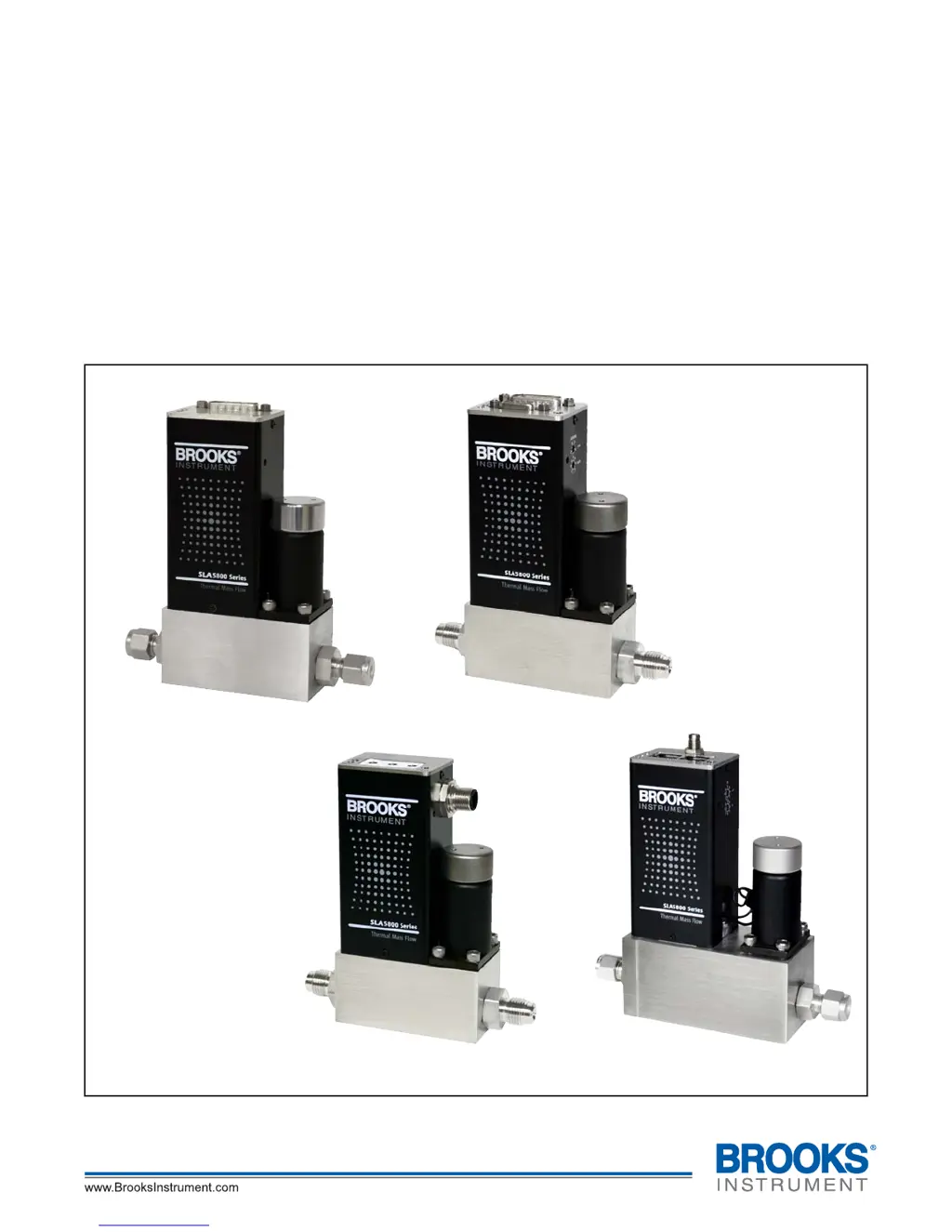
Model SLA5850
with RS485 Communications
Model SLA5850
with DeviceNet
®
Communications
Model SLA5850
with Profibus
®
Communications
Model SLA5851
with EtherCAT
®
Communications

Table of Contents

Questions and Answers

  • D
    David WallerAug 19, 2025
    What to do if Brooks SLA5850 Measuring Instruments output signal stays at approx. 5.5 Vdc or 22 mA?
    • J
      John JohnsonAug 19, 2025
      If the output signal of your Brooks Measuring Instruments stays around 5.5 Vdc or 22 mA, even when the Setpoint changes, and there's flow, it could be due to a valve issue. Specifically, the valve may be leaking or stuck open. Another potential cause is +15 V applied to the valve override input. You may also check the valve override terminal (Pin 12).
  • B
    Brenda JacobsAug 21, 2025
    Why Brooks SLA5850 Measuring Instruments flow cannot be achieved?
    • D
      Daniel FrazierAug 21, 2025
      If you cannot achieve flow with your Brooks Measuring Instruments, regardless of the Setpoint, it might be due to a clogged control valve or the valve override input being grounded. Check the valve override input (Pin 12).
  • J
    john99Aug 25, 2025
    What to do if Brooks Measuring Instruments controller oscillates?
    • M
      marycarterAug 25, 2025
      If your Brooks Measuring Instruments controller oscillates, the cause might be that the pressure drop or inlet pressure deviates from calibrated values. Adjust pressures to original specifications. Another reason may be unstable inlet pressure, so you should check the external pressure regulator.
  • H
    howardshepherdAug 26, 2025
    What to do if Brooks Measuring Instruments output signal follows Setpoint at lower Setpoints, but does not reach full scale?
    • J
      Jacob VasquezAug 27, 2025
      If the output signal of your Brooks Measuring Instruments follows the Setpoint at lower settings but doesn't reach full scale, it could be due to insufficient inlet pressure or pressure drop. Adjust pressures and inspect in-line filters, cleaning or replacing them as needed. Also, the sensor or valve might be partially clogged, so cleaning them is recommended.
  • K
    Kimberly JamesAug 28, 2025
    What to do if Brooks Measuring Instruments output signal follows Setpoint at higher Setpoints but will not go below 2%?
    • S
      santosmichelleAug 28, 2025
      If the output signal of your Brooks Measuring Instruments follows the Setpoint at higher settings but won't go below 2%, it is possible that the control valve leaks or is stuck open. Clean the control valve.
  • K
    kyle92Aug 30, 2025
    What to do if Brooks SLA5850 Measuring Instruments instrument is grossly out of calibration and flow is higher than desired?
    • A
      Andrea MosesAug 30, 2025
      If your Brooks Measuring Instruments is grossly out of calibration and the flow is higher than desired, the sensor may be partially clogged. Clean the sensor.
  • J
    Jason GallagherSep 1, 2025
    What to do if Brooks SLA5850 Measuring Instruments output stays at zero?
    • R
      Rachel PenaSep 1, 2025
      If the output of your Brooks Measuring Instruments remains at zero, regardless of the Setpoint, even with flow through the meter/controller, the sensor might be clogged. Clean sensor.
  • E
    Erik VillaSep 3, 2025
    Why is the flow rate not achieving setpoint in my Brooks SLA5850 Measuring Instruments?
    • J
      John PattersonSep 4, 2025
      If the flow rate or flow signal of your Brooks Measuring Instruments fails to achieve the setpoint, it might be due to insufficient pressure drop across the MFCs. If necessary, increase the pressure.
  • H
    hansensusanSep 5, 2025
    What to do if the output signal doesn't reach full scale on Brooks SLA5850 Measuring Instruments?
    • C
      Cory HollandSep 5, 2025
      If the output signal of your Brooks Measuring Instruments follows the setpoint at lower setpoints but doesn't reach full scale, it could be due to several reasons: * Insufficient inlet pressure or pressure drop: Adjust the pressures and inspect in-line filters, cleaning or replacing them as needed. * Partially clogged sensor: Clean the sensor. * Partially clogged valve: Clean the control valve.
  • M
    Mrs. Tamara Garcia DVMSep 8, 2025
    What to do if flow cannot be achieved regardless of setpoint on Brooks Measuring Instruments?
    • B
      Bobby EvansSep 8, 2025
      If the flow cannot be achieved regardless of the setpoint in your Brooks Measuring Instruments, it could be due to a clogged control valve. In this case, you should clean the control valve.

Summary

Essential Instructions

European Pressure Equipment Directive (PED)

Details compliance with European Pressure Equipment Directive (PED).

European Electromagnetic Compatibility (EMC)

Explains compliance with European Electromagnetic Compatibility (EMC) directive.

ESD (Electrostatic Discharge)

Provides guidelines for handling electrostatic discharge sensitive components.

Section 1 Introduction

1-1 Scope

Defines the scope of the manual for the Brooks Instrument Mass Flow Product.

1-2 Purpose

States the purpose of the manual for measuring and controlling gas flows.

1-3 Description

Describes the SLA5800 Series as a configurable platform for mass flow control.

1-4 Specifications

Provides detailed specifications for the SLA5800 Series, referencing tables.

PC-based Support Tools

Details PC-based tools for process control, monitoring, diagnosis, and tuning.

RS485 Communications

Describes the RS485 communication capability for process control and monitoring.

Profibus Communications

Explains the Profibus communication protocol for fieldbus automation standards.

DeviceNet Communications

Details the DeviceNet communication capability for high speeds and system connectivity.

EtherCAT Communications

Introduces the EtherCAT communication interface for enhanced automation and system integration.

Section 2 Installation

2-1 General

Introduces installation instructions for Brooks Digital MFC's and MFM's.

2-2 Receipt of Equipment

Provides guidance on checking equipment upon receipt for damage during shipment.

2-3 Recommended Storage Practice

Offers recommendations for storing equipment to maintain its condition.

2-4 Return Shipment

Outlines procedures for returning instruments, including RMA and decontamination.

2-5 Transit Precautions

Advises on transporting the instrument to the installation site safely.

2-6 Removal from Storage

Details visual inspection requirements when removing equipment from storage.

2-7 Gas Connections

Guides on making gas connections, ensuring piping is clean.

2-8 In-Line Filter

Recommends installing an in-line filter to prevent foreign material from entering the sensor.

2-9 Installation

Provides general installation procedures and cautions for MFC/MFM.

Special considerations for high pressure installations

Addresses specific procedures for high-pressure applications to ensure proper operation.

Special considerations to be taken when installing the SLA5853 MFC

Highlights unique installation considerations for the SLA5853 MFC model.

2-10 Electrical Interface

Explains the analog and digital electrical interface for MFC/MFM connections.

2-11 Operation Check Procedure (Analog I;O)

Details the steps for checking the operation of analog I/O MFC/MFM units.

2-12 Operation Check Procedure (Digital I;O)

Outlines the procedure for checking the operation of digital I/O MFC/MFM units.

2-13 Bus;Network (DeviceNet, Profibus, Foundation Fieldbus, EtherCAT)

Addresses potential issues in bus/network MFC operation and communication setup.

Section 3 Operation

3-1 Overview

Introduces the topics covered in the Operation section.

3-2 Theory of Operation for Flow Measurement

Explains the principles of thermal mass flow measurement and sensor operation.

3-3 Features

Lists the features of Brooks Digital MFC/MFMs, noting not all features are on all instruments.

3-4 Analog I;O Mode of Operation

Describes the basic features of the analog I/O options for Brooks Digital Series MFCs/MFMs.

Zeroing the MFC

Details the procedure for re-zeroing the flow sensor, especially at temperature extremes.

3-5 Communications Features

Describes various communication protocols (RS485, DeviceNet, Profibus, EtherCAT) and their features.

3-6 Alarms (Analog versions only)

Outlines alarms associated with Analog versions of Brooks Digital Series.

3-6-1 Alarms (Analog versions only) - Configuration Attributes

Explains configurable alarm attributes and provides an alarm summary table.

3-6-2 Diagnostic Alarms (Analog versions only)

Describes diagnostic alarms indicated by the LED when a failure is detected.

3-6-3 General Alarms (Analog versions only)

Details general alarms for unexpected process control events like flow, setpoint deviation.

3-7 Calibration;Configuration Sets

Explains how calibration and configuration parameters are saved as sets and can be adjusted.

Flow Calibration Options

Lists options for modifying factory calibration, including gas correction and scaling.

Configuration Options

Lists configuration parameters stored in Calibration/Configuration Sets.

3-8 Special Features

Details special features adjustable via the diagnostics port and software.

3-9 PC-based Support Tools

Lists PC-based tools for process control, monitoring, diagnosis, and tuning.

Section 4 Maintenance & Troubleshooting

4-1 Maintenance and Troubleshooting

Introduces troubleshooting procedures and general maintenance for MFC/MFMs.

4-1-1 Troubleshooting Analog or Digital

Provides guidance on diagnosing MFC-related problems and answers common questions.

4-1-2 System Checks

Suggests system checks to perform before removing a suspect MFC/MFM for troubleshooting.

Frequently Asked Questions (FAQ)

Addresses common questions regarding LEDs, rotary switches, and the zero button.

Bench Troubleshooting

Details bench troubleshooting procedures for MFC/MFMs using a test setup.

4-1-3 Cleaning Procedures

Provides procedures for cleaning Brooks Digital Series MFC/MFMs when deposition occurs.

4-1-4 Calibration Procedure

States that calibration is not described in this manual and directs to service locations or software.

LIMITED WARRANTY

BROOKS SERVICE AND SUPPORT

START-UP SERVICE AND IN-SITU CALIBRATION

CUSTOMER SEMINARS AND TRAINING

TRADEMARKS

Brooks SLA5850 Specifications

General IconGeneral
BrandBrooks
ModelSLA5850
CategoryMeasuring Instruments
LanguageEnglish

Related product manuals