CORNER KNIFE POSITION ADJUSTMENT
• Adjust the corner knife positional correction value
to
suit the material thickness.
The higher the corner knife position
is,
the father"inside the knife
Is
positioned.
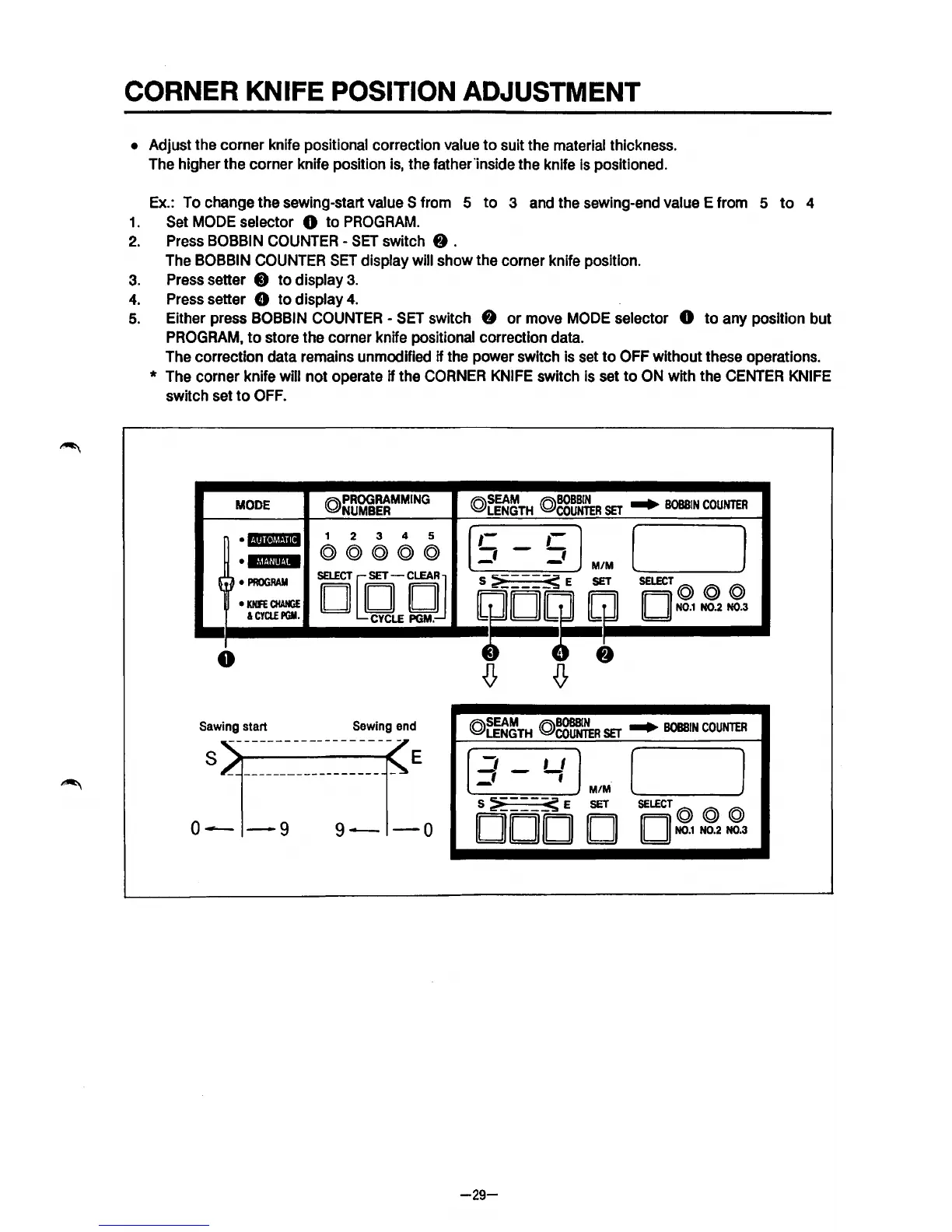
Ex.: To change the sewing-start
value S from 5
to
3 and the sewing-end value E from 5
to
4
1.
Set MODE selector 0 to
PROGRAM.
2.
Press BOBBIN COUNTER -
SET
switch
f)
.
The BOBBIN COUNTER
SET
display will show the corner knife position.
3.
Press setter 8
to
display
3.
4.
Press setter 8 to display
4.
5.
Either press BOBBIN COUNTER -
SET
switch
f)
or move MODE selector 0
to
any position but
PROGRAM,
to
store the corner knife positional correction data.
The correction data remains unmodified
if the power switch
Is
set
to
OFF without these operations.
* The corner knife will not operate if the
CORNER
KNIFE
switch
Is
set
to
ON with the
CENTER
KNIFE
switch set
to
OFF.
MODE
©)PROGRAMMING
NUMBER
(Q)SEAM
(Q)BOBBIN
...
LENGTH
COUNTER
SET
BOBBIN
COUNTER
(
~
·•Nmll
1
2
3
4 5
,-
,-
)
©)@©)©)@
;:;
-
~
•E@iii·IM
M/M
~
} •
PROGRAM
O[QQJ
S
:?i----~
E
SET
SELECT
©)
©)
@
•
KNFE
CHANGE
D
~
,, ,,
N0.1
N0.2 N0.3
&
CYCLE
PGM.
!
0
Sawing start
Sewing end
s
E
3-Lf
MIM ( l
o-
-9
9-
-o
S
~---~
E
SET
SELECT@
©)
@
DOD D D
N0.1
N0.2 N0.3
-29-



 To Next Page