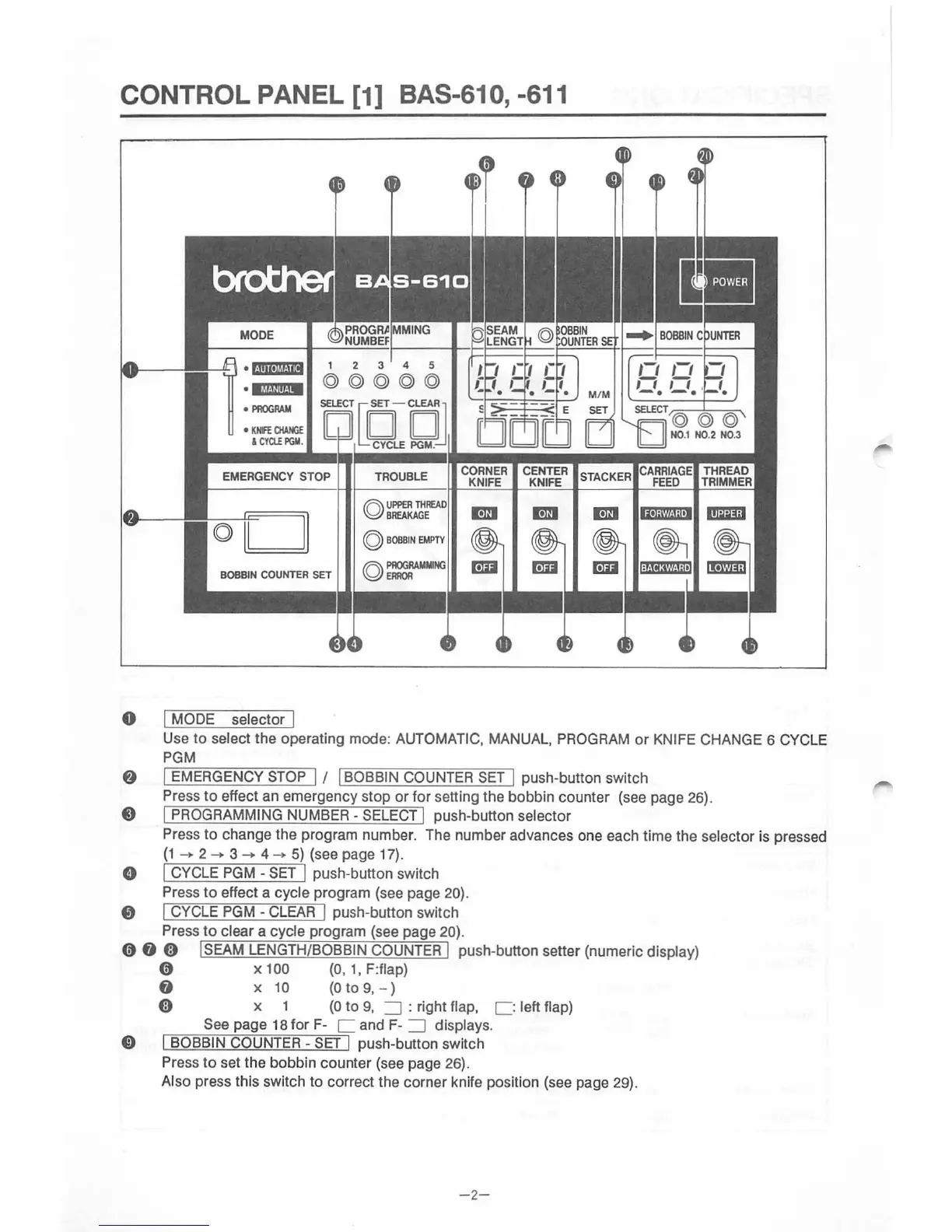
CONTROL PANEL [1] BAS-610, -611
•
ijiiU)tt.liiii
•
iftf.J~!It
·
1M
•
PROGRAM
•
KHFE
CIIAHGE
&
CYClE
PGM
.
EMERGENCY STOP
0 I MODE selector I
Use
to
select
the
operating mode: AUTOMATIC, MANUAL, PROGRAM
or
KNIFE CHANGE 6 CYCLE
PGM
8 I EMERGENCY STOP I I I BOBBIN COUNTER
SET
I push-button switch
Press
to
effect an emergency stop
or
for setting the
bobb
in counter (see page 26).
8 I PROGRAMMING NUMBER - SELECT I push-button selector
Press
to
change the program number. The number advances one each time the selector is pressed
(1
--.
2--.
3--.
4--.
5)
(see page 17).
0 I CYCLE
PGM
-
SET
I push-button switch
Press
to
effect a cycle program (see page 20).
0 I CYCLE
PGM-
CLEAR
I push-button switch
Press
to
clear a cycle program (see page 20).
0 0 0 !SEAM LENGTH/BOBBIN COUNTER I push-button setter (numeric display)
0 x 1
oo
(0, 1, F:flap)
0 x 1 0
(0
to
9,
- )
0 x 1
(0
to
9,
=:J
: right flap, c : left flap)
See page 18
for
F- C and F-
=:J
displays.
0 I BOBBIN COUNTER
-SET
I push-button swit
ch
Press
to
set
th
e bobbin counter (see page 26).
Also press this switch
to
correct the corner knife position (see page 29).
-2
-



 To Next Page