TROUBLE
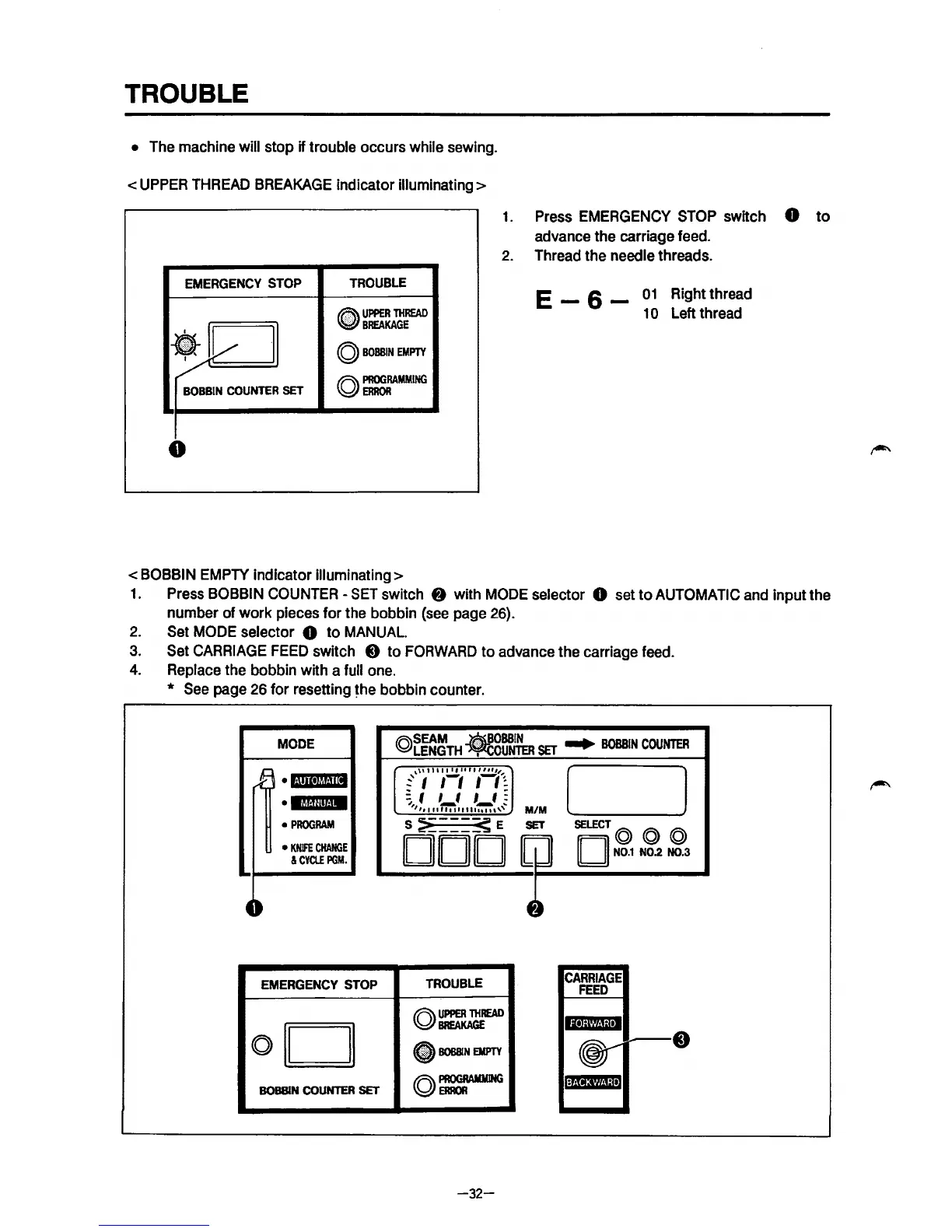
• The machine will stop if trouble occurs while sewing.
<UPPER
THREAD
BREAKAGE
indicator illuminating>
1.
Press EMERGENCY
STOP
switch 8
to
advance the carriage feed.
2.
Thread the needle threads.
EMERGENCY
STOP
TROUBLE
•
UPPER
THREAD
E _ 6 _
01
Right thread
1
0 Left thread
~
·I
BREAKAGE
•
©
BOBBIN
EMPTY
I
BOBBIN
COUNTER
SET
©~MMING
0
<BOBBIN EMPTY indicator illuminating>
1.
Press BOBBIN COUNTER -SET switch 8 with
MODE
selector 0 set
to
AUTOMATIC and input the
number of work pieces for the bobbin
(see
page 26).
2.
Set MODE selector 8 to MANUAL
3.
Set
CARRIAGE
FEED
switch 0 to
FORWARD
to advance the carriage feed.
4.
Replace the bobbin with a full one.
*
See
page 26 for resetting
~he
bobbin counter .
MODE
k\
•I·!III•M!·!i
II
•
lt'l!·!lll!·!·
•
PROGRAM
•
KNIFE
CHANGE
&CYClE
PGM.
4~
EMERGENCY
STOP
oil
II
BOBBIN
COUNTER
SET
.r\\SEAM
-~BOBBIN
...
BOBBIN
COUNTER
~LENGTH
~OUNTER
SET
,\\I
I
Ill
I I
II
II
I
lilt"
:' I 1-1
II~
=flflf:
,,,,,
'"i"l":":""'~''"
M/M
S
~===~
E
SET
DOD
TROUBLE
©~J:eREAD
•
BOBBIN
EMPTY
©~
-32-
( l
SELECT@ @ @
II
II
N0.1
N0.2 N0.3
CARRIAGE
FEED



 To Next Page