Maintenance 101
4
3
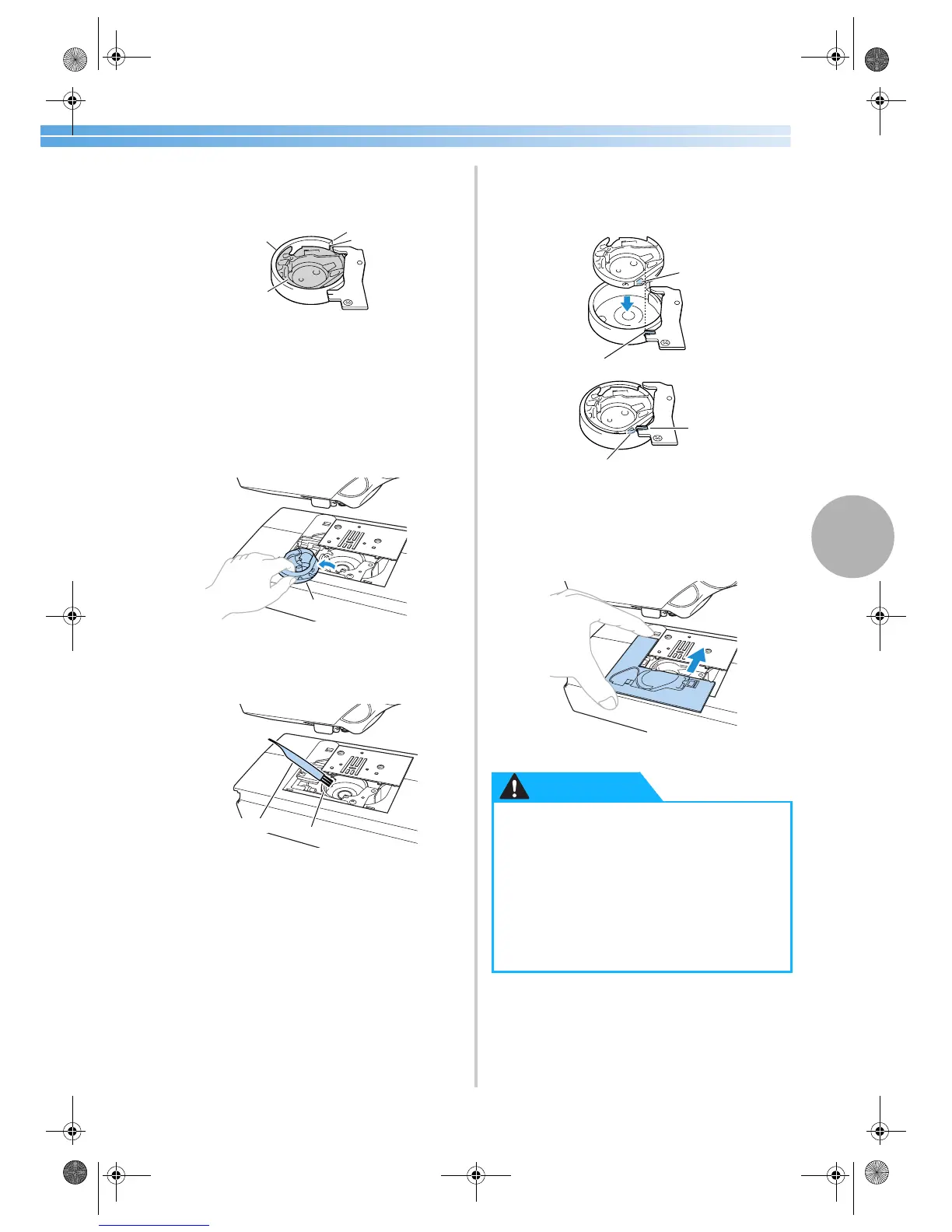
Turn the balance wheel toward you until the
tip of the shuttle hook aligns with the edge of
the race shelf.
1 Shuttle race
2 Shuttle
3 Edge of the shuttle race
4 Tip of the shuttle hook
• Be sure to turn the balance wheel toward
you. Turning the balance wheel away from
you may damage the machine.
4
Remove the shuttle.
Grasp the shuttle, and then pull it out.
1 Shuttle
5
Use the cleaning brush or a vacuum cleaner to
remove any lint and dust from the race and its
surrounding area.
1 Cleaning brush
2 Shuttle race
• Do not apply oil to the shuttle.
6
Check that the edge of the race shelf is
positioned as in step
3, and then insert the
shuttle so that the projection on the shuttle
aligns with the spring.
1 Projection
2 Spring
7
Insert the tabs on the needle plate cover into
the needle plate, and then slide the cover back
on.
3
1
2
4
1
1
2
● Never use a shuttle that is scratched,
otherwise the upper thread may become
tangled, the needle may break or sewing
performance may suffer. For a new
shuttle (part code: XC3153-051), contact
your nearest authorized service center.
● Be sure that the shuttle is correctly
installed, otherwise the needle may
break.
1
2
2
1
CAUTION
S2_brotherE.book Page 101 Thursday, February 13, 2003 11:03 AM


 To Next Page
 Loading...