Upper Threading 29
1
Pulling up the bobbin thread
When making gathers or before free-motion quilting,
first pull up the bobbin thread as described below.
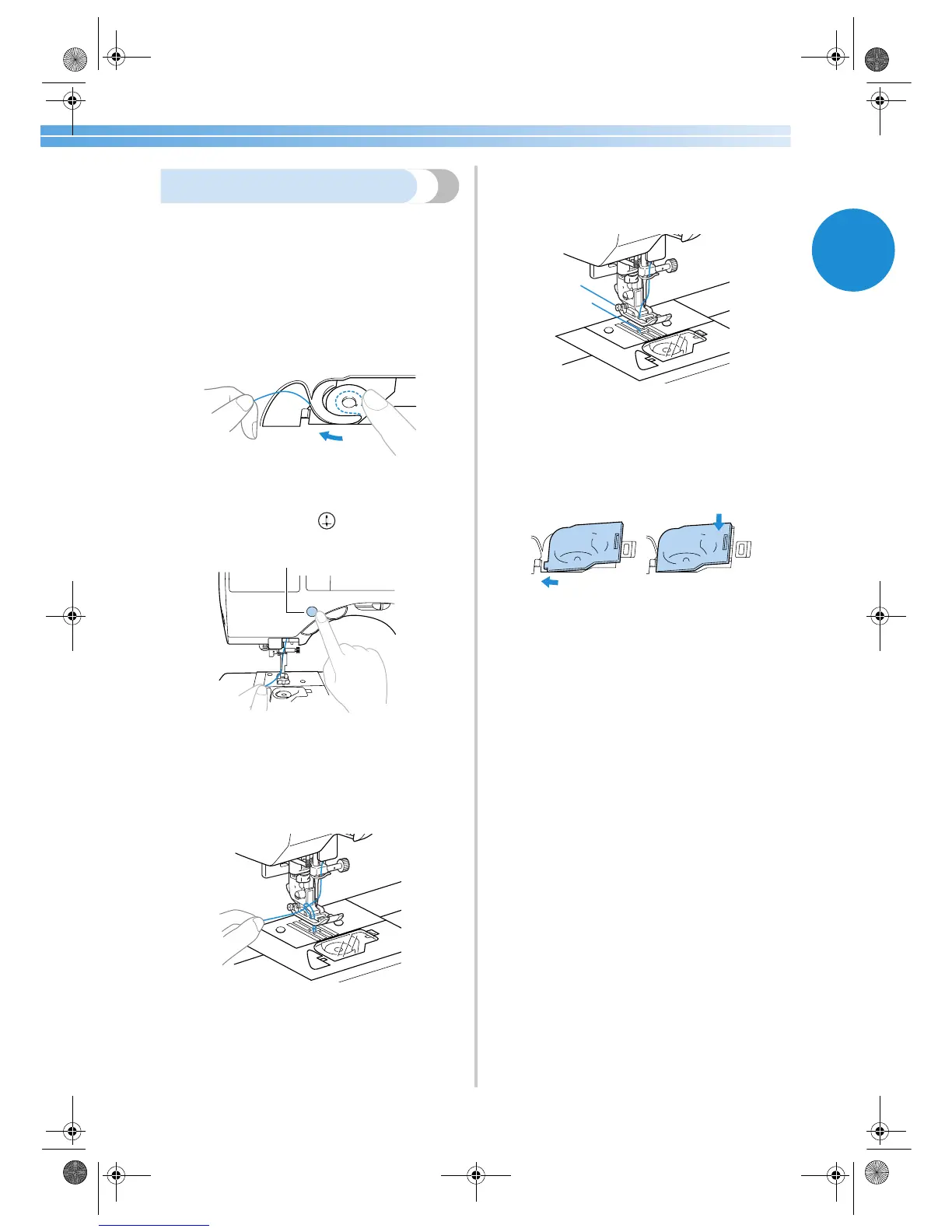
1
Insert the bobbin into the shuttle.
• Refer to steps
1 through 5 of “ Installing the
bobbin” (page 16).
2
Pass the bobbin thread through the slot.
Do not cut the thread with the cutter.
3
While lightly holding the upper thread with
your left hand, press (needle position
button) twice to raise the needle.
1 Needle position button
X The bobbin thread is looped around the
upper thread and can be pulled up.
4
Carefully pull the upper thread upward to pull
out the end of the bobbin thread.
5
Pull out about 10-15 cm (3/8-5/8 inch) of the
bobbin thread under the presser foot toward
the rear of the machine.
6
Reattach the bobbin cover.
Insert the tab in the lower-left corner of the
bobbin cover, and then lightly press down on
the right side.
1
2
1
S2_brotherE.book Page 29 Thursday, February 13, 2003 11:03 AM


 To Next Page