EasyManua.ls Logo

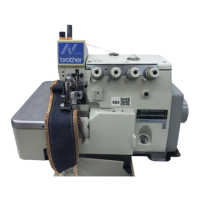
Brother FB-N210 - User Manual

Brother FB-N210
54 pages
Print Icon
To Next Page IconTo Next Page
Loading...
FB-N110, N210
FB-N310
INSTRUCTION MANUAL
BEDIENUNGSANLEITUNG
MANUEL D’INSTRUCTIONS
MANUAL DE INSTRUCCIONES
HIGH SPEED OVERLOCK SEWING MACHINE
HIGH SPEED SAFETY STITCH SEWING MACHINE
Please read this manual before using the machine.
Please keep this manual within easy reach for quick reference.
HOCHLEISTUNGS-ÜBERWENDLINGMASCHINE
HOCHLEISTUNGS-SICHERHEITSNAHTMASCHINE
Bitte vor Gebrauch der Maschine diese Anleitung lesen!
Bitte halten Sie diese Anleitung stets griffbereit zur schnellen Orientierung!
SURJETEUSE GRANDE VITESSE
SURJETEUSE GRANDE VITESSE - POINT SAFETY
Veuillez lire ce manuel avant d’utiliser la machine.
Veuillez garder ce manuel près de vous pour une vérification rapide.
OVERLOCK DE ALTA VELOCIDAD
OVERLOCK CON PUNTADA DE SEGURIDAD
Por favor lea este manual antes de usar la máquina.
Por favor guarde este manual al alcance de la mano para una rápida referencia.

Table of Contents

Other manuals for Brother FB-N210

Questions and Answers

  • N
    Natalie WilsonJul 29, 2025
    Why is the thread breaking on my Brother Sewing Machine?
    • J
      Jennifer MartinezJul 29, 2025
      Thread breakage can occur due to several reasons. Make sure the needle is correctly installed and the machine is properly threaded. High thread tension could also be the culprit, so check and adjust it as needed. Damage to the looper, needle plate, needle, or needle guard can also cause thread breakage; if any of these parts are damaged, try to fix them with sandpaper or buffing.
  • F
    frenchjasmineAug 2, 2025
    What to do if my Brother FB-N210 needle breaks?
    • S
      Sheena KelleyAug 2, 2025
      If the needle breaks, make sure you are using a needle and thread that are appropriate for the material you are sewing. Also, check that the needle is installed correctly and that the installation positions of the needle, under looper, and over looper are correct.
  • E
    Erik PerezAug 7, 2025
    Why does my Brother FB-N210 skip stitches?
    • M
      melinda50Aug 7, 2025
      Skipping stitches can occur for several reasons. Check the installation positions of the needle, under looper, and over looper. Ensure that the thread tension and threading are correct. Also, check for low thread tension in the double chain stitch looper. If the looper tip is damaged or blunt, correct it with sandpaper or install a new looper.
  • B
    Brian WhiteAug 11, 2025
    What to do if seams are not consistent on my Brother FB-N210?
    • C
      cheryljenkinsAug 11, 2025
      Inconsistent seams can result from several factors. Start by checking and cleaning the thread path if you notice inconsistent thread tension. Low thread tension or a blunt needle tip can also cause this issue; replace the needle if it's blunt. Also, check for low presser foot pressure and the feed dog height.
  • B
    brett17Aug 15, 2025
    Why does my Brother FB-N210 cause wrinkles?
    • L
      Lori AndersonAug 15, 2025
      Wrinkles can appear due to a few reasons. Ensure you are using a needle and thread that match the material. High thread tension can cause wrinkling, so check and adjust it. Also, check for high presser foot pressure, the feed dog height, and the differential feed amount.
  • M
    Michelle HowellAug 19, 2025
    What to do if double chain stitching is not possible on my Brother FB-N210 Sewing Machine?
    • C
      Christopher Singh DDSAug 20, 2025
      If double chain stitching is not working, check the threading. Also, check the needle and looper thread tension, the main feed dog height, the presser foot position, and the double chain stitch looper installation.
  • N
    Natasha ThorntonAug 25, 2025
    What to do if the knives cut poorly on my Brother FB-N210 Sewing Machine?
    • C
      Cindy HarrisAug 25, 2025
      If the knives are not cutting well, check the upper/lower knife overlap and the upper/lower knife installation. Also, check for wear on the upper and lower knives.

Summary

Safety Instructions

Safety Indications and Meanings

Explains safety indications and symbols used in the manual and on the machine.

Notes on Safety

Environmental Requirements

Details environmental conditions like voltage, humidity, and temperature for machine operation.

Installation Precautions

Covers essential steps and precautions for installing the sewing machine.

Machine Models

Model Specifications

Details stitch forms, device specifications, and model variations.

Installation

General Installation Precautions

Safety precautions and general advice for installing the sewing machine.

Machine Head Installation

Step-by-step instructions for installing the machine head onto the table.

Motor and V-belt Installation

Sewing Speed and Belt Selection

Guidelines for matching motor pulley and V-belt to desired sewing speeds.

Belt and Cover Installation

Mounting the V-belt

Instructions for mounting and tensioning the V-belt.

Installing the Belt Cover

Steps for installing the protective belt cover.

Accessory Installation

Installing Spool Stand and Trimming Knife

Instructions for installing the spool stand and trimming knife.

Lubrication

Lubrication Safety and Procedures

Safety precautions, adding oil, and oil changing procedures.

Correct Operation

General Operation Safety

Crucial safety guidelines and precautions for operating the sewing machine correctly.

Basic Operation Procedures

Covers needle replacement, cover operations, threading, thread tension, and guide adjustments.

Specific Operation Adjustments

Adjusting stitch length, differential feed, and fancy stitch width.

Standard Adjustments

General Adjustment Precautions

Safety guidelines and precautions for performing machine adjustments.

Component Adjustments

Adjusting needle height, loopers, guards, presser foot, knives, and feed dogs.

Optional Accessories

Needle Cooler Installation and Use

Information on using and installing the optional needle cooler.

Troubleshooting

Common Issues and Solutions

Lists common problems and their solutions with reference pages.

Brother FB-N210 Specifications

General IconGeneral
BrandBrother
ModelFB-N210
CategorySewing Machine
LanguageEnglish

Related product manuals