Care and Maintenance
Appendix A-3
MAINTENANCE AND TROUBLESHOOTING
A
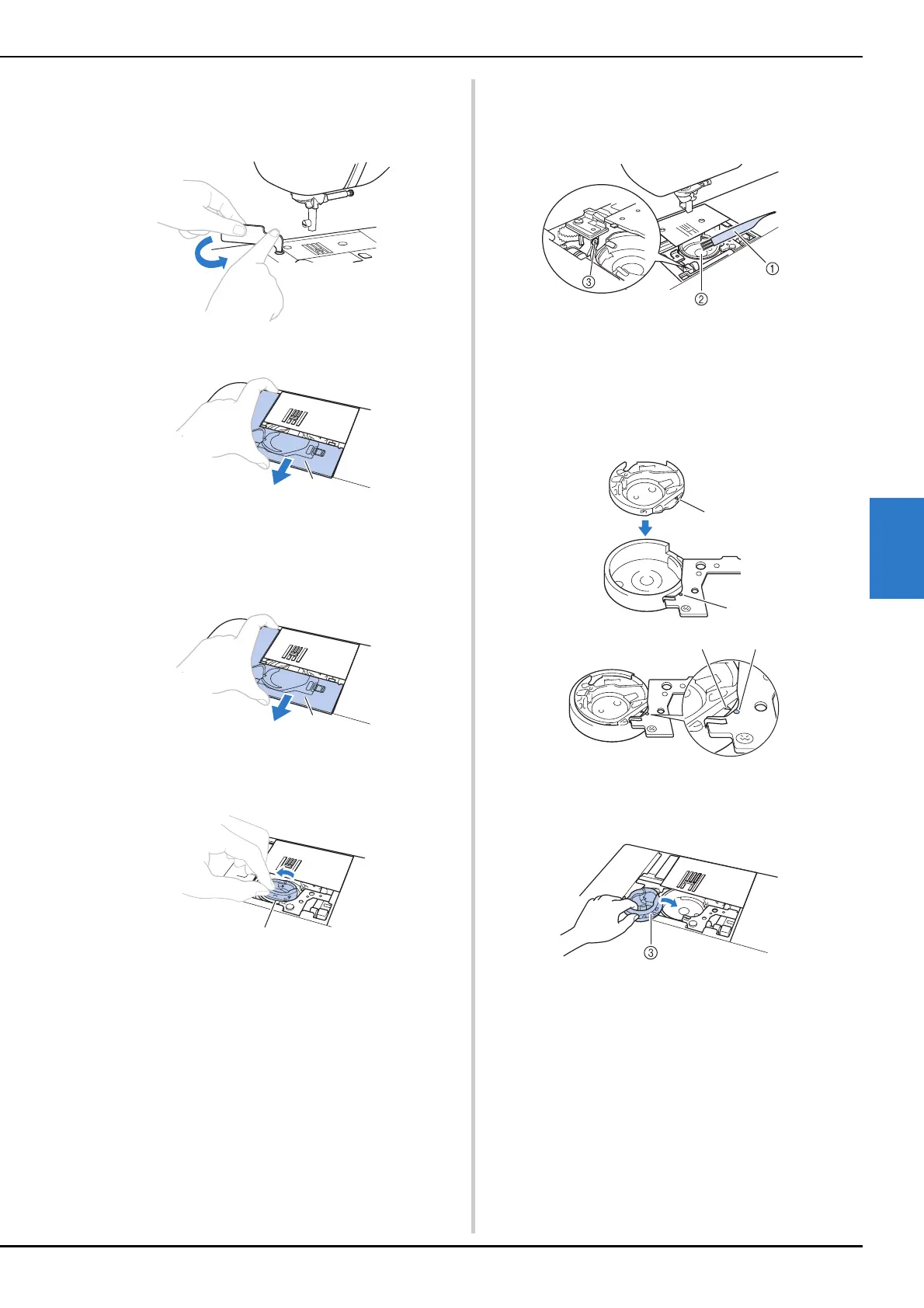
■ If there is a screw in the needle plate cover
1 Use the L-shaped (or disc-shaped) screwdriver to
remove the screw in the needle plate cover.
2 Grasp both sides of the needle plate cover, and then
slide it toward you.
1 Needle plate cover
■ If there is no screw in the needle plate cover
1 Grasp both sides of the needle plate cover, and then
slide it toward you.
1 Needle plate cover
g
Remove the bobbin case.
Grasp the bobbin case, and then pull it out.
1 Bobbin case
h
Use the cleaning brush or a vacuum cleaner to remove
any lint and dust from the race and bobbin thread
sensor and the surrounding area.
1 Cleaning brush
2 Race
3 Bobbin thread sensor
• Do not apply oil to the bobbin case.
i
Insert the bobbin case so that the
S
mark on the
bobbin case aligns with the
z mark on the machine.
• Align the S and
z marks.
1 S mark
2
z mark
3 Bobbin case
• Make sure that the indicated points are aligned
before installing the bobbin case.
b
a


 To Next Page
 Loading...







