EasyManua.ls Logo

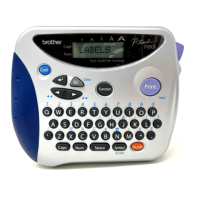
Brother P-touch PT-1300 - User Manual

Brother P-touch PT-1300
134 pages
Print Icon
To Next Page IconTo Next Page
Loading...
Read this User’s Guide before you start using your P-touch.
Keep this User’s Guide in a handy place for future reference.
1300
USERS GUIDE

Table of Contents

Questions and Answers

  • J
    Jennifer PowellJul 29, 2025
    What to do if characters on Brother P-touch PT-1300 are not printing correctly?
    • J
      Joshua DouglasJul 29, 2025
      If the characters printed by your Brother Label Maker aren't forming correctly, and you're using alkaline batteries, they might be low. Try using the AC adapter or replace the batteries. Also, verify that the correct AC adapter (AD-60) is properly connected.
  • D
    dgibsonAug 2, 2025
    How to fix a blank display on my Brother P-touch PT-1300?
    • J
      James LindseyAug 2, 2025
      If the display on your Brother Label Maker remains blank after turning it on, ensure the correct AC adapter (AD-60) is being used and is properly connected. If you're using alkaline batteries, check that they are correctly inserted. If the batteries are low, replace them with new ones.
  • K
    Kathryn MannAug 6, 2025
    How to unlock my Brother P-touch PT-1300 Label Maker when it freezes?
    • K
      Kenneth WheelerAug 6, 2025
      If your Brother Label Maker has locked up, turn it off. Then, while holding the Clear button, turn the machine back on. Note that this will erase the text in the display, all format settings, and all text files stored in the memory.
  • J
    Jessica BellAug 11, 2025
    Why is my Brother Label Maker not printing clearly?
    • L
      Laura CobbAug 11, 2025
      If your Brother Label Maker isn't printing clearly, ensure the correct AC adapter (AD-60) is properly connected. Also, verify that the tape cassette is correctly inserted and isn't empty. Finally, check that the back cover is attached securely.
  • S
    Samantha FosterAug 15, 2025
    Why did my Brother P-touch PT-1300 Label Maker delete saved text files?
    • R
      Rhonda MossAug 15, 2025
      If the text files stored in your Brother Label Maker's memory are gone, the batteries may be low. Replace them with new ones.
  • Q
    qelliottAug 19, 2025
    How to remove white line on Brother Label Maker print?
    • A
      Anna JonesAug 19, 2025
      To remove the blank horizontal white line appearing on your Brother Label Maker's printed labels, clean the print head.
  • D
    Deborah EdwardsAug 23, 2025
    Why is my Brother P-touch PT-1300 Label Maker printing striped tape?
    • T
      Tom FloresAug 25, 2025
      If your Brother Label Maker is printing striped tape, it means you've reached the end of the tape. Replace the tape cassette with a new one.

Summary

Introduction

FCC Notice

Regulatory compliance information for the device.

General Description

Product Views and Labels

Diagrams showing device parts and their names.

Keyboard and LCD Display

Interface Overview

Identifies keyboard layout and display indicators.

General Precautions

Safety Warnings and Cautions

Critical safety advice and operational advisories for users.

Batteries and Power

Battery Replacement Guide

Instructions on how to change batteries for power.

Optional AC Adapter

Connecting the Power Adapter

Steps to connect the AC adapter for power.

Tape Cassette Management

Changing Tape Cassettes

Procedure for replacing the tape cartridge.

Attaching Labels

Industrial Tape Use

Precautions for using super-adhesive industrial tape.

Fabric Tape Application

Stamp Tape Creation

Print Head & Roller Maintenance

Cleaning Procedures

Steps to clean the print head and rollers for optimal printing.

Tape Cutter Care

Cleaning the Cutter Blades

Instructions for cleaning the tape cutter blades.

Carrying Case Organization

Storing Accessories

How to store the P-touch and its accessories in the case.

Power Key Operation

Turning On and Off

How to power the device on and off using the power key.

Code & Caps Key Functions

Using Special Keys

Accessing functions and capital letters via CODE and CAPS keys.

Cursor Key Navigation

Moving the Cursor

Instructions for navigating text with cursor keys.

Space Key Usage

Adding Spaces

How to insert blank spaces between characters.

Return Key Functionality

Line Breaks and Confirmations

How to start new lines and confirm actions.

Accent Functionality

Typing Accented Characters

Guide to adding special accents to text.

Symbol Functionality

Inserting Symbols

How to add various symbols to labels.

Length Functionality

Setting Label Length

Adjusting the length of printed labels.

Size & Width Settings

Adjusting Character Size and Width

Changing font size and width for labels.

Style Functionality

Applying Character Styles

Choosing font styles like bold, italic, or shadow.

Underline Functionality

Adding Underlines

How to underline text for emphasis.

Frame Functionality

Applying Frames

Adding decorative frames to text.

Tape Margin Function

Adjusting Margins

Setting left and right margins for labels.

Horizontal Alignment Function

Aligning Text Lines

Options for text alignment (left, center, right).

Mirror Printing Function

Mirror Text Printing

Printing text in reverse for specific applications.

Barcode Functionality

Creating Barcodes

Guide to parameters and data entry for barcodes.

Print & Feed Operations

Printing and Tape Management

How to print labels, feed, and cut tape.

Numbering Function

Sequential Numbering

Printing labels with incrementing numbers.

Repeat Printing Function

Printing Multiple Copies

Creating multiple identical labels.

Memory Functions

Managing Stored Text Files

Storing, recalling, and deleting text files.

Troubleshooting

Problem Solving Guide

Solutions for common operational issues.

Error Message List

Error Explanations and Remedies

Understanding and resolving error messages.

Specifications

Technical Details

Overview of hardware and software specifications.

Accessories and Supplies

Ordering Information

List of compatible tapes and how to order them.

Brother Contact Information

Support and Service Channels

Contact details for technical assistance and service.

Brother P-touch PT-1300 Specifications

General IconGeneral
BrandBrother
ModelP-touch PT-1300
CategoryLabel Maker
LanguageEnglish

Related product manuals