Using the Optional Cap Frame 237
7
——————————————————————————————————————————————————
————————————————————————————————
2
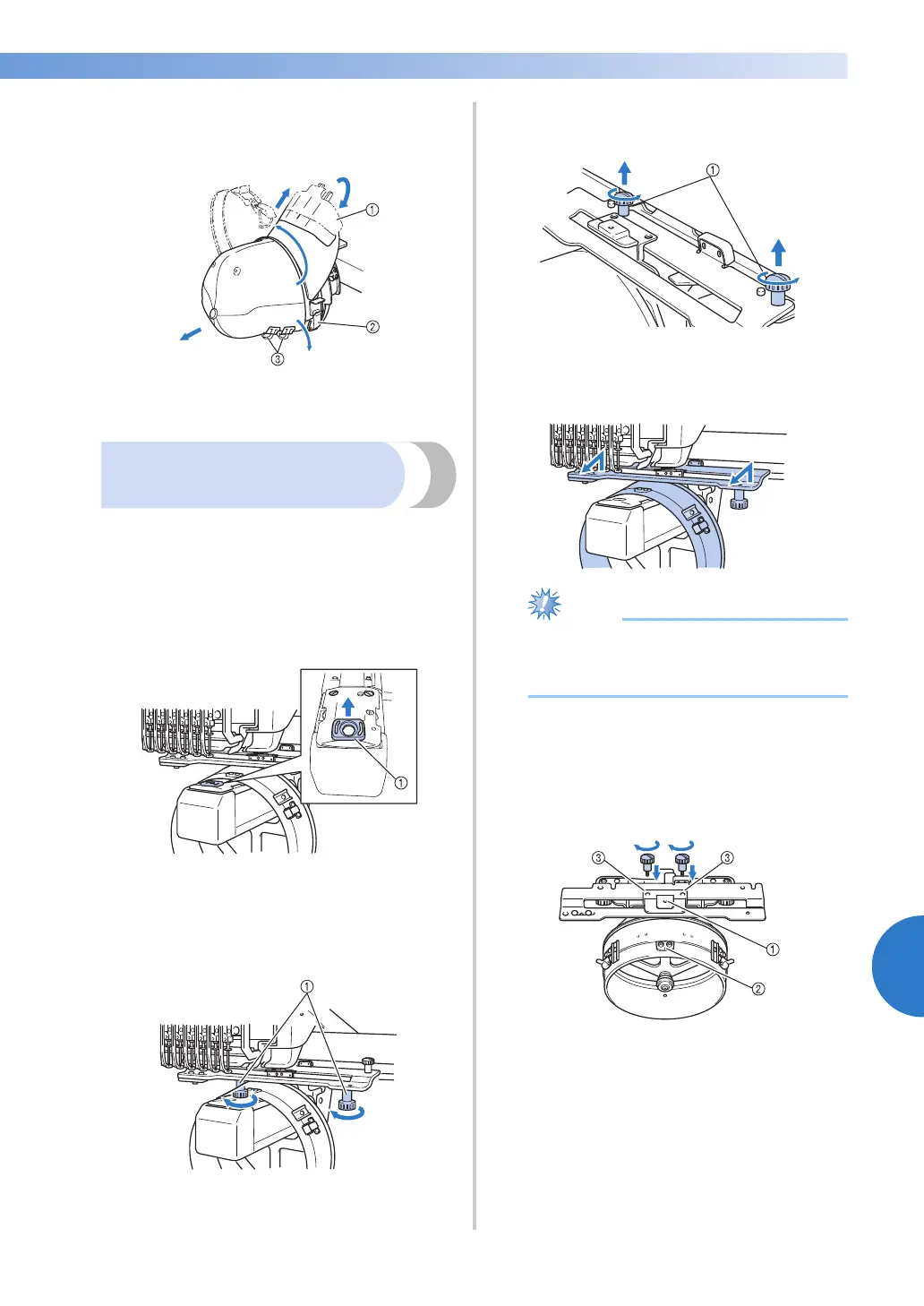
After removing the brim holder, unlock the
snap lock of the clamping frame, remove the
clips, and then remove the cap.
1 Brim holder
2 Snap lock
3 Clips
Installing the embroidery
frame holder
After embroidering using the cap embroidery frame
is finished, remove the needle plate spacer and cap
frame driver, and then re-attach the embroidery
frame holder.
1
Remove the needle plate spacer.
1 Needle plate spacer
2
Loosen the two lower thumb screws.
1 Thumb screws
3
Remove the two upper thumb screws
1 Thumb screws
4
Remove the cap frame driver.
● Be careful that the cap frame driver does
not hit any nearby parts, such as the
presser foot.
5
With the hole on the sweat guard holder
aligned with the centerline of the guiding
plate, insert the two thumb screws removed
in step
3 into the holes at the top, and then
tighten the thumb screws.
1 Hole on the sweat guard holder
2 Centerline of guiding plate
3 Holes on the top
• Insert the thumb screws into the holes
where the cap frame driver that was
originally installed (holes that the thumb
screws were removed from in step
2 on
page 227).
X The movable section of the cap frame
driver is secured.




 To Next Page