19
3
3
About the Printer
Setting Tool
3
The Printer Setting Tool can be used to
specify the printer’s communication settings,
device settings, P-touch Template settings
and paper size settings from your computer.
Before Using the Printer
Setting Tool 3
Make sure the printer is connected to an
electrical socket.
Make sure that the correct printer driver
has been installed and is functional.
Connect the printer to a computer with a
USB cable.
Settings cannot be specified using a wired
LAN, wireless LAN or Bluetooth
connection.
Using the Printer
Setting Tool
3
a Connect the printer to be configured to a
computer.
b For Windows 10: From the Start menu,
click [Brother], and then click [Printer
Setting Tool].
For Windows 8.1: Click [Apps], and
then click [Printer Setting Tool].
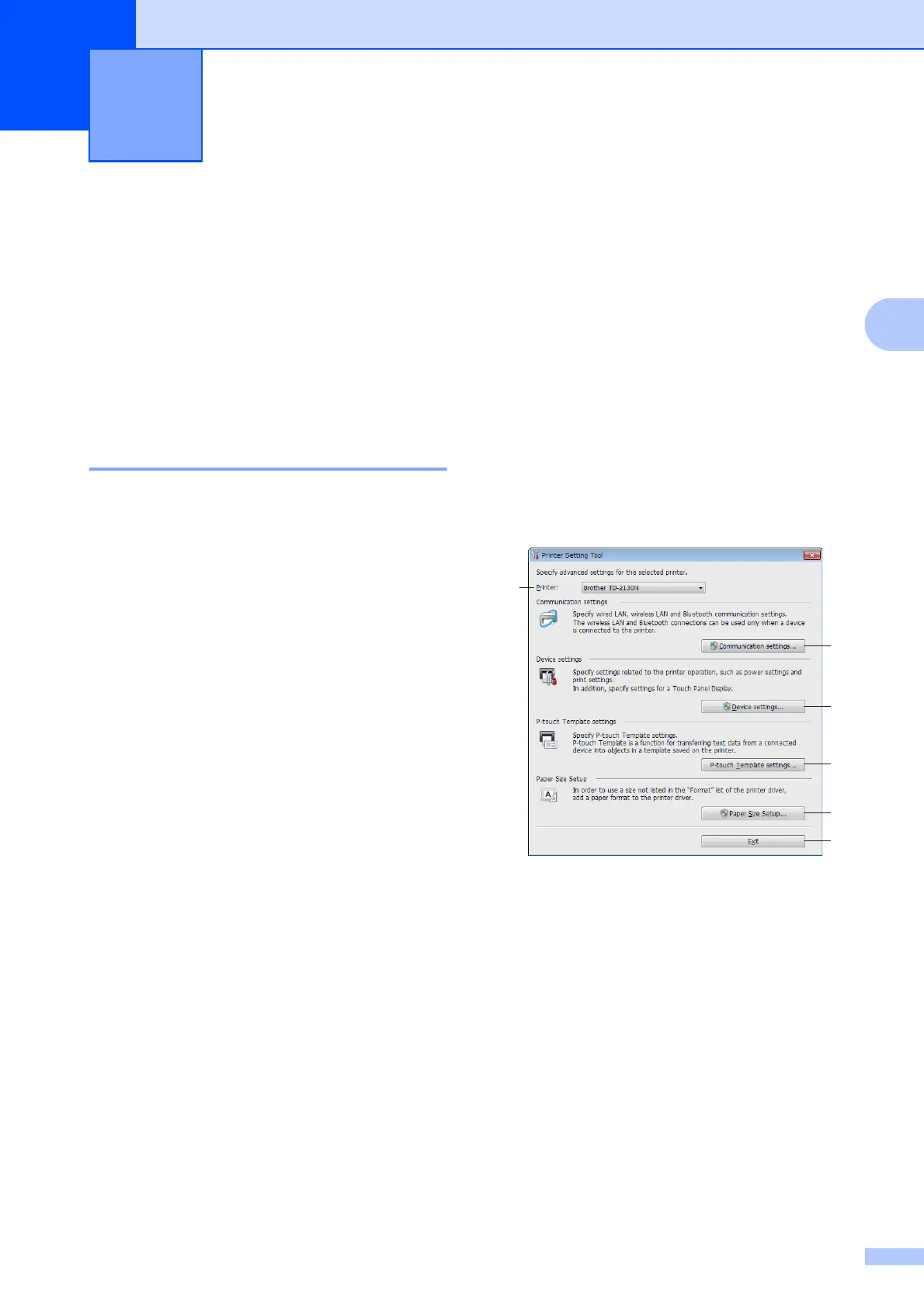
The main window appears.
1Printer
Select the printer to be configured. If only
one printer is connected, no other printer
will appear.
Printer Setting Tool 3
3
2
4
5
6
1



 To Next Page
 Loading...