Using the Optional Touchpanel Display (Optional:PA-TDU-001) (TD-2125N/2135N/2125NWB/
71
10
Creating a Label
Layout
10
From the computer, use P-touch Editor,
which is available downloading from Brother
support website, to create a label layout. For
more information on use, see the Software
User’s Guide downloading from Brother
support website (support.brother.com
).
Creating a Template 10
Label sample
a For Windows 10:
From the Start menu, click [Brother
P-touch] - [P-touch Editor].
For Windows 8.1:
Click [P-touch Editor] in the [Start] or
[Apps] screen, or double-click [P-touch
Editor] on the desktop.
b When P-touch Editor starts, select
whether you want to create a new layout
or open an existing layout.
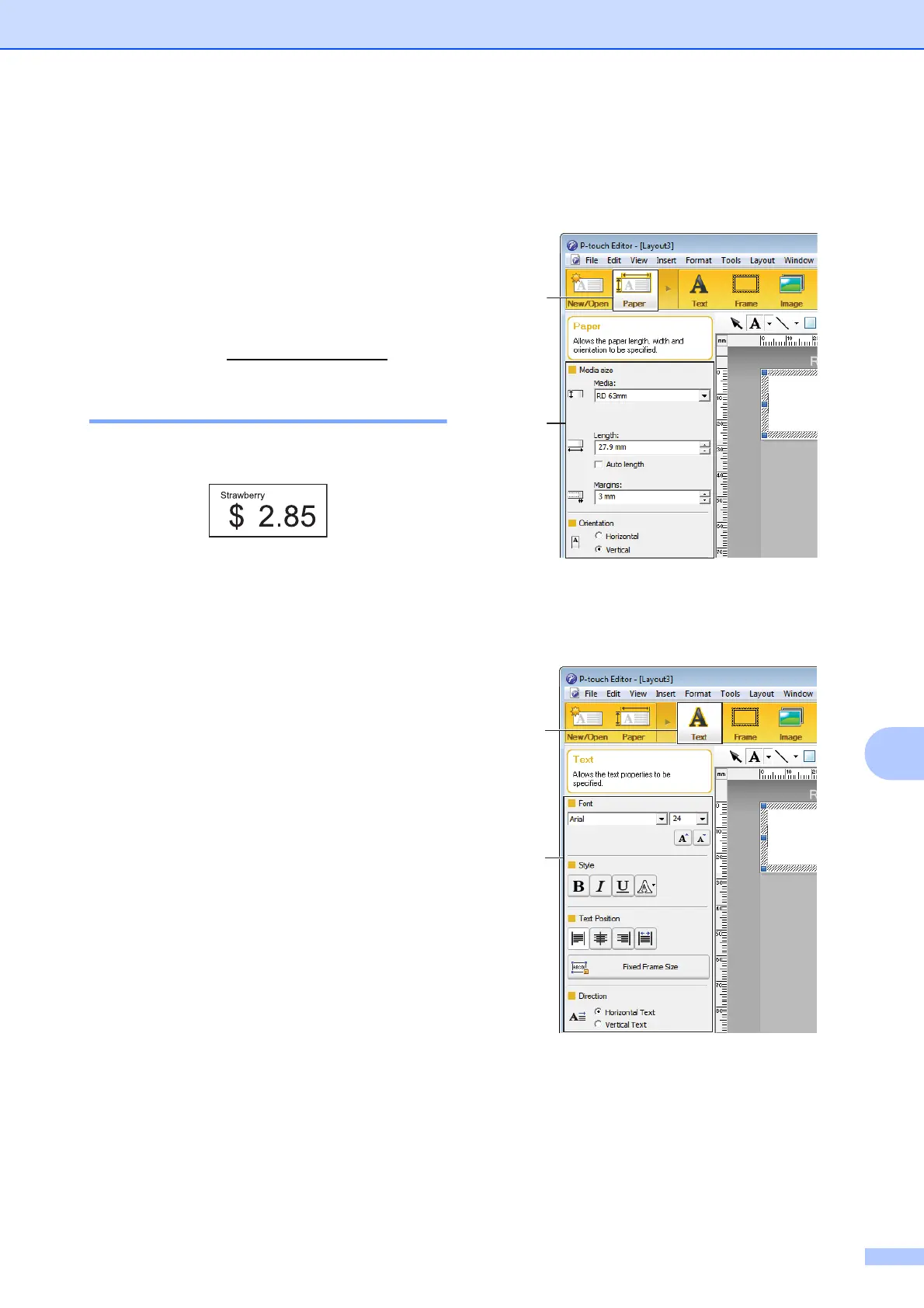
c Click [Paper] (1), and then specify the
media and length (2). (This window
appears in [Express] mode.)
d Click [Text] (1), and then specify the font
and style (2).
1
2



 To Next Page
 Loading...