UNINET IMAGING INC. • BROTHER 1240/1650 • ASSEMBLING THE TONER CARTRIDGEUNINET IMAGING INC. • BROTHER 1240/1650 • DISASSEMBLING THE TONER CARTRIDGE
UNINET IMAGING INC. • BROTHER HL 1240/165 (TN 430/460) CARTRIDGE REMANUFACTURING INSTRUCTIONS
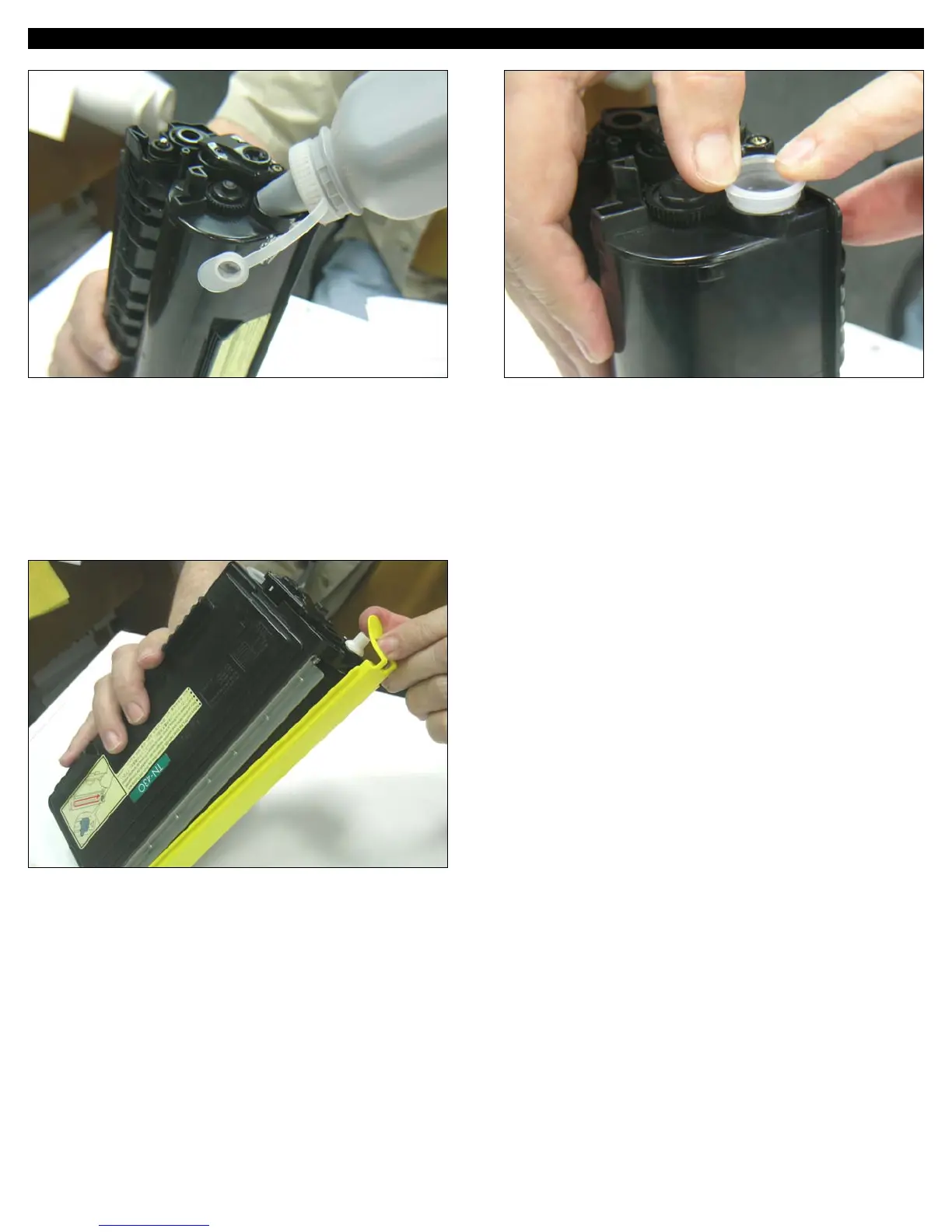
12. Insert the OEM or the compatible yellow seal cover for the
developer roller to protect it during transit.
NOTES
10. Reassemble cartridge in reverse order.
Fill cartridge with the adequate load of new toner for 3000 pages
in the TN-430 (110 grams) or 6000 pages in the TN-460 (210
grams).
11. Recap the hopper securely.
© 2007 UniNet Imaging Inc. All Trademark names are property of their respective owners. Product brand names mentioned are intended to show compatibility only. UniNet Imaging does not guarantee or warrant downloaded information.
www.uninetimaging.com/technical.asp
11124 Washington Blvd., Culver City, California USA 90232 • Ph +1 310 280 9620 • Fx +1 310 280 0533 • techsupport2@uninetimaging.com






 To Next Page