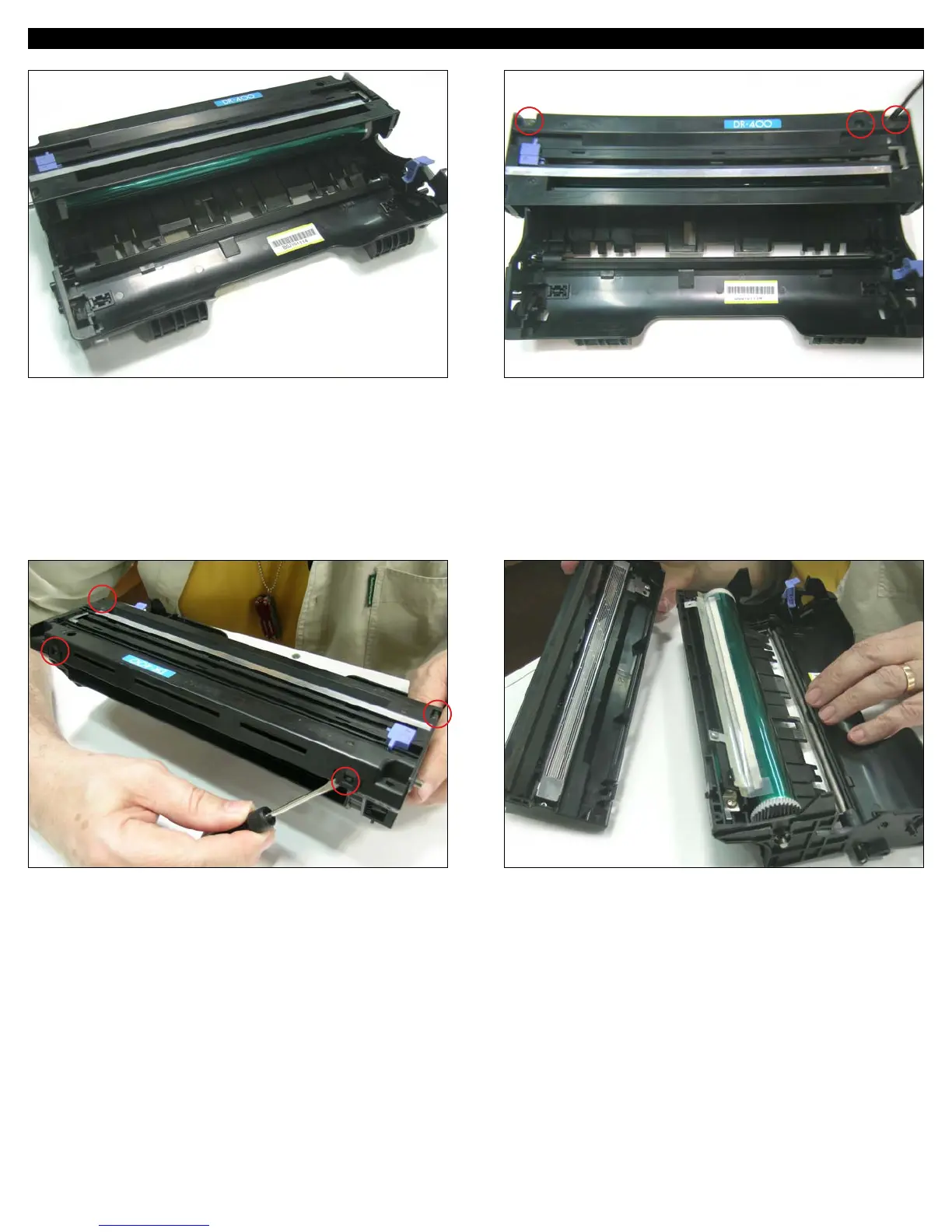
OPC CARTRIDGE 13. With a medium size Phillips screwdriver remove the screws
securing the corona wire assembly. There are two in each corner
holding the plastic top and one, visible thru the hole on the right
hand side securing the electric contact of the control grid and
the cleaning felt.
14. Press the four tabs to remove the assembly from the top of
the cartridge starting from the two behind followed by the ones
on each side.
15. Clean the grid surface of any toner with compressed air.
1
3
4
2
1
2
3
UNINET IMAGING INC. • BROTHER 1240/1650 • ASSEMBLING THE TONER CARTRIDGEUNINET IMAGING INC. • BROTHER 1240/1650 • DISASSEMBLING THE TONER CARTRIDGE
UNINET IMAGING INC. • BROTHER HL 1240/165 (TN 430/460) CARTRIDGE REMANUFACTURING INSTRUCTIONS
© 2007 UniNet Imaging Inc. All Trademark names are property of their respective owners. Product brand names mentioned are intended to show compatibility only. UniNet Imaging does not guarantee or warrant downloaded information.
www.uninetimaging.com/technical.asp
11124 Washington Blvd., Culver City, California USA 90232 • Ph +1 310 280 9620 • Fx +1 310 280 0533 • techsupport2@uninetimaging.com






 To Next Page