33
34
P
ROBLEM
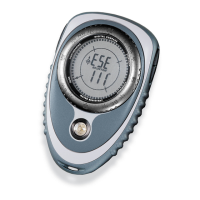
: When pressing and holding POWER to turn the Outback on, it goes
through the LCD test pattern, momentarily illuminating all the LCD segments, and
then shuts off.
S
OLUTION
: Change the batteries. Initially powering up the Outback takes more
power than only having the compass on. Therefore when powering up the Outback,
it may need more power than available and it resets itself by going through the LCD
test pattern. See page 32 for details on changing batteries.
Problem: After pressing a button, the Outback goes through the LCD test pattern,
momentarily illuminating all the LCD segments, and then shuts off.
Solution: Change the batteries. Pressing a button on the Outback takes more power
than the only having the compass on. Therefore when a button is pressed, the Outback
may need more power than available and it resets itself by going through the LCD test
pattern. See page 32 for details on changing batteries.
DISPLAY PROBLEMS
Problem: ÒdISTÓ is shown on the display word.
Solution: Calibrate the Outback. When the Outback detects magnetic interference
causing errors in the compass heading, ÒdISTÓ is shown on the display word indicating
magnetic distortion. If after recalibrating the Outback ÒdISTÓ is still displayed, the
Outback is most likely close to some object with very strong magnetic fields, such an
underground steel tank. Try moving away from the source of the magnetic field; even
a slight separation helps. See page 10 for details on calibration.
Problem: The Outback is ÒstuckÓ. No matter what button is pressed, nothing happens.
Solution: Remove the batteries, wait 60 seconds and reinsert the batteries.
Sometimes there is an abrupt change in power which causes the Outback to get
ÒstuckÓ. Generally, this will only happen once and it will not harm the Outback.
See page 32 for details on removing batteries.
T
ROUBLE
S
HOOTING
ACCURACY PROBLEMS
P
ROBLEM
: The Outback seems to give inaccurate readings.
S
OLUTION
1: Calibrate the Outback. Due to the internal electronics of the Outback
and stray magnetic fields from outside sources, the Outback must be calibrated to be
accurate. The Outback must be calibrated upon initial use, and when the batteries are
removed or replaced. See page 10 for details on how to calibrate the Outback.
S
OLUTION
2: Change the batteries. As the batteries in the Outback wear down, it can
cause the Outback to give inaccurate or jumpy readings. See page 32 for details on
changing batteries.
P
ROBLEM
: The Outback is supposed to be tilt-compensated. When the Outback is
tilted, it gives inaccurate readings.
S
OLUTION
: The Outback does provide tilt-compensation within a range of ±15¡ from
level. Keep in mind 15¡ is not a large amount. 1¡ is approximately the thickness of a
sheet of paper. Tilt-compensation is provided to allow the Outback to be accurate
even when not held perfectly level, not to allow for use at large tilt angles.
POWER PROBLEMS
P
ROBLEM
: When the light button is pressed, the Outback shuts off.
S
OLUTION
: Change the batteries. The backlight and night navigation LEDÕs take
more power than the compass alone. Therefore when the light button is pressed, the
Outback may need more power than available and shuts off. See page 32 for details
on changing batteries.
BRUNTON MAN. MECH. 7/97 9/29/98 9:09 AM Page 19


 To Next Page