EasyManua.ls Logo

Brydge 12.9 - Brydge 12.9 Keyboard Functions; On-Screen Keyboard Toggle; Screen and Backlit Key Brightness; Quick Lock and Navigation

Brydge 12.9
4 pages
Print Icon
To Next Page IconTo Next Page
To Previous Page IconTo Previous Page
Loading...
Switch Language
Ctrl + Shift + Spacebar
(Spacebar allows you to toggle through available languages)
Copy
Command + C
Cut
Command + X
Undo
Command + Z
Underline
Command + U
Italic
Command + I
Paste
Command + V
Show Dock
Command + Option + D
Switch App
Command + Tab
Home Screen
Command + H
Search
Command + Space
KEYBOARD SHORTCUTS
enter
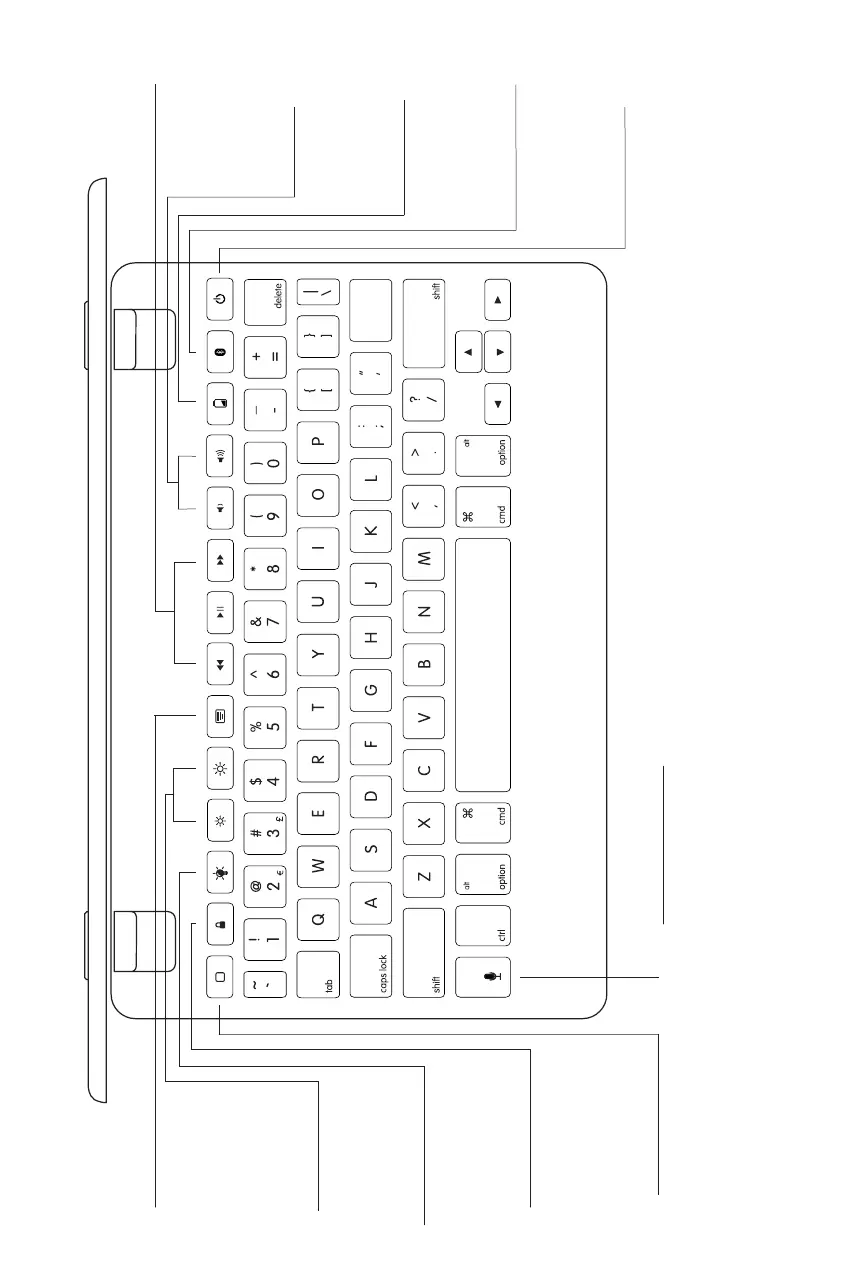
VOLUME
Adjust volume
up, down, or
mute
QUICK LOCK
Lock your iPad
with a single touch
HOME &
CONTROL
CENTER
- Press once for
home screen
- Press twice for
control center
SCREEN
BRIGHTNESS
Adjust screen
brightness up
and down
BACKLIT KEYS
Adjust the
brightness of your
keyboard
BATTERY
Press to see how
much battery life
is left
POWER
Turn your
Brydge on or off
PLAYER
CONTROLS
Rewind,
Play/Pause, and
Fast Forward
SIRI
Dedicated Siri
button
BLUETOOTH
Press to pair your
Brydge and iPad
ON-SCREEN
KEYBOARD
Easily toggle
between your
Brydge and
on-screen
keyboard

Related product manuals