EasyManua.ls Logo

Bticino F500 - User Manual

Bticino F500
75 pages
Go to English
Print Icon
To Next Page IconTo Next Page
Loading...
PART. T9524B - 10/06 - PC
art.F500
art.F500 COAX
Istruzioni d’uso
Gebrauchsanweisungen
Instructions d’utilisation
Instruction sheet
Instrucciones de empleo
Instrucções de uso
Gebruikershandleiding

Table of Contents

Questions and Answers

Summary

Introduction

Warnings and Tips

Before installing the Radio Tuner read this manual carefully.

Package Content

Lists the items included in the Radio Tuner package: tuner, instruction sheet, accessories.

General Description

Describes the Radio Tuner's function, tuning FM channels, and use of the Sound System BUS.

Pushbutton Functions

Explains the actions of the device's pushbuttons for frequency tuning and station selection.

LED Indication Tables

Details the meaning of the mono/stereo signal LED and the signal reception LED indicators.

Connection to the SCS BUS Diagram

Diagram illustrating the connection of the Radio Tuner to the Sound System BUS via the audio/video Node.

Configurators

Explains the role of configurator sockets S1, S2, and M for device setup.

Connection to the Sound System BUS

Provides two alternative methods for connecting the Radio Tuner to the Sound System BUS.

F500 COAX - Antenna System Connection Diagram

Illustrates the antenna connection for F500 COAX, including required signal levels for reception.

Installation

Step-by-step guide for installing the Radio Tuner, including configurator setup and BUS connection.

Switching On

Describes the initial startup sequence, display behavior, and standby mode of the Radio Tuner.

Display

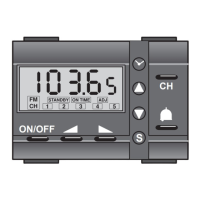
Details the information shown on the display: RDS, frequency, station number, stereo, and search mode.

Operation

Radio Frequency Tuning (Manual Search)

How to manually tune radio stations using the forwards/backwards pushbuttons and interpret display indicators.

Radio Frequency Tuning (Automatic Search)

Procedure for automatically searching for radio stations with good signal quality using the auto/man pushbutton.

Programming

Saving the Radio Stations

Instructions on how to save up to 5 radio stations using the 'M' pushbutton and tune to specific frequencies.

Installation

Troubleshooting

Provides solutions for common problems like no power, backlighting issues, and poor signal reception.

Technical Features

Lists technical specifications: supply voltage, absorption, operating temperature.

Technical After-Sales Service

States Bticino's responsibility is conditional on correct installation according to the manual.

Summary

Introduction

Warnings and Tips

Before installing the Radio Tuner read this manual carefully.

Package Content

Lists the items included in the Radio Tuner package: tuner, instruction sheet, accessories.

General Description

Describes the Radio Tuner's function, tuning FM channels, and use of the Sound System BUS.

Pushbutton Functions

Explains the actions of the device's pushbuttons for frequency tuning and station selection.

LED Indication Tables

Details the meaning of the mono/stereo signal LED and the signal reception LED indicators.

Connection to the SCS BUS Diagram

Diagram illustrating the connection of the Radio Tuner to the Sound System BUS via the audio/video Node.

Configurators

Explains the role of configurator sockets S1, S2, and M for device setup.

Connection to the Sound System BUS

Provides two alternative methods for connecting the Radio Tuner to the Sound System BUS.

F500 COAX - Antenna System Connection Diagram

Illustrates the antenna connection for F500 COAX, including required signal levels for reception.

Installation

Step-by-step guide for installing the Radio Tuner, including configurator setup and BUS connection.

Switching On

Describes the initial startup sequence, display behavior, and standby mode of the Radio Tuner.

Display

Details the information shown on the display: RDS, frequency, station number, stereo, and search mode.

Operation

Radio Frequency Tuning (Manual Search)

How to manually tune radio stations using the forwards/backwards pushbuttons and interpret display indicators.

Radio Frequency Tuning (Automatic Search)

Procedure for automatically searching for radio stations with good signal quality using the auto/man pushbutton.

Programming

Saving the Radio Stations

Instructions on how to save up to 5 radio stations using the 'M' pushbutton and tune to specific frequencies.

Installation

Troubleshooting

Provides solutions for common problems like no power, backlighting issues, and poor signal reception.

Technical Features

Lists technical specifications: supply voltage, absorption, operating temperature.

Technical After-Sales Service

States Bticino's responsibility is conditional on correct installation according to the manual.

Bticino F500 Specifications

General IconGeneral
BrandBticino
ModelF500
CategoryTuner
LanguageEnglish

Related product manuals