ECM
®
830 Electroporation System
Page 14 www.btxonline.com
Quick Start (Continued)
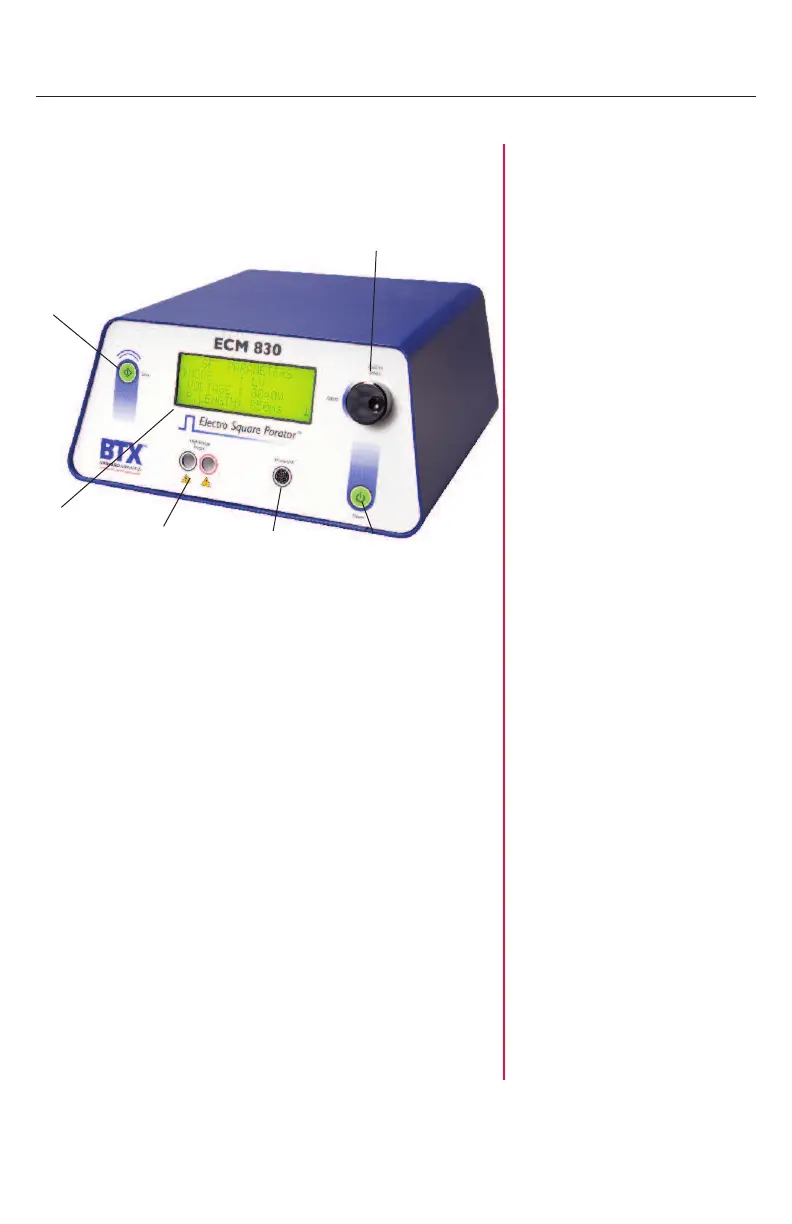
Instrument Controls
Power Switch
1. Switch located on the lower right front panel.
2. Press once to initialize the ECM
®
830 and once more to
turn off.
Note: A stabilization period of 3 seconds is required after
connecting to an outlet.
Start Switch
1. The electronic Start Switch on the upper left front panel
is activated in the “ready” mode when the parameter set
screen is displayed.
2. Once the start switch is activated, the generator will
charge the capacitor bank, then “settle” by bleeding off
the capacitors to the preset voltage, prior to delivering
the pulse.
3. The maximum setting time is 3 seconds. A pulse
sequence may be aborted by pressing the start switch a
second time before the delivery of the pulse.
4. Following the delivery of a pulse, press the start switch
once to deliver another pulse, or press the parameter
control knob to return to “ready” mode.
Power
Switch
Parameter
Control Knob
Start
Switch
Display
High Voltage
Output
Smart Link
™


 To Next Page