ECM
®
830 Electroporation System
Page 15 www.btxonline.com
Quick Start (Continued)
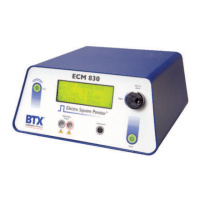
Parameter Control Knob
The Parameter Control Knob is a rotary encoder controlling both
the parameter (i.e. voltage) and the value of the parameter under
control (i.e. 50 volts). The display will indicate which parameter is
under control by the presence of an arrow to the left of the
parameter.
1. To select a parameter to adjust, rotate the knob until the
arrow is to the left of the desired parameter, then push
to select. The arrow will move to the right of the value
displayed for that parameter.
2. To adjust the value of a parameter under control, rotate
the knob clockwise to increase the value and counter
clockwise to decrease it. After the values are set under
control, push the knob to lock set value and arrow
will return to left of parameter under control.
3. In order to move between screens, move the cursor to
the bottom of the screen and rotate the knob clockwise
to move to the next screen.
4. In order to move to the previous screen, move the
cursor to the top of the screen and rotate the knob
counterclockwise.
Display
The ECM
®
830 Display will show two possible screens, the Set
Parameter Screen and the Pulsing Completed Screen as well as
various Status Messages.
Set Parameter Screen
1. The Set Parameter Screen is indicated by a display
showing “Set Parameters” on the first line of each of
three screen pages.
2. The Mode, Voltage and Pulse Length are shown on the
first page; the Number of Pulses, Pulsing Interval and
Polarity are shown on the second page and the
Advanced Features including Save, View and Load are
shown on the third and final page of the Set Parameter
Screen.
3. The ECM
®
830 will beep when toggling from one page
to another.
Mode
The Mode indicates “LV” for low voltage mode or “HV” for high
voltage mode. Adjusting the voltage as appropriate automatically
controls the mode. There is no manual mode control.


 To Next Page