ECM
®
830 Electroporation System
Page 17 www.btxonline.com
Quick Start (Continued)
# Pulses
The # Pulses indicates the number of set pulses from 1-99.
Interval
The Interval indicates the time duration between pulses. The
interval range is 100 ms to 10.0 seconds, switching from units of
ms to seconds after 999 ms, with 0.1 sec resolution.
Advanced Features
The final Set Parameters page enables the user to save, view,
and load up to three programs. Please note that parameters can
be changed inadvertently once a program is loaded. A default
program is used to initialize the system. Program 1 is used to
automatically store changes in parameters set each time the
system is pulsed. Programs #2 and #3 can be used to set and
save experimental parameters for instant use.
Save
1. To save the current set parameters as a program, push
the parameter control knob to move the arrow to the
left of the program number.
2. Rotate the knob to designate the appropriate program
number, then push and hold the knob in, releasing after
a new screen is displayed.
3. The new screen will read “Saved Current Parameters to
Set N”. Push the parameter control knob again to return
to the setup screen.
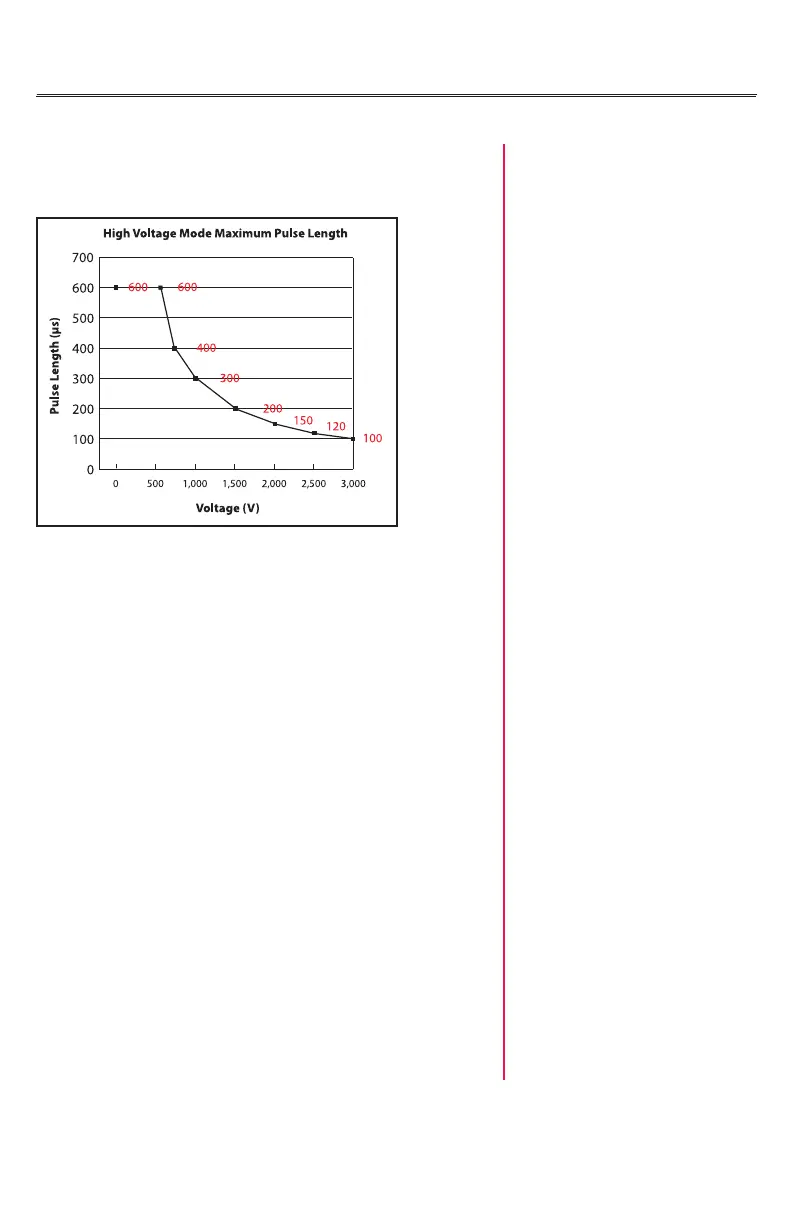
Figure 2


 To Next Page