12
MA671635_13.1 [Original Instructions] 1/23/2012
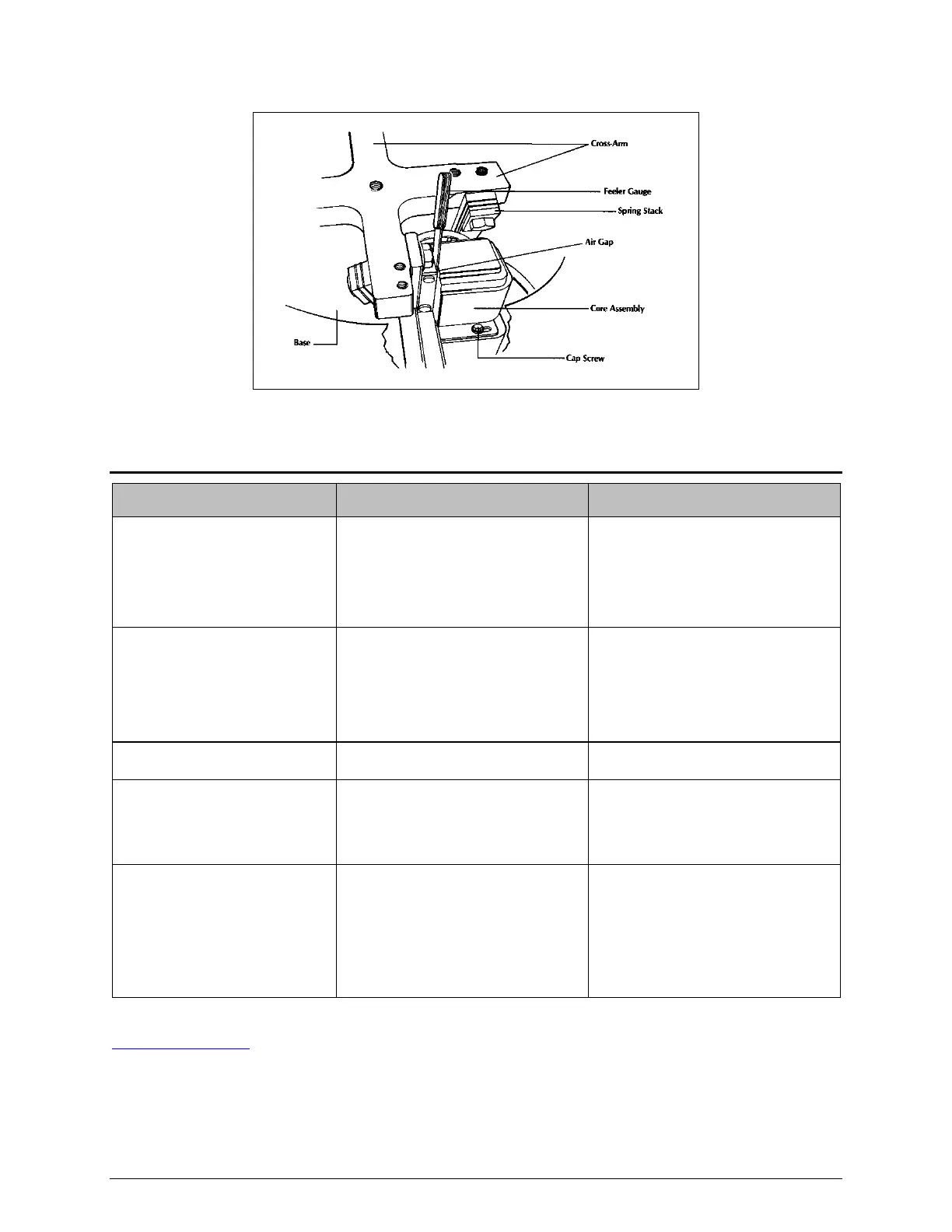
Figure 7 VibroMet 2 Air Gap Adjustment Diagram
Trouble Shooting Chart
Problem Possible Cause Correction
No response
Faulty switch Replace or repair the switch
Failed magnet Replace the magnet
Electrical short Repair the short
Weak action Low voltage Correct the power supply
Loose bowl Tighten the securing screws
Broken springs Replace the Springs**
Loose springs Tighten the spring bolts**
Hum but no vibration
Defect SCR or rectifier Replace broken parts
Loud striking noise
Air gap not adjusted correctly
Adjust air gap to correct gap of
.035 inch
No lubrication between weights
and holders
Coat contacting surface with
clean lubricant
Specimen holders not rotating
at normal rate (6 rev-per-min)
Control set too low Increate the rate
Insufficient lubricant Add clean polishing medium
Cloth not secured
Secure the cloth in the proper
manner
Machine is not level Level the machine
** For more detailed information, contact Buehler Service at 1-800 BUEHLER (1-800-283-4537) or
Service@buehler.com


 To Next Page