26
display the set temperature. e system requires approximately
1-2 minutes of water owing through the heater to determine
and display the correct water temperature.
Home/Status Screen
e Home/Status screen on your X Series (X500) control shows
basic statuses including: time, jet status, light status, current water
temperature, spa operation mode, and heating/cooling status. In
addition, many of the basic functions of operating your spa can
be performed with one touch from the Home/Status screen. In
addition, any necessary error or maintenance messages will appear
at the bottom of the screen.
Start or Stop Accessories
To start or stop an accessory (jets, lights, etc.), press the associated
button. Icons will become animated when their accessory is
turned on, and inanimate when turned o. Icons on the screen
will reect the speed or state of the devices running on your spa.
When an accessory has more than two states, press the button
until it reaches the desired state.
Light Operation
Turn lights on and o using the
button. Press once to turn
lights on. Press again to turn o. Pressing the button repeatedly
will cycle through light modes and colors (ashing, fading, solid
color).
Screen Rotation/Mode Button
From the home status screen you may press the
button to
rotate the screen 180 degrees for easier viewing from inside the spa.
Adjusting the Set Temperature
e water temperature is displayed near the bottom of the home
status screen. Press the
and buttons to set the desired
temperature. e set point will appear in large type. Press again
immediately to adjust the set point to your desired temperature.
After 3 seconds without any change to the set temperature value,
the Home/Status screen and with current water temperature in
the upper right will reappear.
When the set value is lower than the current temperature
“Cooling to xx.x” will appear at the bottom of the screen. When
the set value is higher than the current temperature, “Heating to
xx.x” will be indicated. Normally there is a short delay before the
heating starts, during which “Heating suspended” is indicated
under the value. When the water temperature reaches your set
point a message of “Set point reached” will appear.
Spa Settings
e settings on the X Series (X500) control pad are navigated by
the use of the (Settings) button. One press gives you access
to several menus where you can manage the specic settings of
your spa. After pressing the Settings button you may navigate
to each submenu by pressing the and buttons and then
using the (Light) button to select a submenu.
When using the Settings menu or submenus the screen will
revert back to the Spa mode and Home/Status screen if no key
is pressed for 60 seconds. Note that if an accessory is not present
in your spa conguration, its menu will not appear. Refer to the
following section to get details about the possible settings,
accessories, and their detailed functionalities.
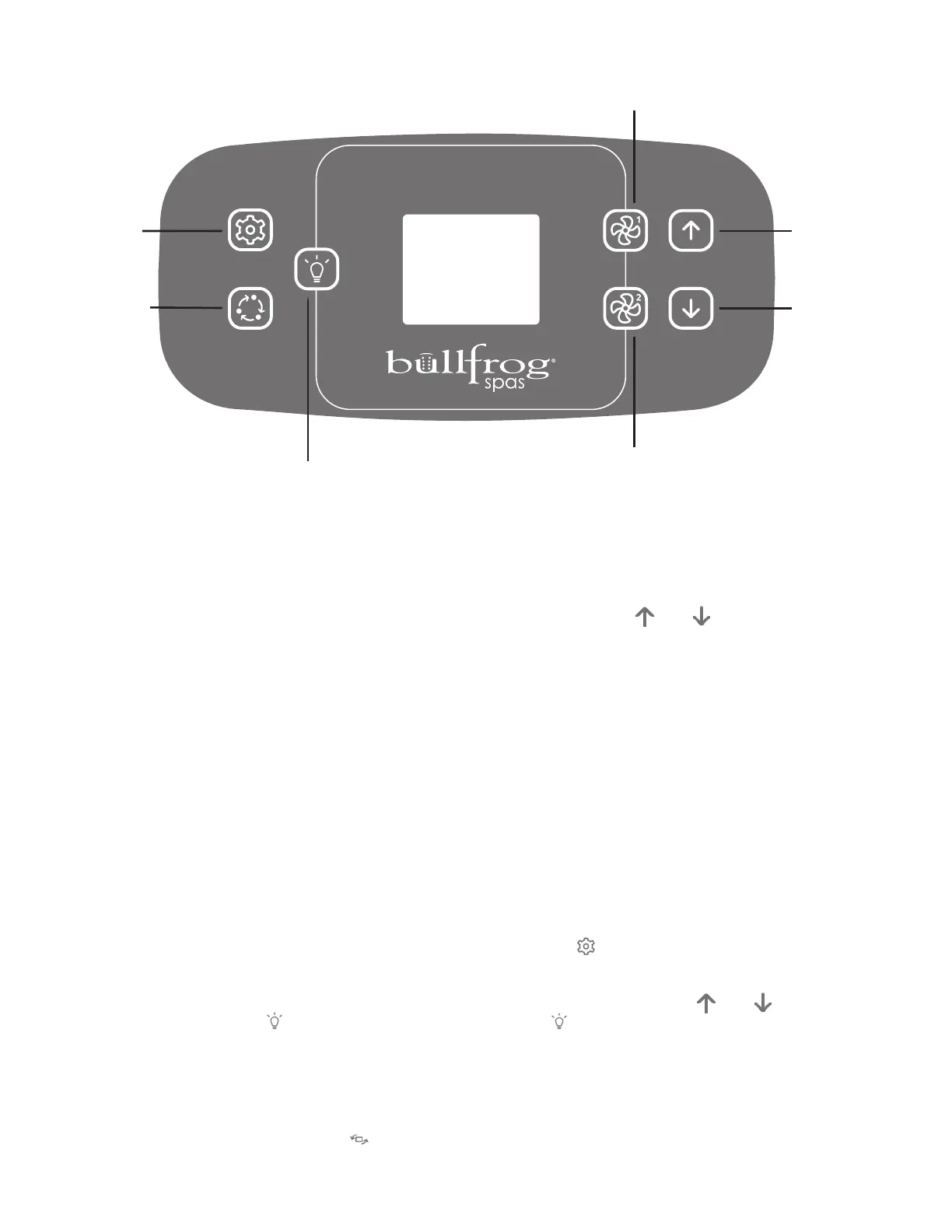
Jet / Key 1
Press to toggle jets
LOW/HIGH/OFF
Jet / Key 2
Press to toggle jets
LOW/HIGH/OFF (for
spas equipped with
dual pumps)
Lights Toggle
Press to toggle lights
ON/OFF
Down Button
Used to move through
menu selections
Up Button
Used to move through
menu selections
Settings
Mode/Invert
X Series Control (no Audio)



 To Next Page