26
If continuity is present as described, the auger switch
is operating properly.
If continuity is not present as described, replace the
auger switch.
Removal and Replacement:
1. Pull the dispenser drawer out until the drawer hits
the drawer stop. Using a screwdriver gently pry up
on the drawer stop and remove the drawer from
the dispenser.
2. Remove the four #8-32 locking screws securing
the switch panel to the drawer.
3. Lift the switch panel with wires and L.E.D./adjust-
ment board out as an assembly.
4. Turn switch panel over and remove the wires from
the auger switch that is to be replaced.
5. Compress the clips on the back of the control panel
and gently push switch through the opening.
6. Push the new switch into the opening, with the “o”
on the switch to the outside, until the clips snap
into position.
7. Reconnect the wires to the switch. Refer to Fig. 8
when reconnecting wires.
8. Position the switch panel inside the drawer and
secure with four #8-32 locking screws.
9. Reinstall drawer.
FIG. 8 AUGER SWITCH TERMINALS
P1336
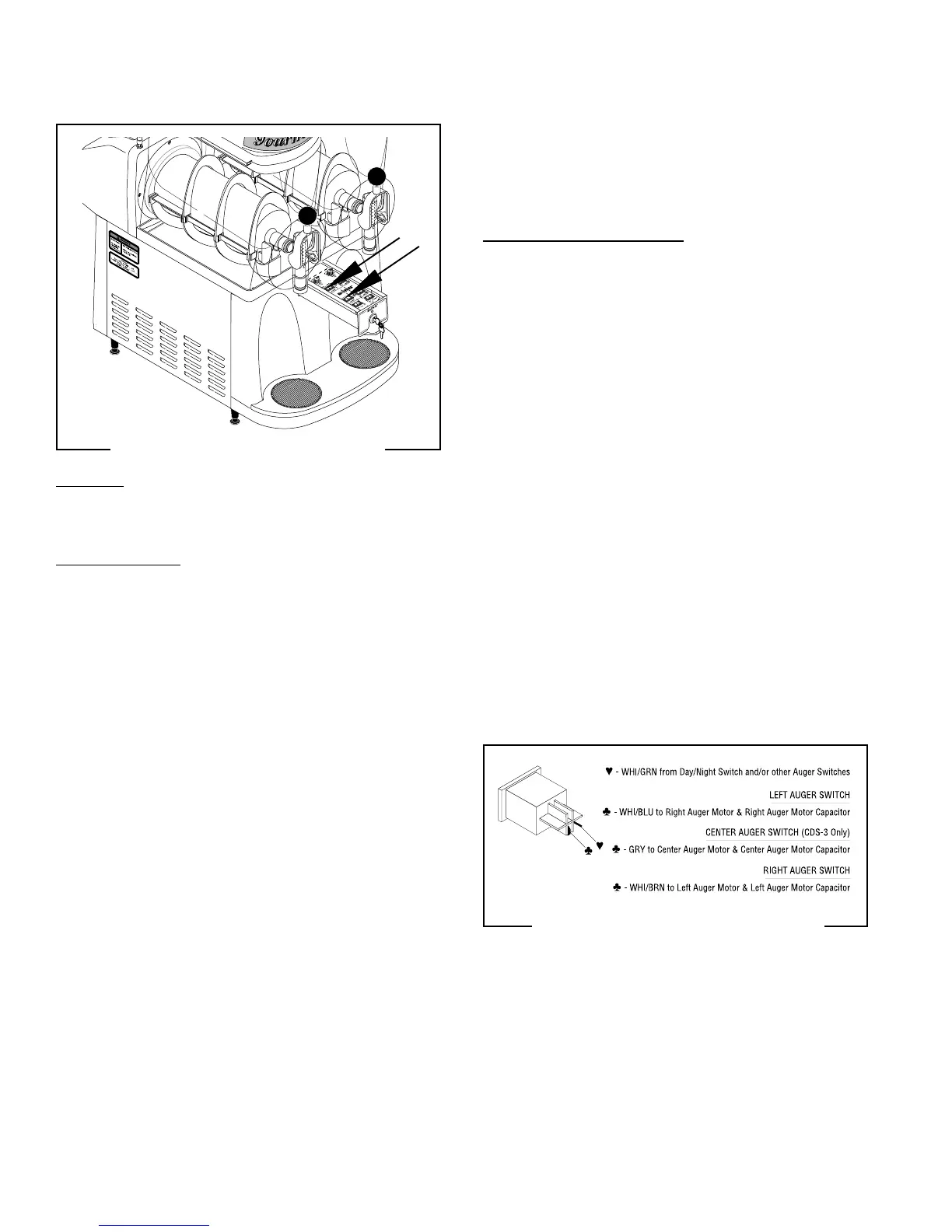
FIG. 7 AUGER ON/OFF SWITCHES
P1343
Location:
The auger switches are located inside the dispenser
drawer.
Test Procedures:
1. Disconnect the dispenser from the power source.
2. Disconnect the white/green wire from the switch
to be tested and white/black wire from contactor
located on the outside bottom of the component
bracket .
3. With a voltmeter, check the voltage across the
white/green and the white/black wires and the
“ON/OFF” switch in the “ON” position. Connect the
dispenser to the power source. The indication
must be:
a) 120 volts ac for 120 volt models.
b) 230 volts ac for 230 volt models.
4. Disconnect the dispenser from the power source.
If voltage is present as described, reconnect the white/
black wire to the contactor and proceed to #5.
If voltage is not present as described, refer to the
Wiring Diagram
and check the dispenser wiring har-
ness.
5. Remove the white/blue wire from the right auger
switch, the white/brown wire from the left auger
switch, or the grey wire from the center auger switch.
6. With the auger switch to be tested in the “ON”
position check for continuity across the terminals.
Continuity must not be present when the switch is
in the “OFF” position.
SERVICE (cont.)
AUGER ON/OFF SWITCHES
27646 122200



 To Next Page