35
SERVICE (cont.)
COOLING DRUM ALIGNMENT
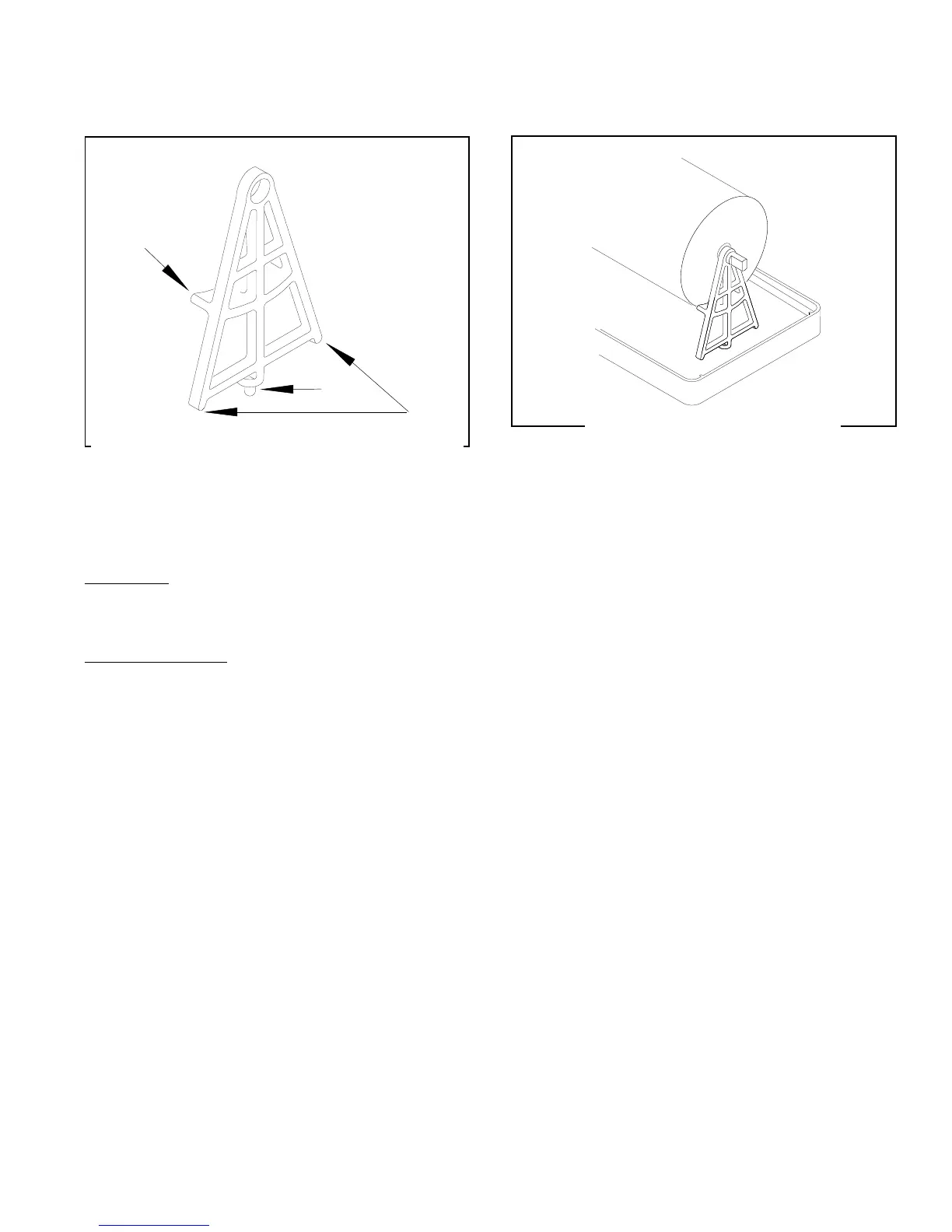
The “A” shaped Cooling Drum Shipping Supports,
removed during
Initial Set-Up
should be kept and used
as a tool to reset the alignment of the cooling drums
should it ever be required.
Symptoms:
Squeaky Operation, hopper lifts or won’t seat prop-
erly, hopper is pushed to one side or the other.
To check alignment
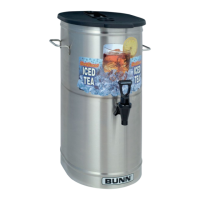
1. Place the “A” shaped support on the auger shaft
with the ledge under the cooling drum.
2. Lift the cooling drum while rotating the support
into a vertical position. The boss on the very
bottom will drop into the hopper drip tray’s drain
hole.
Ledge
Boss
Legs
When in its proper position, the cooling drum will
cause a slight pressure on the hopper drip tray drain
hole and the two legs will be equidistant from the hop-
per drip tray.
If adjustment is needed, remove the support and gen-
tly force the free end of the evaporator in the direction
the adjustment is needed.
Reinstall the support, check the alignment, and read-
just the cooling drums as required.
P1510
FIG. 23 COOLING DRUM SHIPPING SUPPORT
FIG. 24 CHECKING ALIGNMENT
27646 122200



 To Next Page