28
For any help concerning set up and use of your TV please call the Customer Helpline: 0871 2000 463
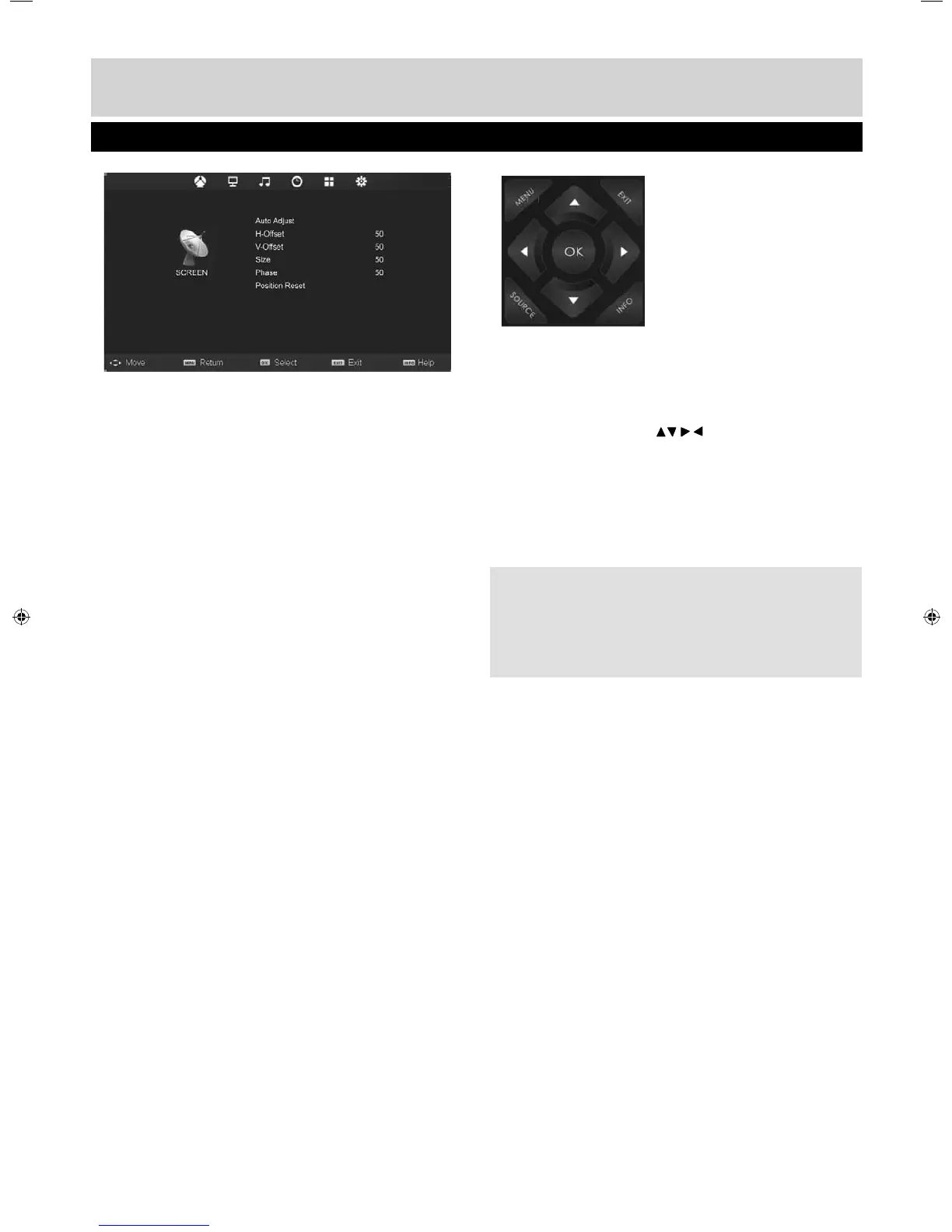
Auto Adjust
Lets you automatically confi gure the television to be
used as a computer monitor
H Offset
Changes the horizontal position of the picture
V Offset
Changes the vertical position of the picture
Size
Increase picture size
Phase
To adjust delay time of phase in order to reduce the
noise of picture
Position Reset
Changes back to the factory settings
Tip: If the computer is left in-active for a period of
time, the television will switch into a ‘sleep’ state (the
screen will power off to save power). To switch back
on press the standby button.
PC Settings
AV
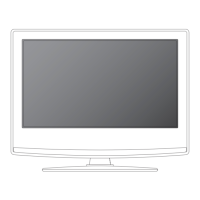
To access this menu, press [MENU] button on the
remote control and scroll right.
To enter a sub menu press [OK]
If you wish to make changes to any of the default
settings, use the scroll buttons. To confi rm
any settings press [OK] button.
To exit this menu at anytime, press [EXIT] button.
User Guide - Bush -32-149 BUS-MAN-0012.indd Sec1:28User Guide - Bush -32-149 BUS-MAN-0012.indd Sec1:28 10/30/2014 2:04:07 PM10/30/2014 2:04:07 PM



 To Next Page