31
For any help concerning set up and use of your TV please call the Customer Helpline: 0871 2000 463
USB mode offers playback of various different types
of content that you have saved on your USB Memory
Stick.
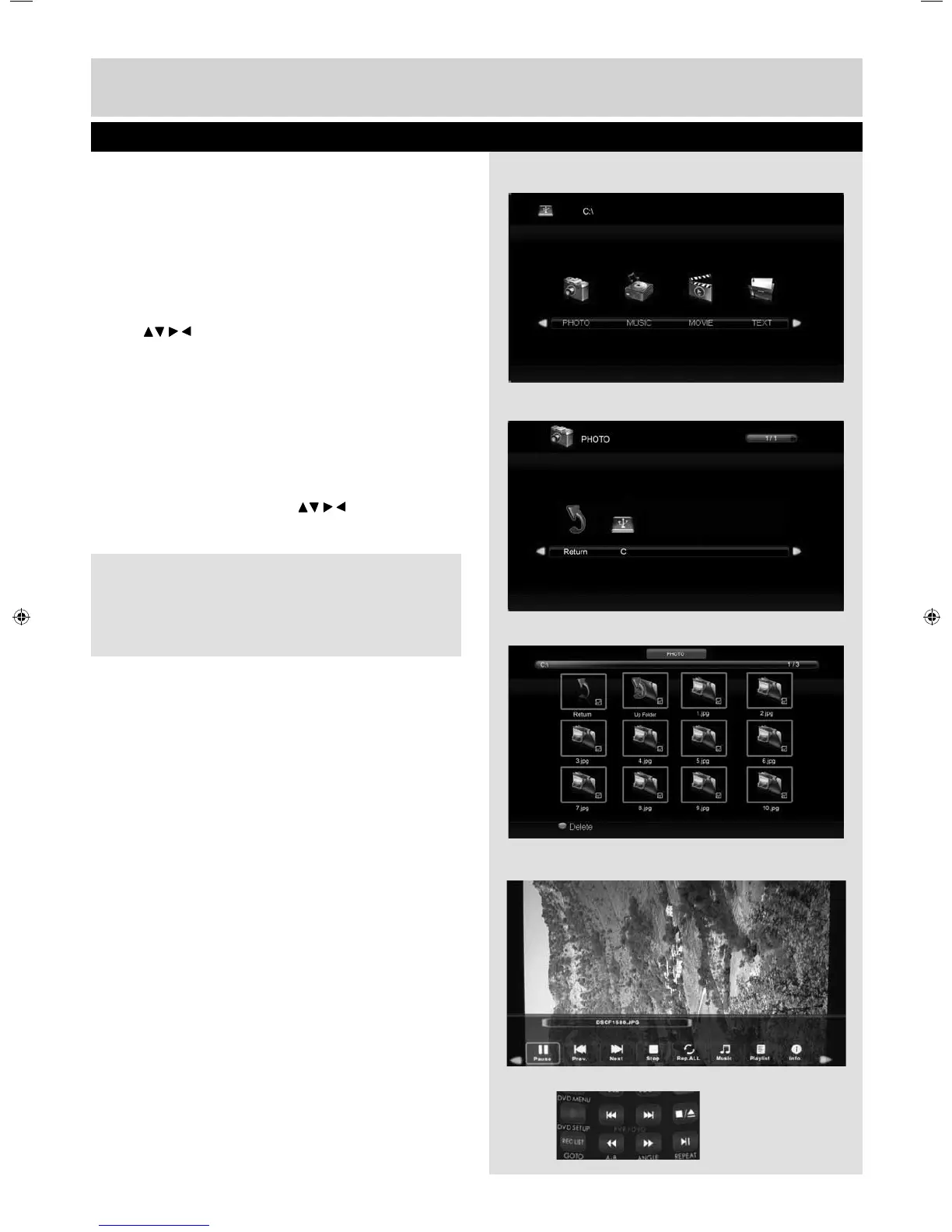
On switching to USB source the menu screen will
appear. The content will be divided into Photo,
Music, Movie and Text based on fi le type.
1) You can navigate through the menus using the
scroll buttons. To confi rm the item you wish
to play/view press [OK] button.
2) Select the drive you require.
(If your drive only has 1 partition you will only see
1 item).
3) You can now access the item. Press OK to view.
4) While viewing you control the item using (Fig A)
or by pressing ( i ) and using and (OK)
USB Mode / Media Player
Fig A
4)
3)
2)
1)
Tip: If you experience a playback issue, please
ensure the fi les being used are the correct format
(example - the picture plays but no sound) See
technical specifi cation page for compatible fi le types
User Guide - Bush -32-149 BUS-MAN-0012.indd Sec1:31User Guide - Bush -32-149 BUS-MAN-0012.indd Sec1:31 10/30/2014 2:04:08 PM10/30/2014 2:04:08 PM


 To Next Page