10
For any help concerning set up and use of your TV please call the Customer Helpline: 0871 2000 463
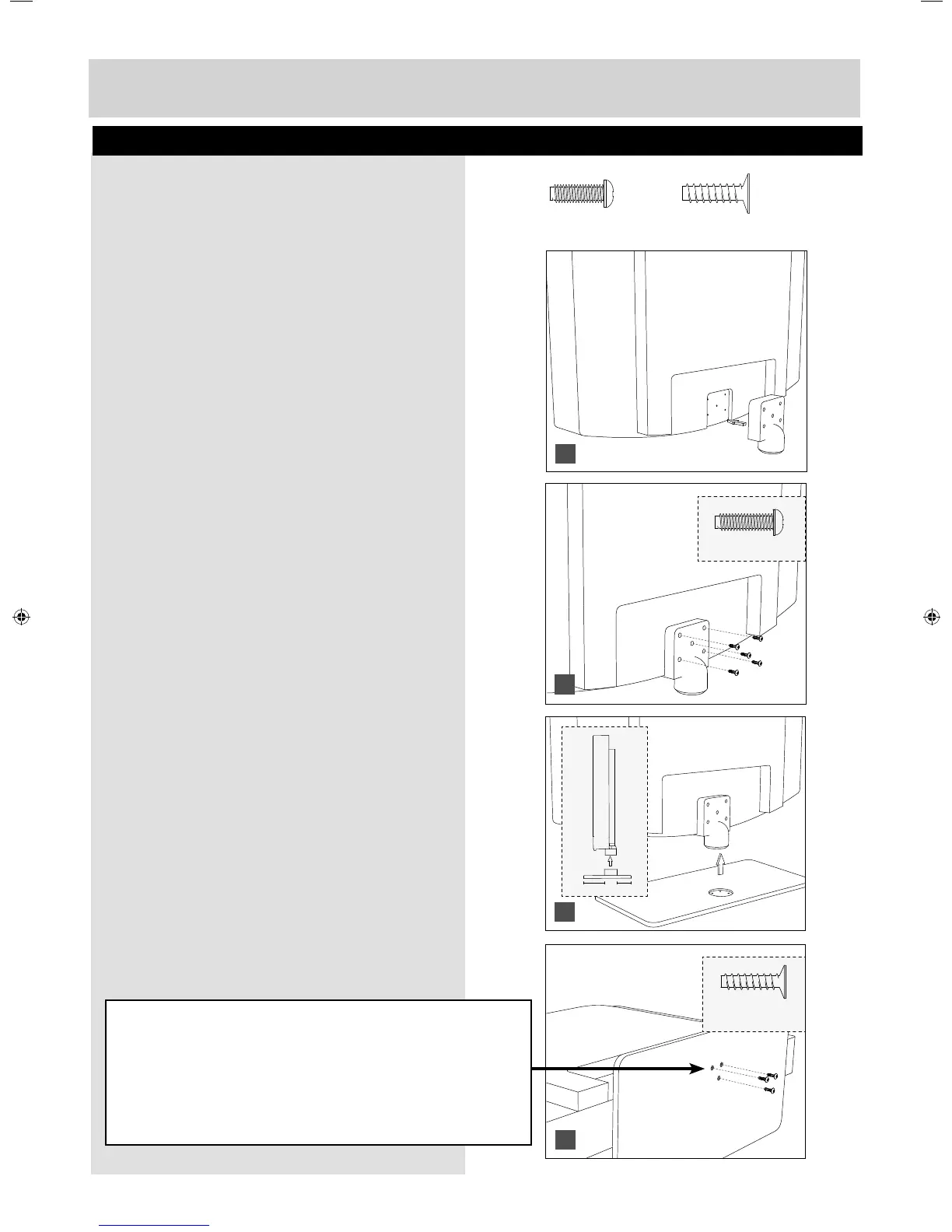
To complete the stand installation you will require a cross head screw driver.
The Stand Installation pack comes with two different
types of screws.
fi g 1) Attach the stand neck to the rear of the TV set.
fi g 2) Secure the neck to the TV using the
5 x M (4x10) screws provided.
fi g 3) Attach the stand base to the neck.
fi g 4) Secure the base to the neck using the
3 x ST (3.7x18) screws provided.
Attaching The Stand
HELPFUL ADVICE FOR FIRST TIME STAND INSTALLATION
When securing the self-tapping screw/s into the base of the stand (on fi rst installation) the screw/s will be
naturally tight as they create a thread in the plastic of the stand neck in order to support a TV of this size.
a) Ensure the cross head screw driver tip fi ts correctly into the head of the
screw and that it is not too big or small.
b) Screw in all screws individually and partially before tightening all of the
screws fully.
c) If they become very tight try loosening them slightly and then re-tightening them once again as this will
continue the process of creating the thread for the screws.
5 x M(4x10)
11/2
3 x ST (3.7x18)
1
2
3
4
3 x ST (3.7x18)
5 x M(4x10)
User Guide - Bush -32-149 BUS-MAN-0012.indd Sec1:10User Guide - Bush -32-149 BUS-MAN-0012.indd Sec1:10 10/30/2014 2:03:51 PM10/30/2014 2:03:51 PM


 To Next Page