16
17
section of these instructions, or online at www.bush-support.com If you still require further assistance, call one of our experts on 0345 600 3021.
If you require any technical guidance or find that your product is not operating as intended, a simple solution can often be found in the
Troubleshooting
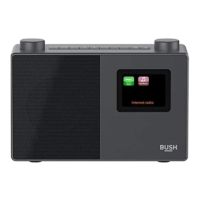
Getting to know your Stereo DAB/FM Radio
You’ll be up and running in no time
Getting to know your Stereo DAB/FM Radio
You’ll be up and running in no time
Connection
1. Connect the mains power lead into the socket on the back of the Radio.
2. Plug the power adaptor into the mains power wall socket and switch on. Slide the
power switch on the back of the radio to On. The Radio will switch on, Welcome to
Digital Radio will be displayed and then your Radio will go to Standby mode.
Inserting batteries (optional)
1. Before installing the batteries (not included) please ensure that the Radio is switched
off using the Power switch on the back of the radio and has been unplugged from the
mains power supply.
2. On the back of the Radio, press down the two tabs on the battery compartment cover
to remove it.
3. Insert 4 x 1.5V C-size (also known as LR-14) batteries, making sure to note the ‘+’ and ‘-‘
markings and position the batteries the correct way around.
4. Replace the battery cover, making sure that it ‘clicks’ shut.
Note: For battery operation please ensure that the mains power is switched off and
remove the mains power plug from the socket on the back of the Radio.
Initial set-up
1. Extend the telescopic aerial to ensure the maximum signal strength when you scan for
radio stations.
2. Short press the Power button on the front of your radio. Your radio will switch on and
begin an automatic scan for DAB stations. A progress bar will show the progress of the
scan and the number of stations found during the scan will also be displayed.
3. When the scan is complete your radio will select the first available station and begin to
play. Stations are listed in numerical and then alphabetical order by default.
Note: The DAB radio station list is stored in the memory and so the next time you
switch your radio on, the station search does not take place. It is possible to scan
manually for stations by pressing and releasing the Scan button.
4. Turn the rotary ‘Tune/Select’ control to scroll through the available stations. When
the station that you would like to listen to is displayed press to ‘Select’. There will be a
short delay whilst your DAB radio tunes to your selected station.
Adjusting the volume
• Turn clockwise to increase the volume.
• Turn anti-clockwise to decrease the volume.
Time and date
The first time you listen to DAB radio, the time and date of your product will be
synchronised automatically to that broadcast by the DAB service in 24 hour mode; which
is in line with daylight saving, so there is no need to set the time and date manually.
If you do wish to set the time and date manually, turn on the radio and follow the steps
below:
1. Long press the Menu button to enter the menu options.
2. Use the Tune/Select control to scroll to <System>. Press to Select.
3. Use the Tune/Select control to scroll to <Time>. Press to Select. <Set Time/Date> is
displayed. Press to Select.
4. Set time is displayed and the hour digits will flash. Use the Tune/Select control to
scroll to the correct hour. Press to Select.
5. The minutes will now flash. Use the Tune/Select control to scroll to the correct
minutes. Press to Select.
Getting to know your Stereo DAB/FMRadio with Bluetooth
Getting to know your Stereo DAB/FMRadio with Bluetooth



 To Next Page