Page 4
Preperation for use
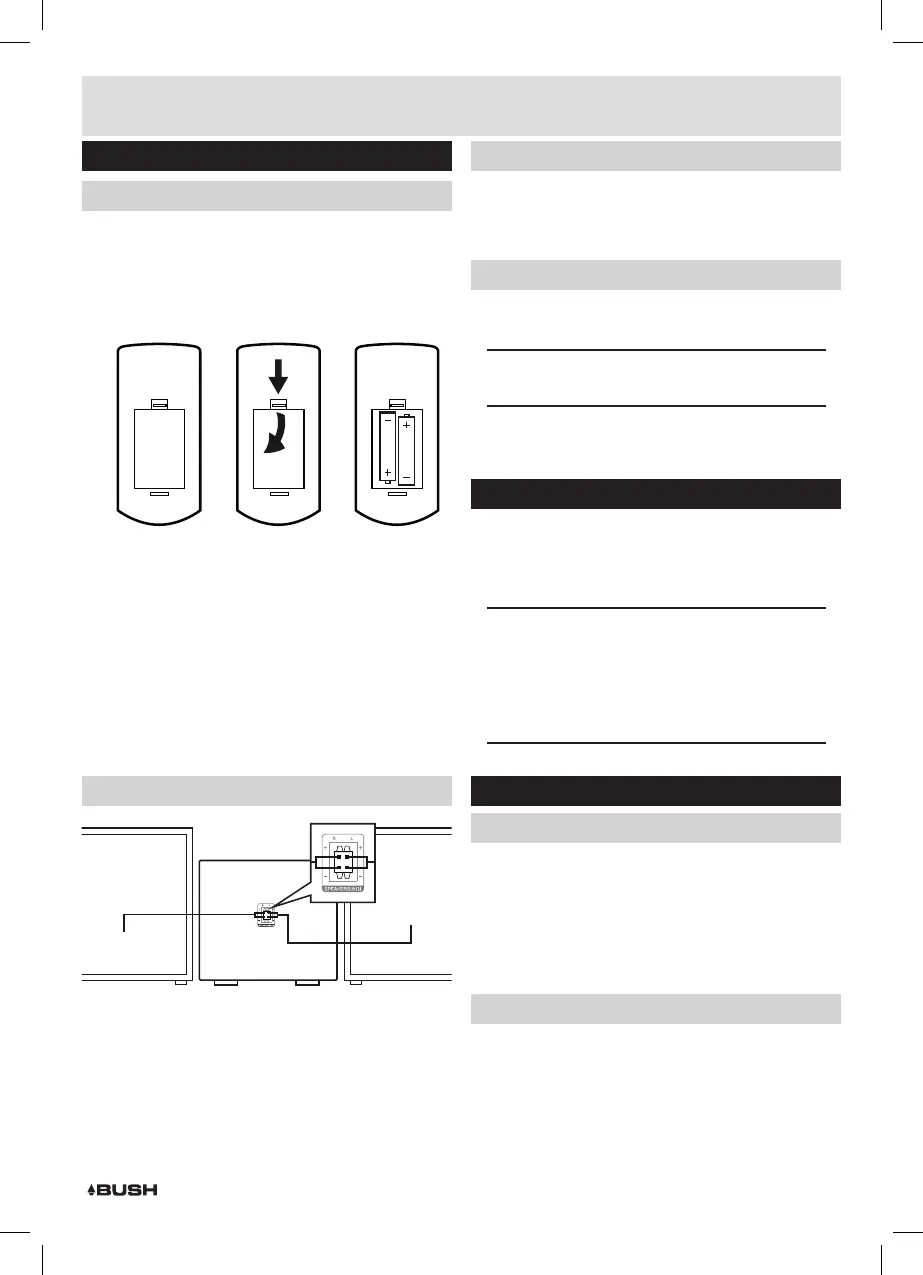
Remote control battery installation
1: Remove the battery cover (as shown).
2: Insert 2 x AAA batteries (supplied), taking note that
the polarities match up.
3: Replace the battery cover, in the same manner as you
removed it.
1 2 3
Notes on battery usage
• Do not insert battery into the remote control in the
wrong direction.
• Do not charge, heat, open or short-circuit the battery.
Do not throw battery into a fire.
• If the remote control does not function correctly or
if the operating range becomes reduced, replace all
batteries with new ones.
• Improper replacement of batteries may result
in explosive hazard. It must be replaced only by
batteries with the same or equivalent type.
Connecting the loud speakers
RIGHT SPEAKER LEFT SPEAKER
REAR PANEL
1: Unwrap the speaker wires.
2: Place a speaker on either side of the main unit,
preferably at the same height, and with at least
150mm between each speaker and the main unit.
3: Connect the speaker wires to the terminals on the
rear of the unit (15). Take care to match the speaker
placed to the LEFT to the LEFT output on the rear of
the unit. Repeat for the RIGHT speaker.
Connecting the loud speakers (cont)
4: When connecting ensure the RED wire connects to
the RED terminal and the BLACK wire to the BLACK
terminal.
Connecting the mains power
1: Connect the mains plug to a UK wall outlet.
2: Extend the pig tail antenna as far as it can go.
NOTE: The quality of the DAB/FM reception will be
influenced by the positioning of the pigtail aerial.
3: Press the STANDBY button (2, 17) to wake from
standby.
Standby mode
1: Press the STANDBY button on the unit (2) or press the
STANDBY button (17) on the remote to put the system
into standby mode. To resume normal operation press
either button again.
NOTE: This unit is designed to enter STANDBY
mode automatically after 20 MINUTES
(approximately) of inactivity. Press the STANDBY
button to wake the unit.
NOTE: When you power on the unit from standby
the last used mode will resume.
General operation
Volume controls
1: Rotate the VOLUME control (10) clockwise or press
the VOLUME+ button (26) to increase the volume
level.
2: Rotate the VOLUME control (10) anti-clockwise or
press the VOLUME- button (26) to decrease the
volume level.
Mute function
1: Press the MUTE button (27) at any time to silence the
output.
2: Press again to resume audio output.
Installation



 To Next Page