14
Getting Access Code and FAQ from ‘Help’
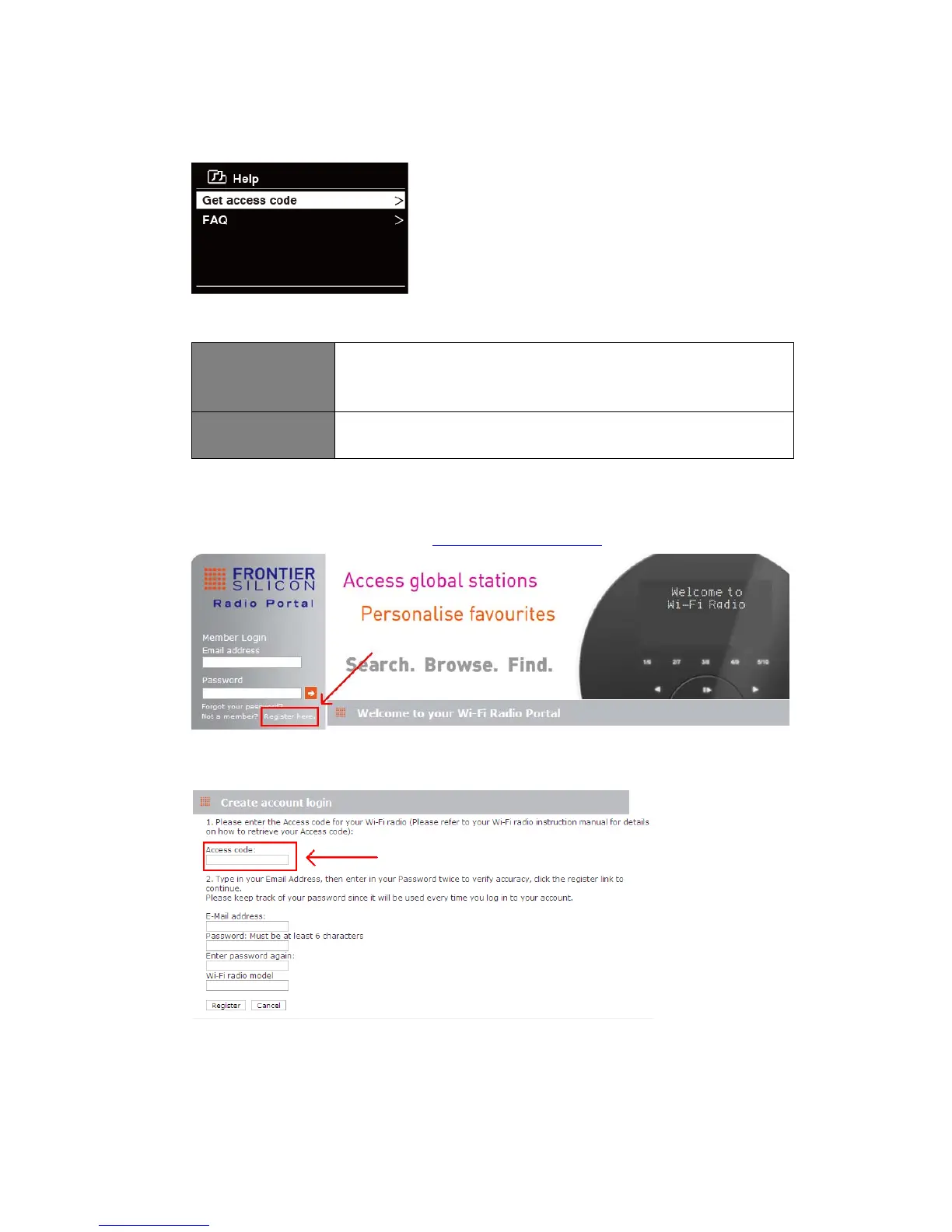
1. Press MENU button > Station list > Help, press SELECT/SNOOZE knob to confirm.
2. Turn SELECT/SNOOZE knob to select Get access code or FAQ, and then press
SELECT/SNOOZE knob to confirm
Get access code
It uses for creating an account when registering your radio on portal
www.wifiradio-frontier. com
Refer to section ‘Adding station to ‘My Favourites’’.
FAQ Turn SELECT/SNOOZE knob to select question, and then press
SELECT/SNOOZE knob to listen the FAQ.
Adding station to ‘My Favourites’
1. To register your radio with the portal: www.wifiradio-frontier.com
2. Create account login, enter Access code is required. Access code can be found from
“Station list > Help > Get access code".
3. To add a Favourite Station, first find a station and then click the “Add” icon.



 To Next Page