24
Using your DAB/FM Digital Radio
Let’s get started
Using your DAB/FM Digital Radio
• Audio mode – the display will show if the station being received is
stereo or mono.
• Frequency – the display will show the frequency of the station
being broadcast.
• Power status – the display will show whether if the radio is being
used on mains or battery. When in battery mode the display will
show the battery capacity (21-100)
FM SET UP OPTIONS
This function allows the FM set up menu to be entered and a number
of options to be changed.
With the music of choice playing, press the MENU button until ‘Scan
setting’ is displayed and then press the TUNNING (
◄
) or (
►
) buttons
to move through the menu options available and press the SELECT
button to enter each option.
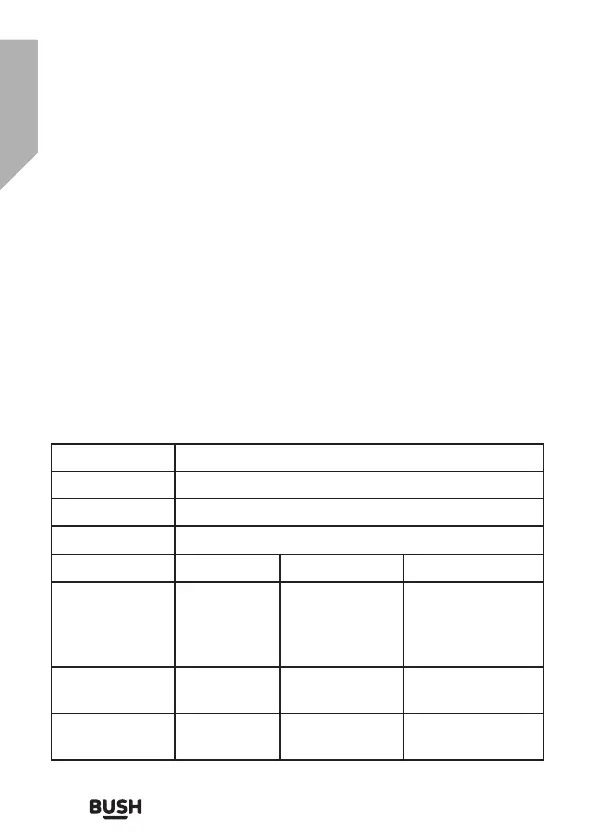
Menu Options
Full scan Initiates full DAB scan
Manual tune Permits manual addition of DAB stations
Prune Removes unavailable DAB stations
System Time Set Time / Date hh:mm:dd:
Auto update Update from any
Update from DAB
Update from FM
No update
Set 12/24 12
24
Set date format dd/mm/yyyy
mm/dd/yyyy



 To Next Page