22
Using your DAB/FM Digital Radio
Let’s get started
Using your DAB/FM Digital Radio
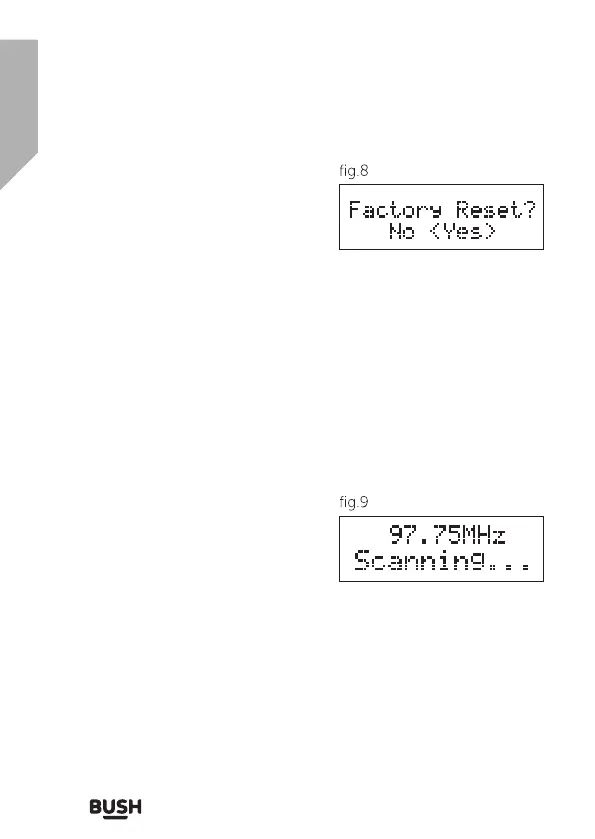
3. The display will now show ‘Factory
Reset? <No> Yes’ (fig. 8). Use the
TUNNING (
◄
) or (
►
) buttons until
<Yes> is shown and then press the
SELECT button to confirm. The
radio will display “Restarting….” and
will then go into standby mode.
4. Proceed as per section 6.1 to re-start the unit and scan for stations.
Note
• All stored programmed stations will be lost during reset.
USING THE RADIO - FM MODE
FM MODE - TUNING
1. To select FM radio, press the MODE button, the display will show
‘FM’ and then the frequency.
2. To activate auto search press the
SELECT button or press and the
TUNNING (
◄
) or (
►
) buttons and
the radio starts to scan up the
frequency band, the display will
show ‘Scanning… ‘(fig.9), and it will
stop automatically once a station has been found.
3. To search manually, press the TUNNING (
◄
) or (
►
) buttons and
immediately release to increment the frequency by 0.05MHz.
4. To change the audio mode (stereo or mono), press the MENU
button and press the TUNNING (
◄
) or (
►
) buttons until ‘Audio
setting’ is displayed. Press the SELECT button to accept. Use
the TUNNING (
◄
) or (
►
) buttons button to switch from ‘Stereo
allowed’ to ‘Forced mono’ and again to switch back. If ‘stereo



 To Next Page