41
or online at www.bush-support.com If you still require further assistance, call one of our experts on 0345 604 0105.
Entertainment
Using the Features via USB Port
1. Switch off the TV before connecting any USB storage
device.
2. Connect your USB storage device to the USB port of
your TV.
3. Press the button on the top of the TV or the button
on the remote control to turn onyour TV and your USB
storage device.
4. Press the INPUT button on the top o f the TV or
the INPUT button on the remotecontrol to display the
Source List. Use the
buttons to select MEDIA and
then press the OK button to confirm.
Attention:
Some versions of portable hard disk may require more
power than the TV USB socket can provide. To ensure
correct operation please use power adapter for that
device.
• If a USB hub is used make sure its mains adapter is
connected to the mains supply as the total current
consumption exceed 500mA.
• The maximum supported storage space of the hard
disk is 1 TB.
• The file system only support FAT32 format.
• If you want to store the video streaming of a DTV
programme, the transfer rate of the USB storage device
must not be less than 5MB/s, otherwise the picture and
sound of the programme will be affected and a warning
statement will be shown on the screen. If this happens,
please upgrade your USB storage device.
• The TV screen will be blank temporarily as it will take
time to start up and stabilize the connected hard disk.
This is normal and the starting time may vary depending
on the brand and the memory size of the connected
hard disk.
• Disconnect the USB storage device if it is not in use.
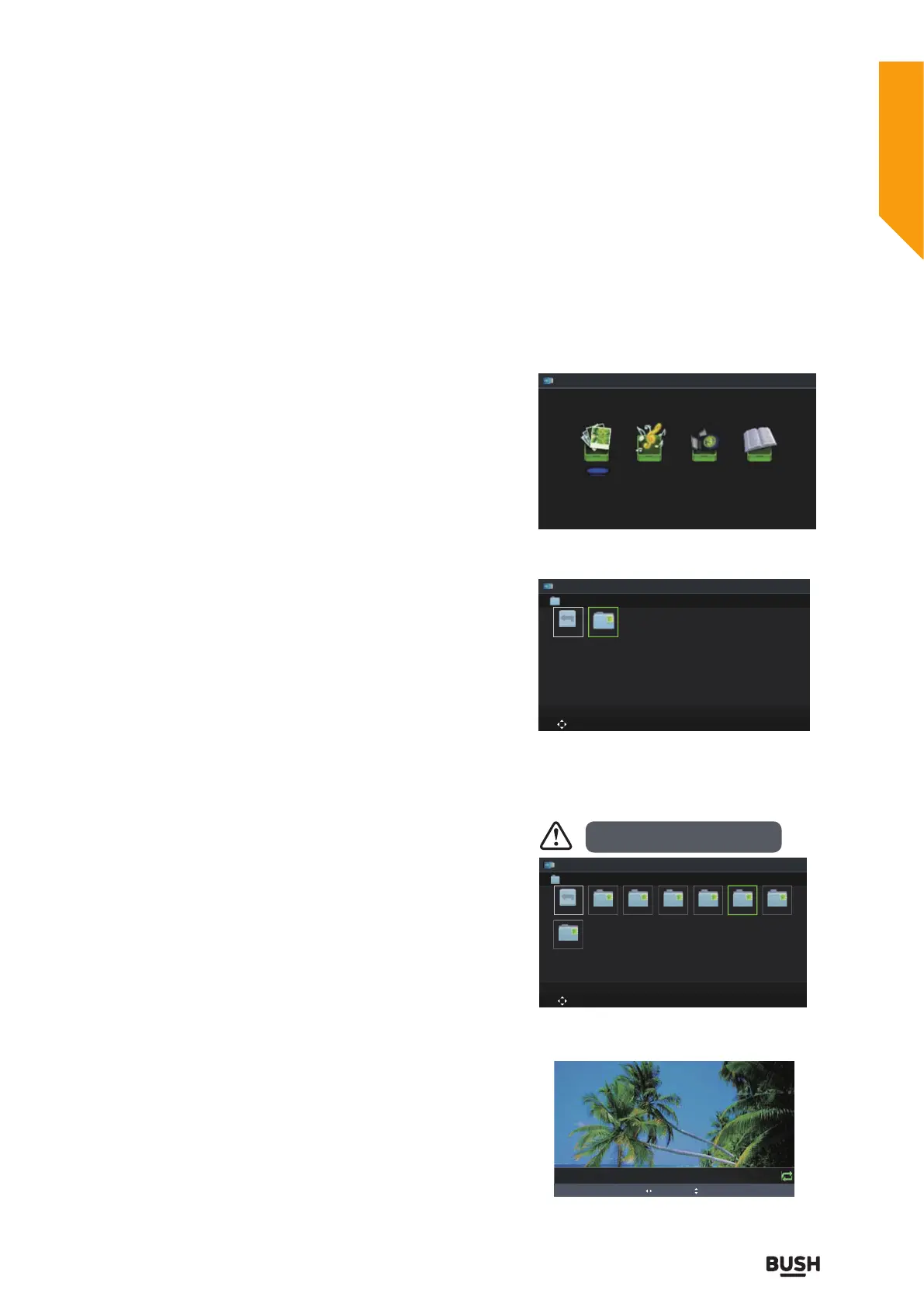
Viewing Photo
1. Press the INPUT button on the top of theTV or the
INPUT button on the remote control then press the
buttons to MEDIA and then press the OK button.
2. Press the
buttons to select Photo and then press
the OK button.
3. Press the
buttons to select your storage device
and then press the OK button.
4. Press the
buttons to navigate in the picture
folder and then press the OK button. If you want to
select the specified photos, press the
buttons to
select the picture file and then press the OK button.
5. Press the OK button to view.
Photo Music Movie Text
Photo
Move CH + / - Change Page OK Selete EPG Quick Menu EXIT Return
USB1
. . .
USB1
1/1
File format supported: JPG.
Photo
Move
CH + / - Change Page OK Selete EPG Quick Menu EXIT Return
AITEMP MY PVR Movie Music Photo Text
LE32G
. . .
USB1
OK Slide Show / Single view Previous / Next Rotate EXIT Back EPG Quick Menu
Date 2010-05-13 20:28:40
Resolution 1366x768
6/12
5_1366x768x24b.jpg
Standard features
Simple everyday use
Standard features



 To Next Page