4
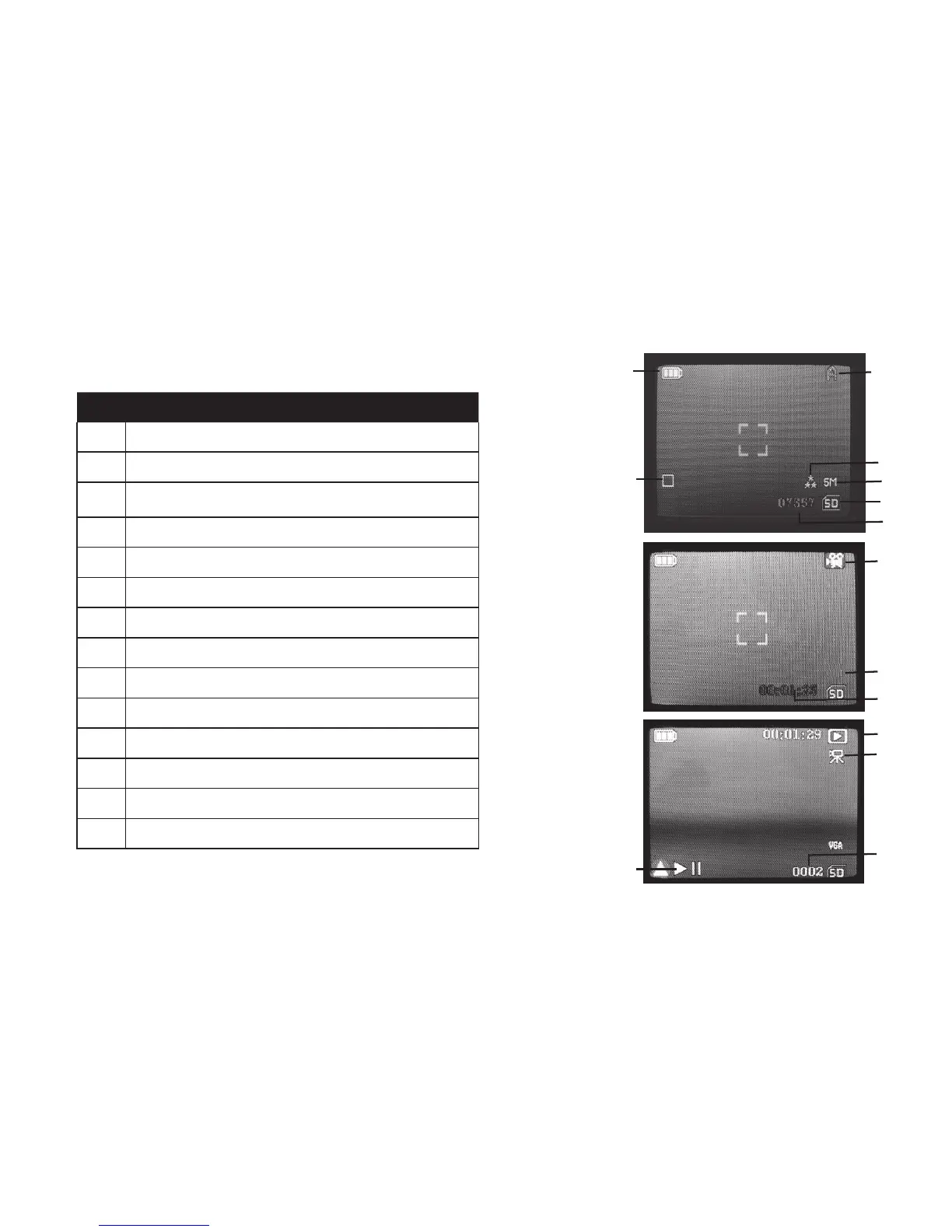
LCD Display Icon Guide
# Icon
1 Battery Indicator (full battery shown)
2 Single Shot (Burst setting=O)
3 Scene Setting (Auto shown)
4 Photo Quality setting (3 stars=Fine)
5 Photo Resolution setting (5 Megapixels)
6 SD Card Inserted
7 # of Photos Remaining (based on unused card memory)
8 Video Mode
9 Video Resolution (HD)
10 Elapsed Video Recording Time
11 Playback (Review) Mode
12 Video Clip
13 File Number (Photo or Video #)
14 Press Up Key to Play/Pause the Video clip
Live Preview
Screen
(Still Photo
Mode)
4
3
7
2
1
6
5
8
9
10
Live Preview
Screen
(Video Mode)
11
Play/Review
Screen
(Video Clip)
12
13
14
HD



 To Next Page