8
3.8 Lens
90 degree and 50 degree are available. 90 degree lens has an
advantage on the near scene; and 50 degree standard lens for
shooting ordinary distance scene.
3.9 TFT screen
Used to display menu settings, view images.
3.10 SD Card Slot
Attention: SD card need purchase by buyer.
Please insert SD card correctly. The supported memory
capacity is up to 64GB. SD card to be formatted before use; and SD
card lock protection off. It’s recommended to use high speed SD
card not less than class 10 to achieve the best performance.
Low-quality SD card and by the TF card into SD card and other
non-standard SD card, will take a picture as a failure. Please don’t
take out batteries, SD card or power supply when camera in “ON”
mode!
The file format of SD card stores: Photos are saved in JPEG
and videos are saved in MOV (H.264).
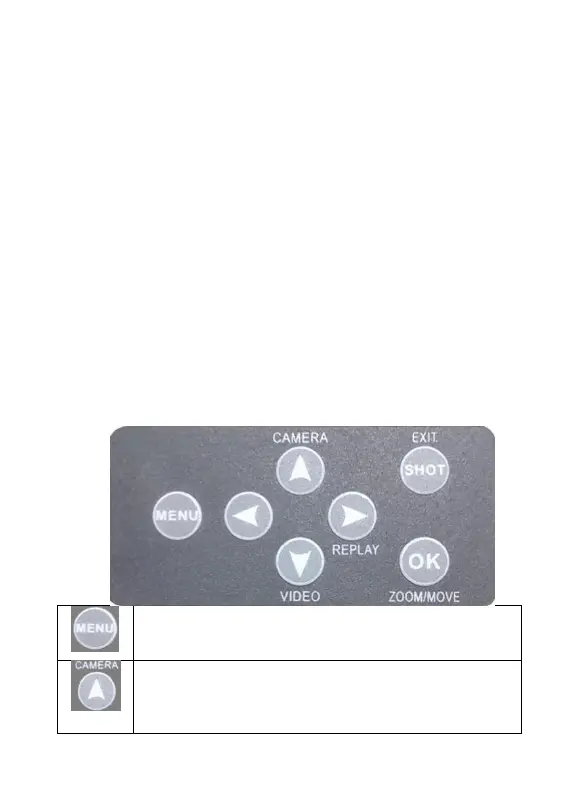
3.11 Keypad
For menu operation
MENU button, press it to set parameters; Switch among
“IMAGE/SET/SYSTEM”; Press “EXIT” button to exit.
Up, Quick switch to camera mode. “ZOOM” mode to
enlarge the picture; “MOVE” mode to move the picture
up.



 To Next Page