26
EN
Büner Elektronik – MT iQ Basic
EN
25Mobile Technology – MT iQ Basic
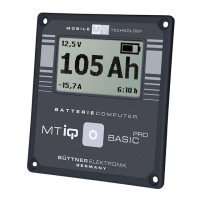
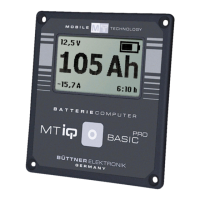
Display of Main Functions
Via button ❶, you can switch between the main displays
of the battery computer.
Successively displayed will be: Capacity display in Ah
(programmed total capacity is shown in the bottom right-
hand corner
❸), capacity display in %, currently flowing
power in A, battery voltage in V.
With current flowing, a display of "-" shows when current
is taken from the battery.
I
f the battery capacity reaches a value of under 20%, the
display will begin to flash as a warning and remains at the
20% displayed.
In order to designate charge/discharge currents below the
display limit of 1A, the display continuously alternates
between 0A and 1A for positive currents and between 0A
and -1A for negative currents.
Adjustment of Battery Capacity
Press button ❶ for 5 seconds to get to the menu for
adjusting the total battery capacity.
This is evident by a flashing button symbol in the display.
Use the menu to adjust the total battery capacity installed
in your vehicle. You can slowly increase the value of the
battery capacity by pressing the button
❶. If you keep
pressing the button for a longer period, the va
lue of the
battery capacity is increased ever faster.


 To Next Page