www.BXB.tw
4
System Installation Instructions
1. Rear Panel Function
Functions:
○
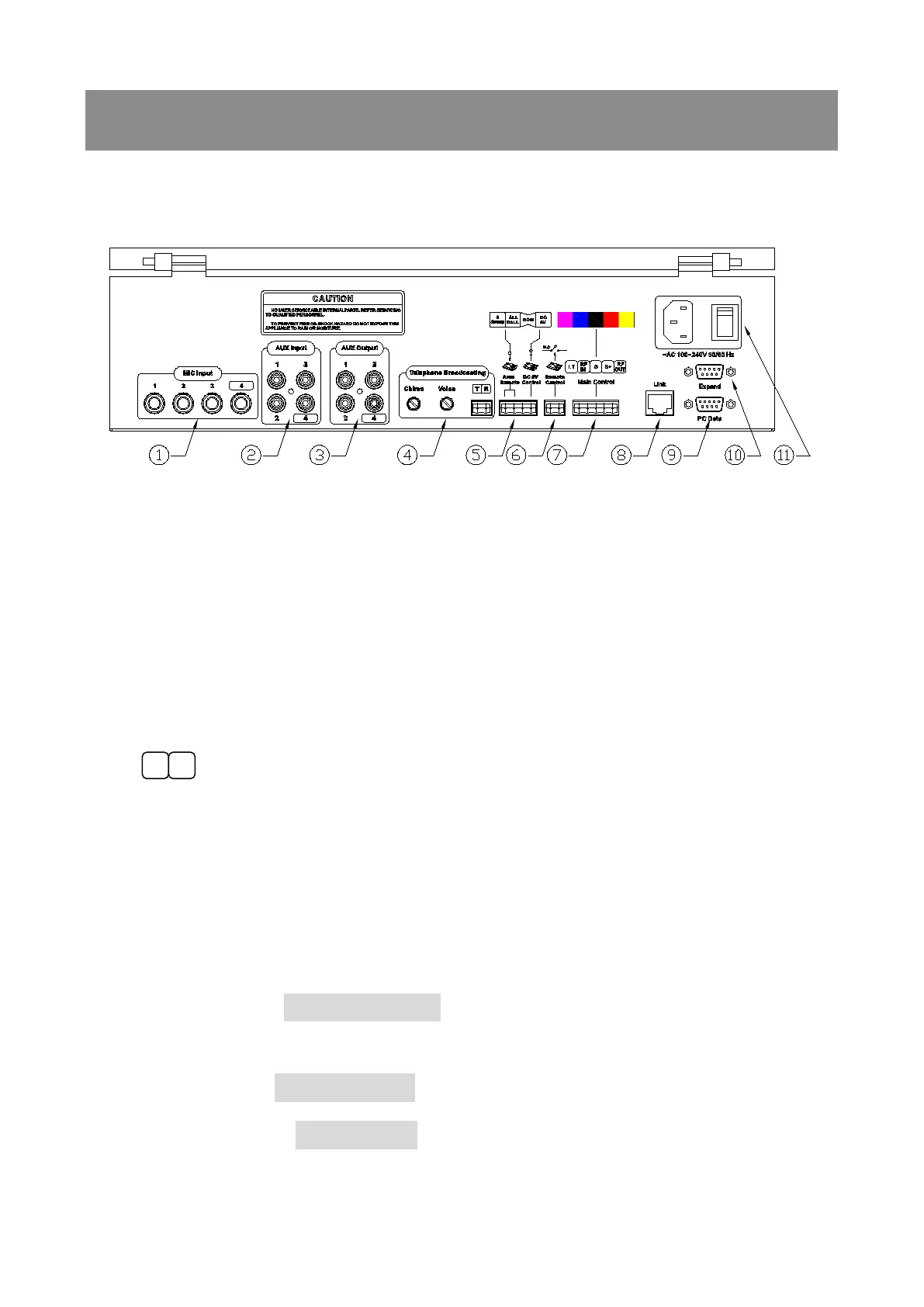
1 MIC-1~MIC-4: Microphone inputs (MIC1 has priority to broadcast)
○
2
AUX 1 should be reserved for telephone broadcasting
AUX1~AUX4: Aux inputs (for CD, tape cassette, radio and timer...)
○
3 AUX OUTPUT:For external amplifiers or recorders
○
4
Connectors for telephone broadcast. System installers select an
available line from the PBX (private branch exchange) to connect.
After connected, you are able to broadcast via remote telephones.
Telephone broadcasting interface:
VOICE:Telephone broadcast volume knob
CHIME:Chime volume knob
○
5
Area Remote:ALL CALL+COM Enable ALL CALL, can be used with timer
clock
External trigger: To activate enforced control connectors
8 Group+COM Enable Group 8, can be used with timer clock
DC 5V Control:DC 5V+COM DC 5V output trigger connector. When


 To Next Page