Gelb Pantone 123C, Grün RAL 6018, Blau Pantone 7461, Grau Pantone 422C, Beschriftung, Fenster- und LED-Umrandung Schwarz, Fenster- und LED-Fond Filtergrau. 29.10.2013 Lortz
1 3 5 7 9 10 12 14
1513118642
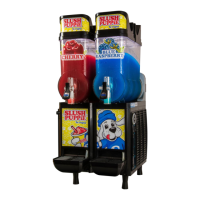
Fig.3 Control Panel
1 Button home - Synchronization after switch-on
- Quit of errors in operation
2
LED not ready Is blinking in case of error or missing synchronization of thr blade.
3
Button speed Choice of speed.
4
Display speed Display the selected speed; L (Low) and H (High)
5
Button program Program choice.
6
Display program Display the selected program.
7
Button step Choice the cut of the material separation in the program.
8
Display step - Show the current cut in the operation.
- Show the selected cut in the program.
9
Button distance - Make the distance between blades smaller
10
Button distance + Make the distance between blades bigger.
11
Display distance Display the distance between blades.
12
Button key Switch on the programming mode.
13
LED key Is blinking in programming mode.
14
Button DEL Reset display mileage
15
Display mileage Total length of all cuts from zero position
Table 3 Control Panel Elemets
4 Control Panel


 To Next Page