10
CHANGING USER CODES
Step 1 Your system must be in the Disarmed state to change user codes.
Step 2 Press [U]-[5].
Step 3 Enter a “Master Arm/Disarm Code”.
NOTE: For partitioned systems, someone changing the code of
another person must have access to all or more partitions than
the user being changed.
Step 4 The
ready light
will flash.
Step 5 Enter the 2 digit “user number” (always enter 2 digit such as [0] - [3]
for user 3, or [5] - [2] for user 52).
Step 6 Enter the new four (4) or six (6) digit “user code”.
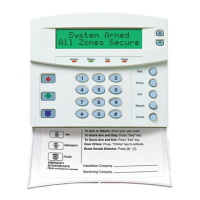
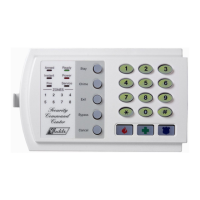
Note for NX1300
Series LED Keypad:
The zone lights will illuminate specifying the
first digit of the “user code”. (Lights 1-8 on = code is blank; lights 1-8
off = “0”; lights 1 and 8 = “9”.) Use the up and down scroll keys to
view the next digit or enter a new 4- or 6-digit “user code”. While
using the up and down scroll keys you can change any digit by
entering a new digit. This will advance you to the next digit.
NOTE: To delete a user code, enter [U]-[U]-[U]-[U] for a 4-digit code,
or [U]-[U]-[U]-[U]-[U]-[U] for a 6-digit code.
Step 7 The
ready light
will flash indicating you are back at Step 4 above. If
the code is rejected, the sounder will beep 3 times.
Step 8 If another “user code” needs to be programmed, return to Step 5.
Step 9 Press the [#] key while the
ready light
is flashing to exit the User
Code Programming Mode.
ASSIGNING USER CODE AUTHORITY LEVELS
Assign authority levels to users by following the steps below. Assign user codes
before assigning authority levels.
Step 1 Press [U]-[6].
Step 2 Enter a “Master Arm/Disarm Code”.
NOTE: Someone changing the authority of another person can
only add or remove partition authorization for partitions to
which they have access.
Step 3 The
ready light
will flash.



 To Next Page