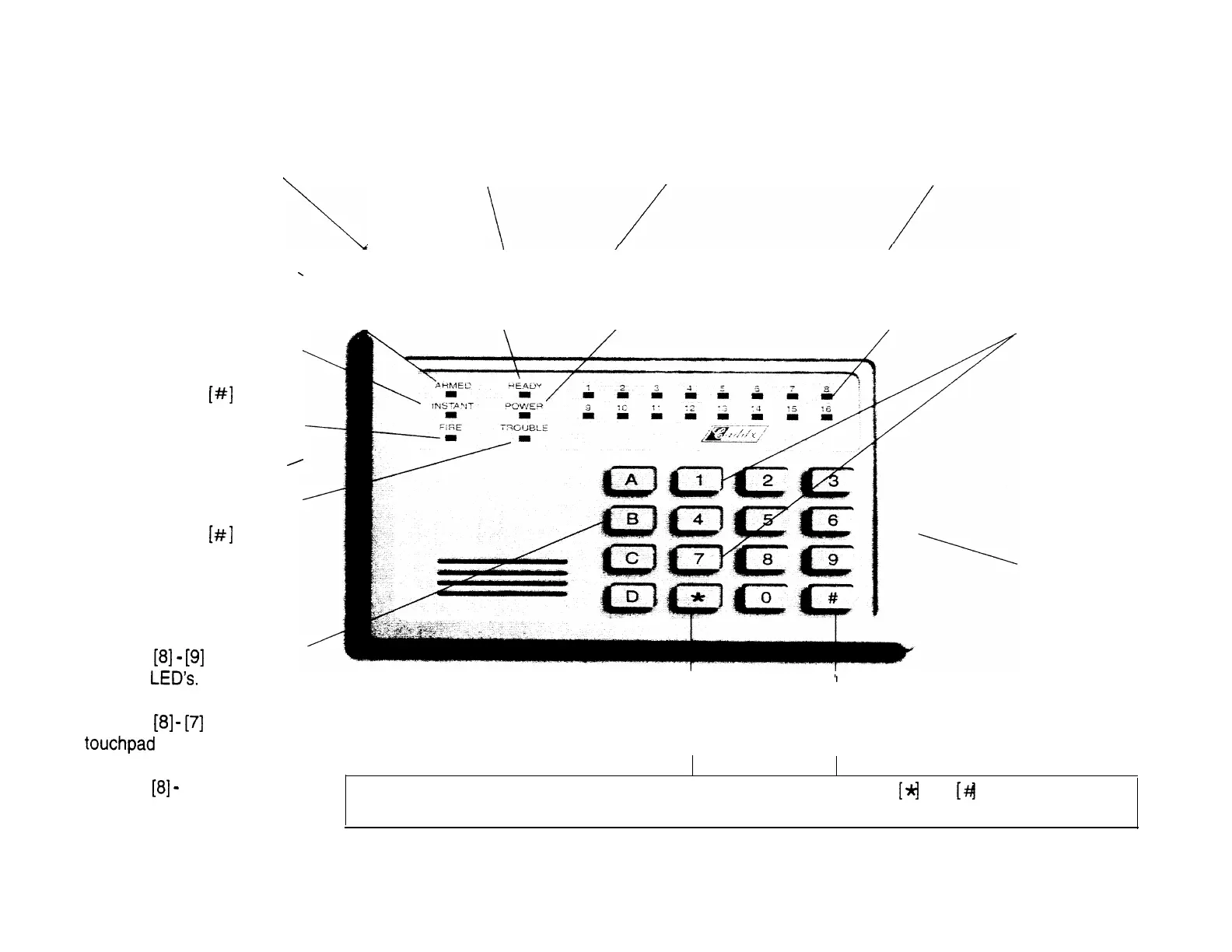
ARMED light indicates system is
READY light indicates all zones
armed. Flashing ARMED light
POWER light indicates AC
ZONE light indicates status of zones.
are secure or bypassed, and
indicates previous alarm.
power is present to your
On means zone(s) bypassed,
system is ready to arm.
system.
flashing
means zone(s) open.
INSTANT light indicates no
BELL TEST: If
programmed
by the
installers,
pressing these
buttons
simultaneously
will activate a
local test of the
siren/bell. Enter
your code to
silence.
entry/exit delay is present.
FIRE light indicates a smoke
or heat detector has been
activated. This light is reset
by pressing the
reset
button.
TROUBLE light indicates a
technical problem with the
fire zone. This light is reset
by pressing the
reset
button.
Pressing will turn off
Keypad
Pressing will turn off
backlighting.
Pressing
[0] will turn off both
of the above.
PANIC/HOLD UP ALARM: If programmed by the installer, pressing the
and
simultaneously for
one second will activate a panic/hold up transmission, and/or sound the local siren/bell.
I
STAR button is used to remove or
POUND button is used to reset
regain entry/exit delay; also used
during zone bypassing.
Fire Zone or code entry.
PULL OUT
ZONE
IDENTIFICATION
LABEL



 To Next Page