Fuel
Data
Panel
.
,..^
.
I/
,;
.. .
.
,
.
. .
..,
.
. .
.
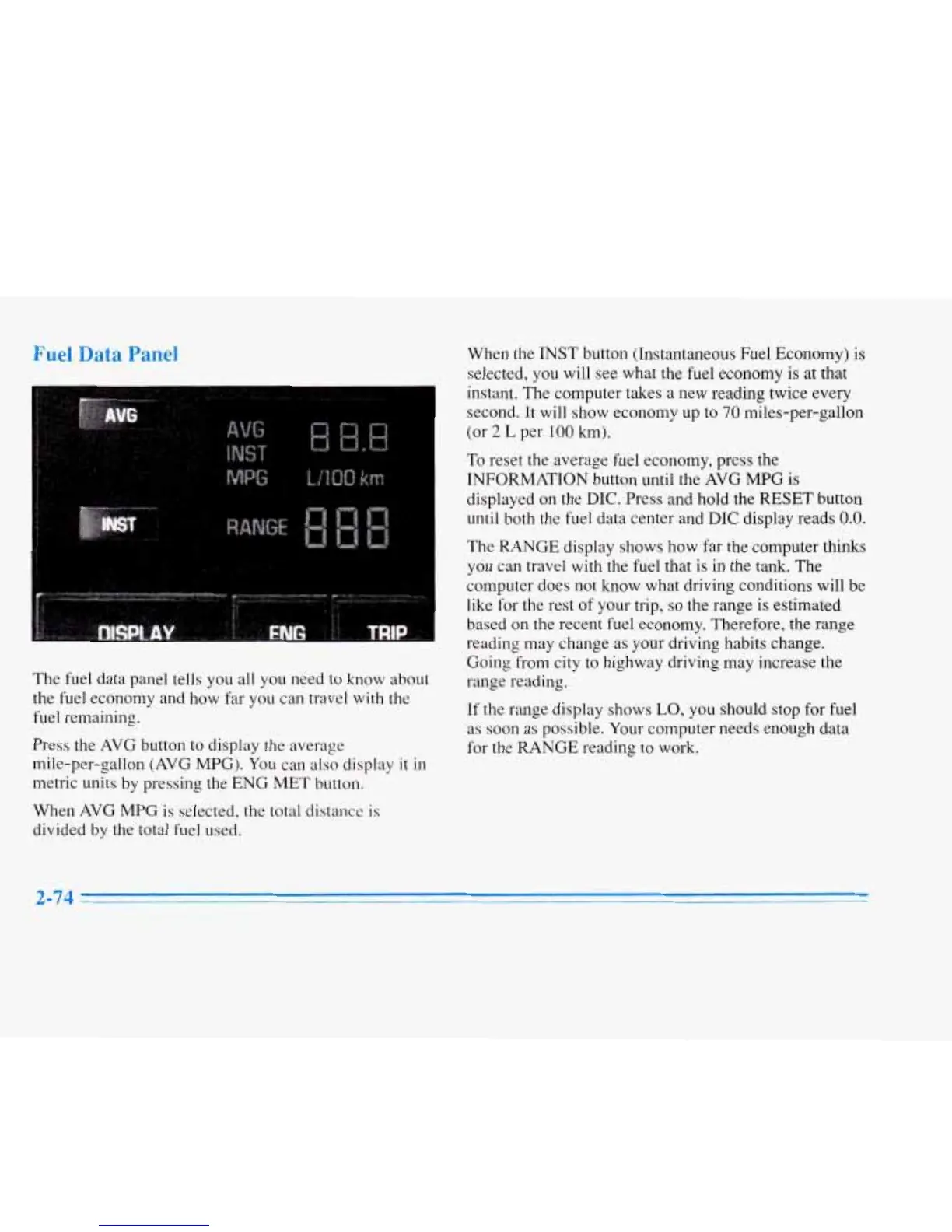
The fuel data panel tells you
all
you need to know about
the fuel economy and how far you can travel with the
fuel remaining.
Press the AVG button to display the average
mile-per-gallon (AVG MPG). You can also display
it
in
metric units
by
pressing the ENG
MET
button.
When AVG MPG
is
selected, the total distance
is
divided
by
the total fuel used.
When the INST button (Instantaneous Fuel Economy) is
selected, you will see what the fuel economy
is
at that
instant. The computer takes
a
new reading twice every
second. It will show economy up to
70
miles-per-gallon
(or
2
L
per
100
km).
To
reset the average fuel economy, press the
INFORMATION button until the AVG
MPG
is
displayed on the
DIC.
Press and hold the
RESET
button
until
both the fuel data center and
DIC
display reads
0.0.
The RANGE display shows
how
far the computer thinks
you can travel with the fuel that is in the tank. The
computer does not know what driving conditions will be
like for the rest
of your trip,
so
the range is estimated
based on
the
recent fuel economy. Therefore, the range
reading may change
as
your driving habits change.
Going from city to highway driving
may
increase the
range reading.
If the range display shows
LO,
you should stop for fuel
as soon
as
possible. Your computer needs enough data
for the RANGE reading to work.
2-74



 To Next Page