AM-FM
Stereo
with
Cassette
Tape
Player
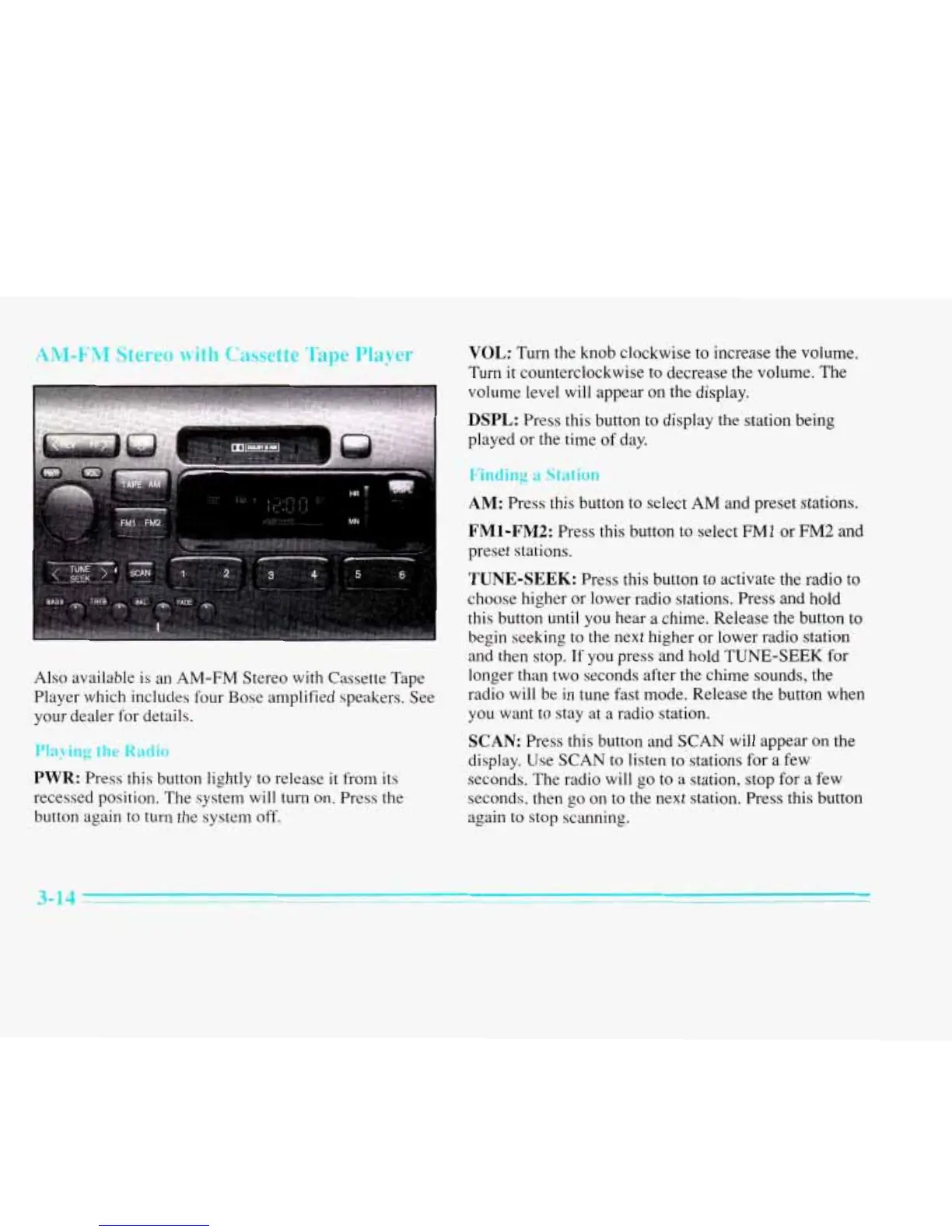
Also available is an
AM-FM
Stereo with Cassette Tape
Player which includes four Bose amplified speakers. See
your dealer for details.
Playing
the
Radio
PWR:
Press this button lightly to release
it
from its
recessed position.
The
system will turn on. Press the
button again to turn the system off.
VOL:
Turn the knob clockwise to increase the volume.
Turn
it counterclockwise to decrease the volume. The
volume level will appear
on
the display.
DSPL:
Press this button to display the station being
played or the time
of
day.
Finding
a
Station
AM:
Press this button to select
AM
and preset stations.
FMl-FM2:
Press this button to select
FMl
or
FM2
and
preset stations.
TUNE-SEEK:
Press this button to activate the radio
to
choose higher or lower radio stations. Press and hold
this button until you hear
a
chime. Release the button to
begin seeking to the next higher or lower radio station
and then stop. If you press and hold TUNE-SEEK for
longer than two seconds after the chime sounds, the
radio will be in tune fast mode. Release the button when
you want to stay at
a
radio station.
SCAN:
Press this button and SCAN will appear on the
display. Use
SCAN
to listen to stations for a few
seconds. The radio will
go
to a station, stop for
a
few
seconds, then
go
on to
the
next station. Press this button
again to stop scanning.
3-14











 To Next Page