95 . . .
–
Section 1
■ LIGHTS
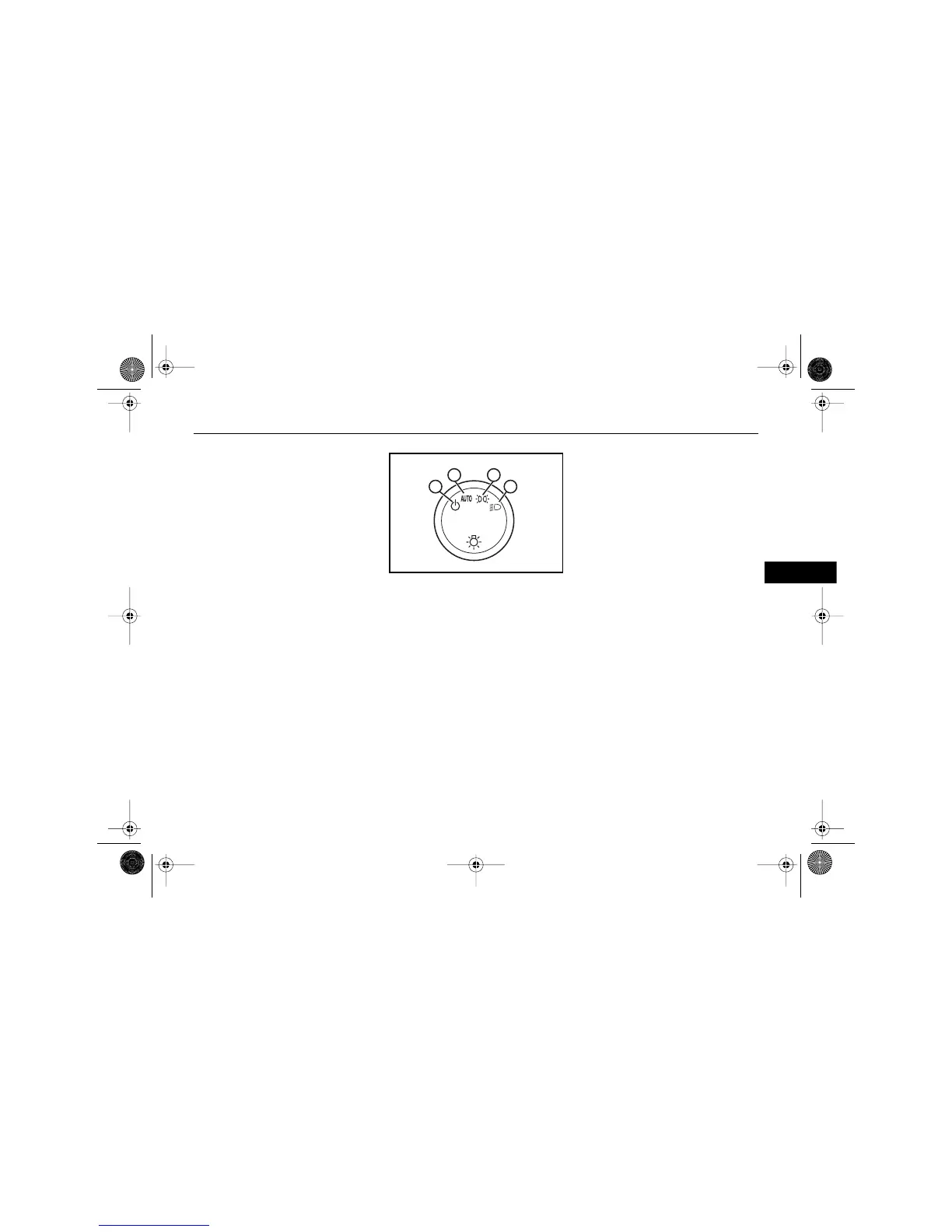
LIGHTS MAIN SWITCH
The main light switch controls
these light systems:
• Headlights
•Taillights
• Parking lights
• License lights
• Sidemarker lights
• Instrument panel lights
Rotate the knob to to turn on
your parking and other operating
lights. The headlights will not
come on.
Rotate the knob to to turn on
your headlights. The parking and
other operating lights will also
come on.
To change the lights from low
beams to high beams, push the
multifunction lever toward the
front of the vehicle. To change the
lights back to low beams, pull the
lever back toward you. When the
high beams are on, an indicator
light on the instrument cluster will
also be on.
Note:
Power to the exterior lights
and to most interior lights is
automatically turned off
10 minutes after the ignition
is turned off.
If you want the headlights to
stay on for an additional
10 minutes, use the main light
switch to turn them back on
manually.
Rotate the knob to to activate
the automatic headlight system.
When activated, this automatic
headlight feature turns your
headlights and other operating
lights on and off by sensing how
dark it is outside.
See "Automatic Headlight System"
later in this section for more
information.
A
B C
D
$10araEscaladeEXT Page 95 Wednesday, October 14, 2009 9:54 AM










 To Next Page