12 Infotainment System
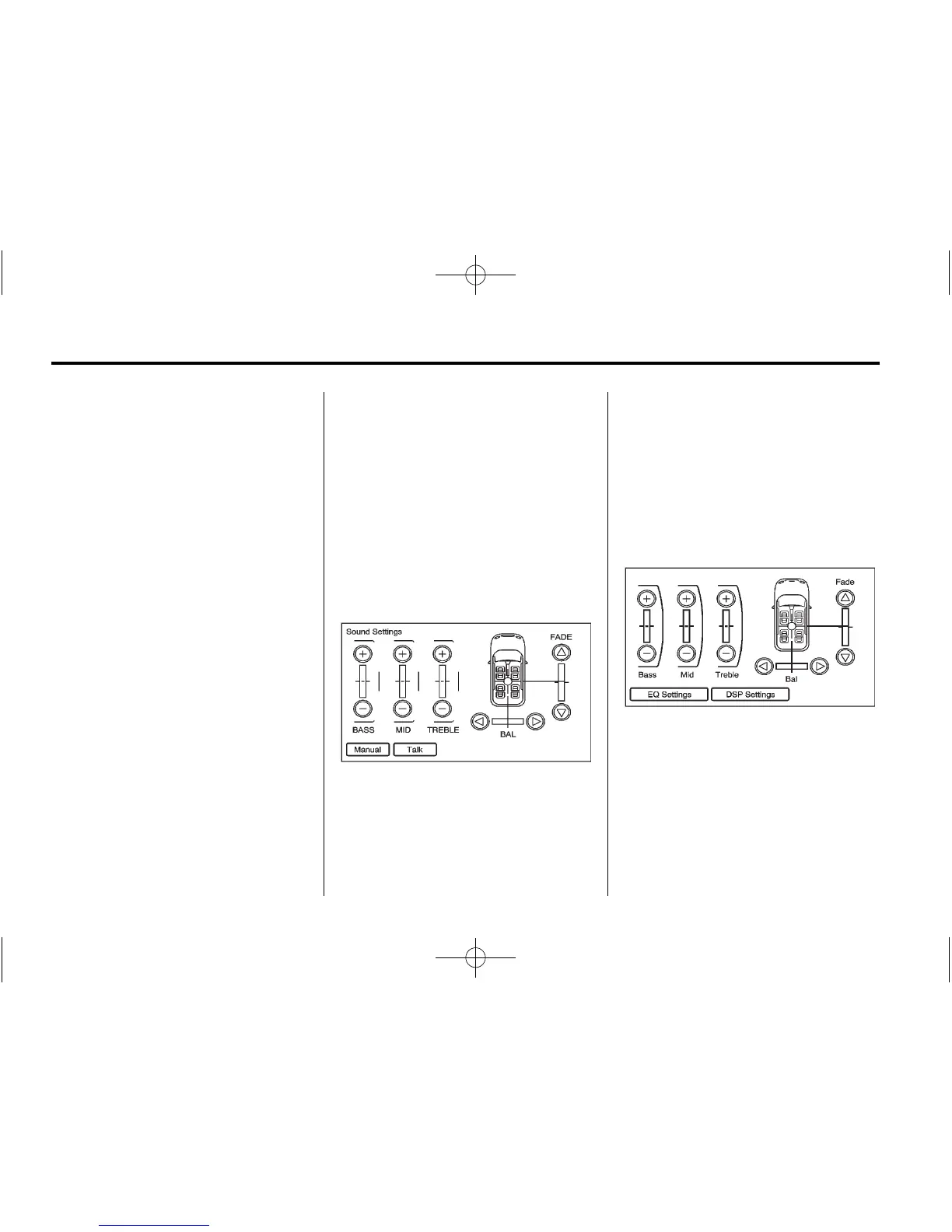
Setting the Tone
To adjust the tone using the
Sound Menu:
To adjust the bass, treble and
midrange:
.
Bass: Press + or − to change
the level.
.
Mid (Midrange): Press + or − to
change the level.
.
Treble: Press + or − to change
the level.
Adjusting the Speakers
To adjust the speaker balance using
the Sound Menu:
.
Press and hold the o for more
sound from the left speakers or
the
p for more sound from the
right speakers. The middle
position balances the sound
between the left and right
speakers.
To adjust the speaker fade:
.
Press and hold the w for more
sound from the front speakers
and the
x for more sound from
the rear speakers. The middle
position balances the sound
between the front and rear
speakers.
EQ Settings
EQ (Equalization): The EQ
settings are selected through the
sound menu. EQ provides a choice
of Manual or Talk settings.
Digital Signal Processing (DSP)
(If equipped)
The DSP feature is selected through
the sound menu and provides a
choice of two different listening
experiences. DSP can be used
while listening to the audio system.
To view the DSP options, press the
DSP Settings screen button on the
Sound Menu.


 To Next Page
 Loading...












