Cadillac XTS Owner Manual (GMNA-Localizing-MidEast-10292881) - 2017 -
crc - 7/1/16
10 IN BRIEF
The power window switches on the
driver door control all the windows.
Each passenger door has a switch that
controls only that window.
Press the switch to lower the window.
Pull the switch up to raise it.
See Power Windows 0 43.
Seat Adjustment
Uplevel Seat Adjustment
If equipped, the ignition must be on
to use all uplevel seat features.
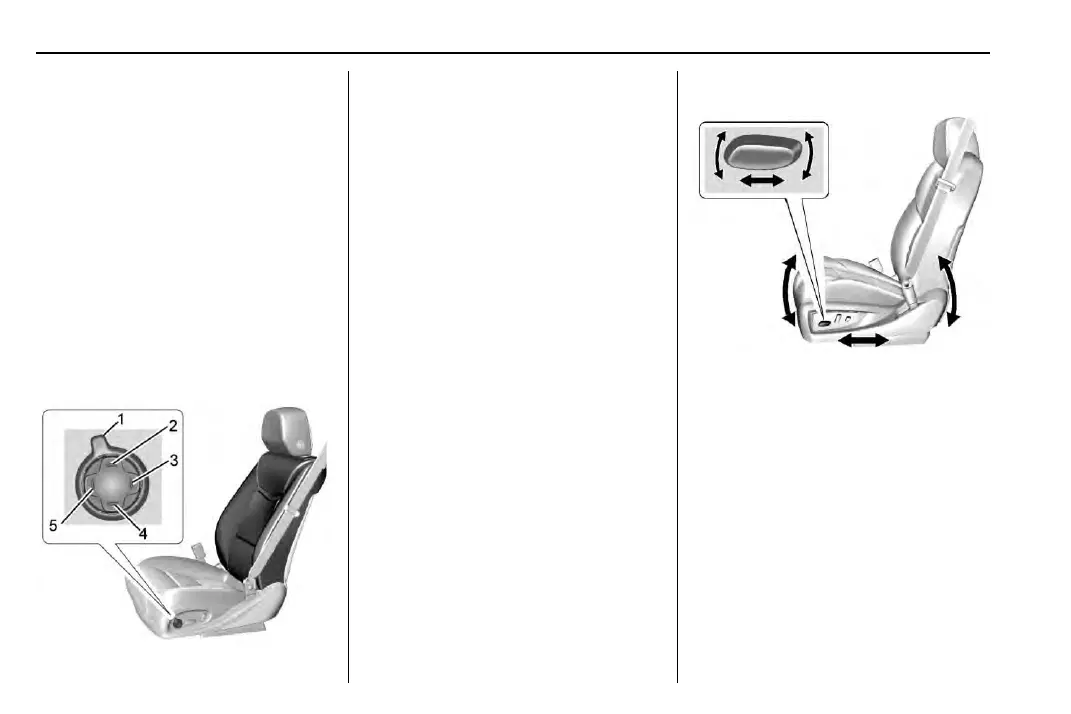
Uplevel Seat Control
1. Feature Select
2. Up
3. Rearward
4. Down
5. Forward
.
Move Feature Select (1) to display
seat adjustments on the
infotainment display. Press and
release or hold to scroll through
features.
.
Press Up (2) to make upward
adjustments of the selected
feature.
.
Press Rearward (3) to make
rearward adjustments of the
selected feature.
.
Press Down (4) to make downward
adjustments of the selected
feature.
.
Press Forward (5) to make for ward
adjustments of the selected
feature.
Base Seat Adjustment
To adjust the seat:
.
Move the seat forward or rearward
by sliding the control forward or
rearward.
.
Raise or lower the front part of the
seat cushion by moving the front
of the control up or down.
.
Raise or lower the seat by moving
the rear of the control up or down.
See Power Seat Adjustment 0 53.



 To Next Page