Cadillac XTS Owner Manual (GMNA-Localizing-MidEast-10292881) - 2017 -
crc - 7/1/16
18 IN BRIEF
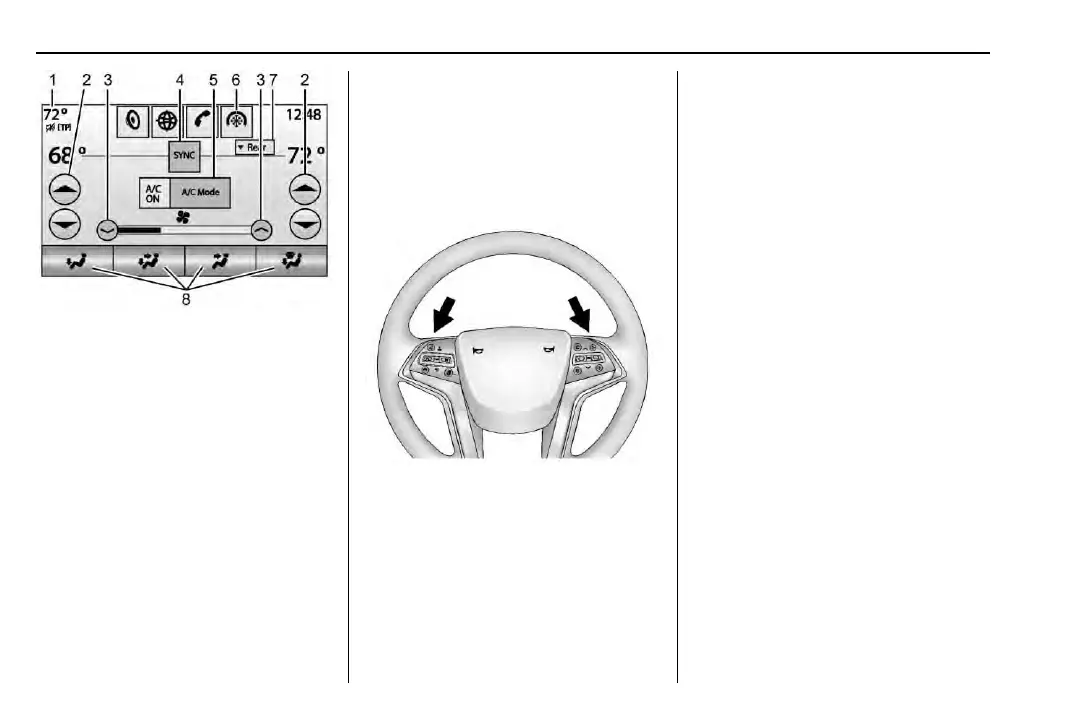
Climate Touch Screen Controls
1. Outside Temperature Display
2. Driver and Passenger
Temperature Controls
3. Fan Control
4. SYNC (Synchronized
Temperature)
5. A/C Mode (Air Conditioning )
6. Climate Control Selection
(Application Tray Button)
7. Rear (Rear Climate Control
Touch Screen)
8. Air Deliver y Mode Control
See Dual Automatic Climate Control
System 0 159 and Rear Climate Control
System 0 163 (if equipped).
Transmission
Tap Shift
Tap Shift allows the driver to
manually control the automatic
transmission. To use Tap Shift, the
shift lever must be in M (Manual
Mode). If equipped, the controls are
on the back of the steering wheel. Tap
the left control to downshift, and the
right control to upshift. A Driver
Information Center (DIC) message
indicates the gear the vehicle is in.
See Manual Mode 0 184.



 To Next Page