Cadillac XTS Owner Manual (GMNA-Localizing-MidEast-10292881) - 2017 -
crc - 7/1/16
160 CLIMATE CONTROLS
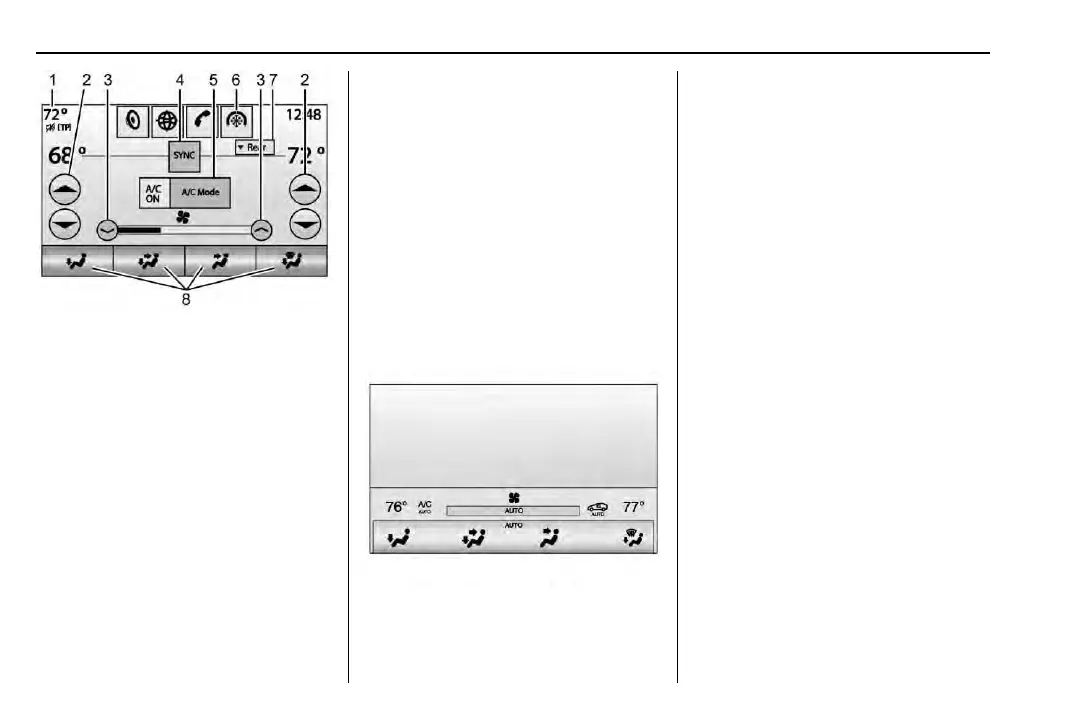
Climate Touch Screen Controls
1. Outside Temperature Display
2. Driver and Passenger
Temperature Controls
3. Fan Control
4. SYNC (Synchronized
Temperature)
5. A/C Mode (Air Conditioning )
6. Climate Control Selection
(Application Tray Button)
7. Rear (Rear Climate Control
Touch Screen)
8. Air Deliver y Mode Control
Climate Control Touch Screen
The fan, air delivery mode, air
conditioning, driver and passenger
temperatures, and SYNC settings can
be controlled by pressing CLIMATE on
the infotainment home screen or the
climate button in the touch screen
application tray. A selection can then
be made on the front climate control
page displayed. See the infotainment
manual.
Climate Control Status Screen
The climate control status screen
appears briefly when the climate
control buttons on the faceplate are
adjusted. The air delivery mode can be
adjusted on the climate control status
screen.
Automatic Operation
The system automatically controls the
fan speed, air delivery, air
conditioning, and recirculation in
order to heat or cool the vehicle to the
desired temperature.
When AUTO is lit, all four functions
operate automatically. Each function
can also be manually set and the
setting is displayed. Functions not
manually set will continue to be
automatically controlled, even if the
AUTO indicator is not lit.
For automatic operation:
1. Press AUTO.
2. Set the temperature. Allow the
system time to stabilize. Then
adjust the temperature as needed
for best comfort.
To cool the vehicle faster,
recirculation may be automatically
selected in warm weather. The



 To Next Page