Need help?
Do you have a question about the CalDigit SOHO DOCK and is the answer not in the manual?
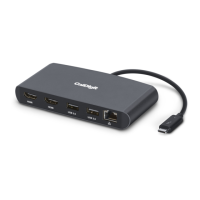
Overview of the CalDigit USB-C SOHO Dock and its purpose for remote work.
Important precautions for using the USB-C SOHO Dock to ensure safe operation.
Critical safety instructions regarding liquids, moisture, and device tampering to prevent damage and injury.
Lists the necessary hardware and software specifications for using the USB-C SOHO Dock.
Details the contents included with the USB-C SOHO Dock package.
Explains compatibility of the USB-C SOHO Dock with various types of laptops, including Gen.1, Gen.2, and Thunderbolt.
Outlines maximum resolutions and display configurations supported by the dock across different devices.
Details the compatibility of USB-C, USB-A, and card readers in bus-powered mode for various systems.
Explains compatibility of the USB-C SOHO Dock with tablets and smartphones.
Step-by-step guide on how to connect the dock to a computer using bus-powered mode.
Step-by-step guide on connecting the dock to a computer using AC power for charging.
Details the Gen.2 USB-C host port and its 10Gb/s performance for connecting to the computer.
Specifies the HDMI 2.0b port capabilities, including resolution and refresh rate support.
Describes the DisplayPort 1.4 connector, its resolution support, and notes on active adapters.
Explains the functionality of the integrated SD and microSD card readers supporting UHS-II.
Explains the dedicated USB-C port for power delivery up to 100W for charging laptops or tablets.
Shows laptop power delivery wattage based on USB-C PD charger wattage and connected USB devices.
Details the 10Gb/s USB-C data port for connecting high-speed storage devices.
Describes the USB-A 3.2 Gen.2 port for connecting peripherals like mice, keyboards, or storage.
Explains how the dock operates in bus-powered mode, drawing power from the computer's port.
Details how power delivery is shared across ports when the dock is AC-powered via a Type-C charger.
Discusses the dock's aluminum construction for heat dissipation and safe operating temperature range.
Lists the various interfaces and ports supported by the USB-C SOHO Dock.
Reiterates the necessary hardware and software for optimal dock performance.
Itemizes the components included in the product packaging.
States the warranty period for the USB-C SOHO Dock.
Mentions available CalDigit USB-C cables for purchase.
Highlights the availability of an active adapter for connecting DisplayPort to HDMI.
Provides contact information and required details for technical assistance with the dock.
Confirms the 2-year limited warranty and directs users for further details.
 General
| Brand | CalDigit |
|---|---|
| Model | SOHO DOCK |
| Category | Docking Station |
| Language | English |

 To Next Page