9!
Search!
Press!OK!in!correspo ndence!with!t h e !SEARC H!ic o n!to!start!scann in g ! th e ! b u s !to!acquire!the!c onnected!m e te r s.!
The!default!search!settings!are:!
• Speed:!9600bps
• Search!type:!Primary!ID!+!Secondary!ID
• Primary!ID!scanning!range:!1-250
Once!the!meters!search!is!complete,!press!OK!to!save!all!the!m ete rs!retu rne d!by !the !searc h,!o the rw ise!pre ss!ESC!to!quit!
without!saving!any!of!the!meters!returned!by!the!search.!!
Settings!
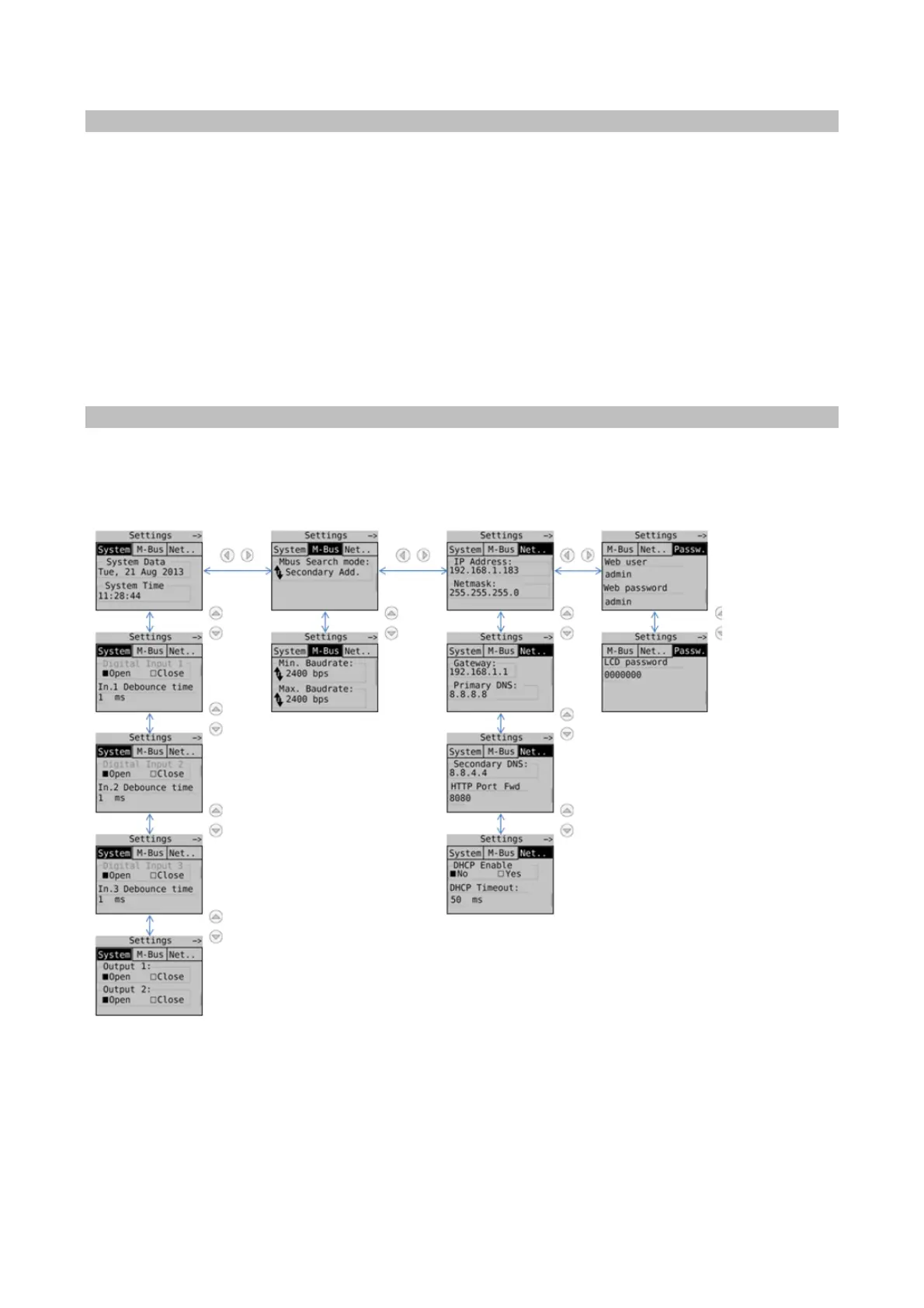
Press!OK!in!correspo ndence!with!t h e !SETTING S!icon !to !acc ess !the!su bmenu,!which!is!divided!into!four!su b-sections.!
!!!!!!General! M-Bus !!!!Network!
Password
!
For!each!field!reached!by!means!of!the!navigation!buttons!press!OK!to!select!the!field!to!be!edited!and !the n!p ress!OK!
again!to!edit!the!values,!which!are!to!be!entered!using!the!navigation!arrows.!


 To Next Page