23!
!
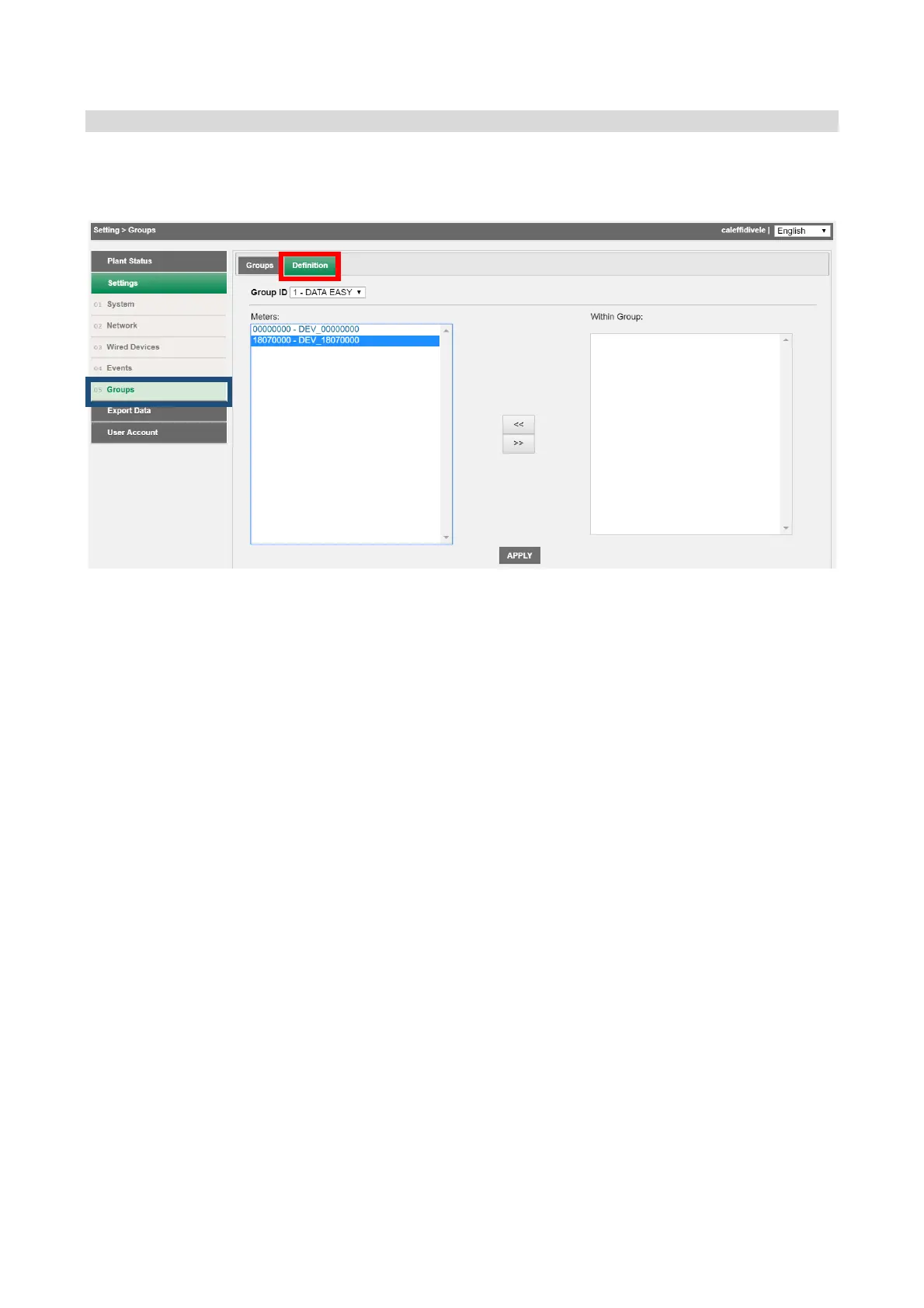
Settings!>!Groups!>!Definition!
Once!a!group!has!been!created!the!components!to!be!included!in!the!group!can!be!defined.!The!window !is!divided!into!
two!boxes:!
!
!
• Meters:!shows!all!devices!linked!to!DATA!EASY!
• In!Gro u p :!sh o w s !all!th e !de v ice s!lin ke d !to !D A T A !E A S Y !an d !alre a d y!in !th e!s e lec te d !gro u p!
• A! single! device! can! be! positioned! either! in! the! right-hand! box! or! in! the! left-hand! box!
using!the!direction!arrows!between!the!two!boxes!(<<!>>)!
!
1. Select!the!group!of!interest!in!the!Group!ID!box!
2. Select!the!device!to!be!included!in!the!group!!
3. Press!the!left!arrow!to!include!the!device!
On!terminating!the!operations!press!the!APPLY!button!to!save!the!changes.!!
!
!
!
!
!
!
!
! !


 To Next Page